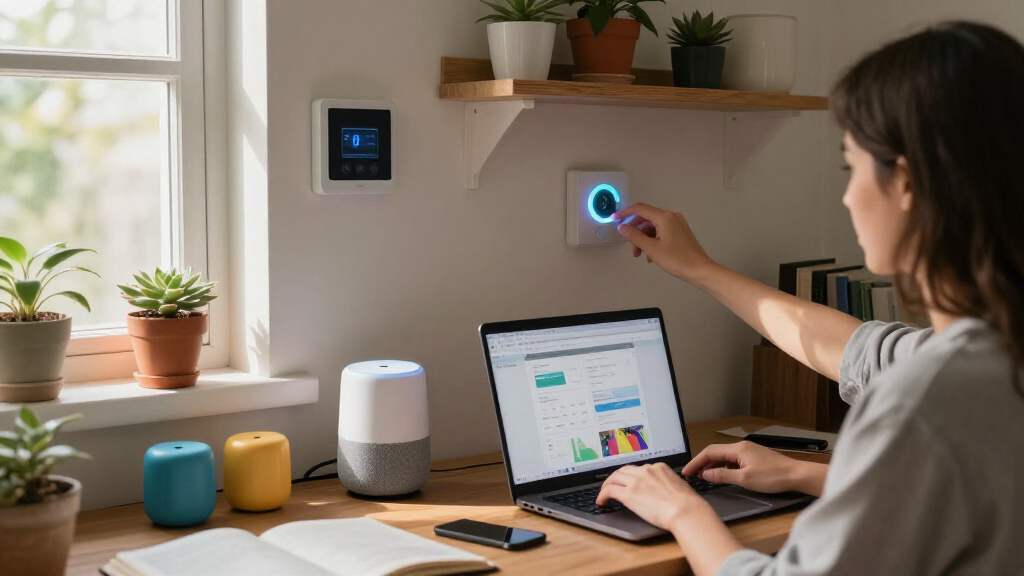
Smart home dorm room gadgets need to solve a specific set of problems: scarce outlets, shared Wi-Fi, strict residence hall rules, and student budgets. The Amazon Echo Spot earns my best overall pick because it acts as the command center for an entire dorm setup — alarm, voice control, and smart home hub in one compact device. For pure value, the GHome WiFi Smart Plug makes almost any dorm appliance voice-controllable for the price of a coffee run, while the Kasa KP303 power strip stands out for turning three outlets plus USB ports into independently controlled smart outlets. The main tradeoff in this category is smart functionality versus outlet capacity — many dorms offer only a handful of outlets, so choosing between a smart hub, a smart strip, or a dumb-but-spacious surge tower depends on what your room can physically support. Read on for the full breakdown of how these seven gadgets compare.
Complete the kit



Key Takeaways
- The amazon.com/dp/B0BFCBKXWL?tag=autohomebots-20&ascsubtag=dc-693442″ target=”_blank” rel=”nofollow sponsored noopener”>Amazon Echo Spot won best overall because it is the only product here that controls the others — voice control turns cheap smart plugs into a hands-free system, which matters when you’re studying or half-asleep.
- Smart plugs offer the highest impact-per-dollar in this lineup, but the single-outlet GHome and Amazon plugs only make sense if you already have enough wall outlets; otherwise the Kasa KP303 covers three devices plus USB from one socket.
- The power strip tower and the smart power strip fill opposite needs: the tower maximizes raw capacity (12 outlets) for non-smart gear, while the Kasa trades capacity for app scheduling and energy monitoring.
- The two desk lamps split along a clear line: the lamp with the built-in power strip saves desk space for cramped rooms, while the Addtam‘s four lighting modes suit students who prioritize eye comfort during long study sessions.
- Dorm Wi-Fi is the hidden constraint — every smart pick here requires 2.4GHz network access, so students on restricted campus networks should confirm device connectivity rules before buying anything voice-controlled.
| GHome WiFi Smart Plug with Alexa and Google Assistant Compatibility |  | Best Budget Starter Plug | Connection: WiFi 2.4GHz, Bluetooth | Compatibility: Alexa, Google Assistant | App Support: GHome, Smart Life, Tuya | VIEW LATEST PRICE | See Our Full Breakdown |
| 6FT Power Strip Tower Surge Protector with 12 Outlets and 4 USB Ports |  | Best for Device-Heavy Desks | Total Outlets: 12 AC + 4 USB | Voltage: 125V | Maximum USB Current: 3.4A | VIEW LATEST PRICE | See Our Full Breakdown |
| Amazon Echo Spot (newest model), Smart Alarm Clock with Alexa, Glacier White |  | Best Smart Hub and Alarm Clock | Display: 2.83-inch touchscreen, 240x320px | Dimensions: 4.5″W x 4.1″D x 4.4″H | Weight: 14.3 oz | VIEW LATEST PRICE | See Our Full Breakdown |
| LED Desk Lamp with Power Strip, 3 AC Outlets, 4 USB Ports, Stepless Dimming | 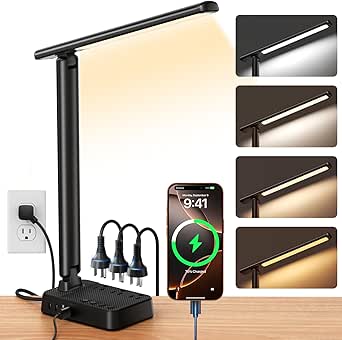 | Best Desk Space Saver | Light Source: 64 LEDs, dimmable | Built-in Charging: 3 AC outlets, 4 USB ports (2 USB-C) | Special Features: Stepless dimming, color temperature control, 60-min timer, memory function | VIEW LATEST PRICE | See Our Full Breakdown |
| Kasa Smart Plug Power Strip KP303, Smart Outlet with 3 Outlets and 2 USB Ports |  | Best Smart Power Strip | Outlets: 3 independently controllable | USB Ports: 2 | Voice Control: Alexa, Google Assistant | VIEW LATEST PRICE | See Our Full Breakdown |
| Addtam LED Desk Lamp with 4 Modes |  | Best Space-Saving Combo | Light Source: LED | Color Modes: 4 color temperatures, 5 brightness levels | Control Method: Touch | VIEW LATEST PRICE | See Our Full Breakdown |
| Amazon Smart Plug with Alexa Compatibility |  | Best Single Smart Plug | Dimensions: 3.2″ x 1.5″ x 2.2″ | Weight: 3.1 oz (87 g) | Electrical Rating: 120VAC, 60Hz, 15A max | VIEW LATEST PRICE | See Our Full Breakdown |
| smart home dorm room gadget | Dimensions |
|---|---|
| GHome WiFi Smart Plug with Ale | — |
| 6FT Power Strip Tower Surge Pr | — |
| Amazon Echo Spot | 4.5"W x 4.1"D x 4.4"H |
| LED Desk Lamp with Power Strip | 5.52"D x 3.74"W x 14.57"H |
| Kasa Smart Plug Power Strip KP | — |
| Addtam LED Desk Lamp with 4 Mo | 11.8"D x 3.75"W x 14.56"H |
| Amazon Smart Plug with Alexa C | 3.2" x 1.5" x 2.2" |
More Details on Our Top Picks
GHome WiFi Smart Plug with Alexa and Google Assistant Compatibility
Most dorm smart home setups start with a single plug, and this one makes that first step painless at a price that leaves room in a student budget. Compared with the Kasa Smart Plug Power Strip KP303, the GHome trades multi-outlet control for sheer affordability — you can scatter several of these across a room for the cost of one smart strip. Scheduling and timer functions are the real draw here: a fan, a coffee maker, or string lights can run on a class schedule without touching anything. Setup is where it stumbles slightly — the plug refuses to connect on 5GHz networks and needs a few minutes of app fiddling before Alexa recognizes it, which is more friction than the plug-and-go Amazon Smart Plug. Once connected, though, it’s dependable day to day.
Pros:- Very low per-plug cost makes multi-device automation affordable
- Works with both Alexa and Google Assistant
- Scheduling and timers help cut standby power draw
- App supports group control and sharing with roommates
Cons:- Only connects to 2.4GHz WiFi, which trips up some campus networks
- Requires app-based setup before voice control works — no native Alexa pairing
Best for: Students making their first smart home purchase who want to automate one or two devices without spending much
Not ideal for: Anyone on a 5GHz-only WiFi network or who expects zero-setup pairing out of the box
- Connection:WiFi 2.4GHz, Bluetooth
- Compatibility:Alexa, Google Assistant
- App Support:GHome, Smart Life, Tuya
- Features:Remote control, schedules, timers, group control, sharing
- Setup:App-based pairing required
Our verdict“This is the cheapest credible way to dip a toe into dorm automation, as long as your WiFi network cooperates.”
6FT Power Strip Tower Surge Protector with 12 Outlets and 4 USB Ports
When one roommate has a laptop, monitor, printer, and phone and the other has a gaming console, a dorm’s two wall outlets simply don’t cut it. This tower solves the outlet-math problem with 12 AC outlets and 4 USB ports in a vertical footprint smaller than a coffee mug. The tradeoff versus the Kasa KP303 is stark: this strip carries roughly four times the outlets but zero smart features — no app, no scheduling, no voice control. It’s purely dumb power, done well, with 1800 joules of surge protection standing between cheap dorm wiring and your electronics. The angled outlets and flat plug genuinely help when the strip is wedged behind a lofted bed. Just don’t treat it as invincible: daisy-chaining a space heater and a mini fridge into it is asking for a tripped breaker.
Pros:- 16 total ports eliminate outlet scarcity in shared rooms
- Vertical tower design saves desk and floor space
- 1800-joule surge protection guards against dorm wiring spikes
- Flat plug and angled outlets fit tight gaps behind furniture
Cons:- No smart home compatibility whatsoever
- 125V only — useless for international students traveling home
Best for: Roommates sharing limited outlets who need to power many devices at once without smart features
Not ideal for: Anyone who wants app control or scheduling — this strip has no WiFi capability at all
- Total Outlets:12 AC + 4 USB
- Voltage:125V
- Maximum USB Current:3.4A
- Surge Protection:1800 Joules
- Cord Length:6 feet
- Plug Type:Type B, 3-pin (North American)
Our verdict“Buy this when quantity of outlets matters more than intelligence — it’s the dumb-workhorse counterpart to smarter strips in this lineup.”
Amazon Echo Spot (newest model), Smart Alarm Clock with Alexa, Glacier White
The Echo Spot is the closest thing this roundup has to a command center, and it earns that role by doing three jobs from one nightstand footprint: alarm clock, Alexa speaker, and built-in eero WiFi extender covering up to 1,000 square feet — genuinely useful in dorms where the router lives at the far end of the hall. Compared with a basic smart plug like the GHome, the Spot doesn’t just control devices; it gives you a screen for weather, timers, and routines, plus voice control without pulling out your phone. The 2.83-inch display is bright and customizable, and the tap-to-snooze interaction is exactly right for groggy mornings. The catch: no camera means no video calls, and its smart home reach is strongest inside the Alexa ecosystem — Google Home loyalists should look elsewhere.
Pros:- Doubles as an eero WiFi extender for up to 1,000 sq. ft.
- Customizable clock faces and colors match any dorm aesthetic
- Acts as the Alexa hub that ties together every smart plug in this guide
- Compact 4.5-inch footprint fits cramped nightstands
Cons:- No camera — video calls and drop-in video are off the table
- WiFi extension requires a compatible eero router to work
Best for: Students who want one bedside device that runs their routines, wakes them up, and boosts weak dorm WiFi
Not ideal for: Google Assistant households or anyone wanting video calling, since there’s no camera
- Display:2.83-inch touchscreen, 240x320px
- Dimensions:4.5″W x 4.1″D x 4.4″H
- Weight:14.3 oz
- Speaker:1.73-inch full-range
- WiFi:Dual-band 802.11a/b/g/n/ac
- eero Built-in:Up to 1,000 sq. ft. coverage
- Materials:36% recycled materials
Our verdict“If you’re building a dorm smart home around Alexa, the Spot is the natural centerpiece — as long as you don’t need a camera.”
LED Desk Lamp with Power Strip, 3 AC Outlets, 4 USB Ports, Stepless Dimming
This lamp attacks the dorm desk problem from two directions at once: it lights your workspace and swallows the charging clutter that normally eats your desk. With 3 AC outlets and 4 USB ports (including two USB-C) built into the base, it effectively replaces a separate power strip — something neither the GHome plug nor the Echo Spot can claim. The stepless dimming and adjustable color temperature matter more than they sound: warm low light for late nights that won’t wake a roommate, bright cool light for 2 a.m. essay sprints. A 60-minute timer and memory function mean it reverts to your preferred setting every time. The compromises are real, though — the foldable aluminum arm wobbles if you bump the desk, and a lamp with cables snaking out of it can look messier than the tower strip it replaces.
Pros:- Combines lamp, power strip, and USB charger in one purchase
- Stepless dimming plus color temperature control suits both study and wind-down modes
- Eye-care LED with low blue light and flicker reduction for long sessions
- Foldable arm and memory function adapt to cramped, shared spaces
Cons:- Only available in matte black, limiting decor matching
- Charging cables radiating from a lamp can look untidy
Best for: Students with tiny desks who want lighting and charging consolidated into a single footprint
Not ideal for: Minimalists who hate visible cables — plugging four devices into a lamp creates visible clutter
- Light Source:64 LEDs, dimmable
- Built-in Charging:3 AC outlets, 4 USB ports (2 USB-C)
- Special Features:Stepless dimming, color temperature control, 60-min timer, memory function
- Cord Length:5 feet
- Material:Aluminum, matte black finish
- Dimensions:5.52″D x 3.74″W x 14.57″H
- Voltage:120V
Our verdict“The smartest single purchase for a small desk, provided you accept that a lamp-cum-charging-station looks more utility than décor.”
Kasa Smart Plug Power Strip KP303, Smart Outlet with 3 Outlets and 2 USB Ports
The KP303 sits at the sweet spot between the dumb-but-roomy power tower and the single-outlet GHome plug: it gives you three independently controllable outlets plus two USB ports, all reachable from the Kasa app or by voice. That independence is the killer feature — you can kill the desk lamp at 1 a.m. without unplugging the console still downloading an update. Kasa’s app is also the most polished of the non-Amazon options here, with scheduling that actually works reliably, and the ETL-certified surge protection means you’re not sacrificing safety for smarts. The honest tradeoff is capacity: three outlets vanish fast in a shared room, and there’s no per-USB-port control, so both USB ports switch together with whatever outlet group they’re assigned to.
Pros:- Each of the 3 outlets is individually controllable via app or voice
- Works with both Alexa and Google Assistant
- Scheduling features help cut phantom power draw
- ETL-certified surge protection for connected electronics
Cons:- USB ports aren’t independently controllable
- Requires WiFi and initial app setup before any smart features work
Best for: Students who want app and voice control over a small cluster of desk devices like a lamp, fan, and charger
Not ideal for: Power-hungry setups needing six or more outlets — capacity here runs out quickly
- Outlets:3 independently controllable
- USB Ports:2
- Voice Control:Alexa, Google Assistant
- Control:Kasa Smart app
- Surge Protection:ETL-certified
- Setup:WiFi connection via app
Our verdict“The best balance of brains and outlets in this lineup — pick it when you want smart control of a few devices, not raw port count.”
Addtam LED Desk Lamp with 4 Modes
Most dorm desks face the same crunch: too many devices, too few outlets. This lamp solves both problems at once by pairing an adjustable LED light with a built-in power strip featuring USB ports and AC outlets. Compared with the LED Desk Lamp with Power Strip and Stepless Dimming, the Addtam trades stepless control for a more structured 4-mode, 5-brightness system — some buyers will prefer the presets, others will miss the fine-tuning. Its multi-angle folding arm tucks away neatly, where the 6FT Power Strip Tower wins on raw outlet count but hogs floor space. The touch control and memory function mean it wakes up exactly how you left it, which matters during late-night study sessions.
The compromise is build quality: plastic construction keeps the price and weight down but reads as budget on the desk. It’s a pragmatic pick, not a premium one.
Pros:- Combines task lighting and a charging hub in one compact unit
- 4 color temperatures and 5 brightness levels with memory function
- Foldable, multi-angle arm saves precious desk space
- Flicker-free, eye-friendly LED for long study sessions
Cons:- Plastic build feels less durable than metal alternatives
- Preset brightness steps limit fine control versus stepless-dimming rivals
- Corded 125V design anchors it to one spot
Best for: Dorm residents with cramped desks who need lighting and device charging in a single footprint
Not ideal for: Students already owning a full-size power strip tower — the built-in outlets become redundant
- Light Source:LED
- Color Modes:4 color temperatures, 5 brightness levels
- Control Method:Touch
- Built-In Power:Power strip with USB ports and AC outlets
- Adjustability:Multi-angle foldable arm
- Dimensions:11.8″D x 3.75″W x 14.56″H
- Weight:1.2 pounds
- Power Source:Corded electric, 125V
Our verdict“Buy this if your desk can only fit one gadget — it handles light and power duty in a single purchase.”
Amazon Smart Plug with Alexa Compatibility
Not every dorm resident needs a full smart power strip like the Kasa KP303 — sometimes one lamp or fan is enough to automate. That’s where this plug earns its slot: it’s the simplest, cheapest way to dip a toe into smart control. Setup through the Alexa app takes minutes with no hub required, and the compact body leaves the second wall outlet free, a real advantage in dorms where outlets are scarce real estate. Compared with the GHome WiFi Smart Plug, the Amazon version sacrifices Google Assistant compatibility entirely — a dealbreaker if your roommate runs a different ecosystem. Scheduling and routines work well for things like a coffee maker on a morning timer.
The 2.4 GHz-only Wi-Fi requirement trips up campuses running mesh networks, so verify your dorm’s network before buying.
Pros:- Frictionless setup directly in the Alexa app, no hub needed
- Compact design preserves the second wall outlet
- Scheduling and routines handle lamps, fans, and coffee makers
- Inexpensive entry point into dorm automation
Cons:- Alexa-only — no support for Google Assistant or other platforms
- 2.4 GHz-only connectivity can struggle on some campus networks
- Single outlet means multi-device setups need the Kasa KP303 instead
Best for: Alexa households, including Echo Spot owners, wanting to automate one or two basic devices
Not ideal for: Google Assistant or HomeKit users — the plug is locked to Alexa with no other integrations
- Dimensions:3.2″ x 1.5″ x 2.2″
- Weight:3.1 oz (87 g)
- Electrical Rating:120VAC, 60Hz, 15A max
- Connectivity:2.4 GHz Wi-Fi, 802.11 b/g/n
- Compatibility:Alexa only
- Use:Indoor use only
Our verdict“The right pick if you want one plug, one device, zero fuss — everyone else should step up to a multi-outlet smart strip.”
How We Picked
I evaluated these seven gadgets against the realities of dorm life rather than generic smart home standards. The criteria that mattered most were outlet efficiency (how many devices each product adds or consumes from a single wall socket), setup simplicity (freshmen shouldn’t need an IT degree on move-in day), budget discipline (every pick costs less than a textbook), and residence hall compatibility, including surge protection ratings and whether devices work on shared campus Wi-Fi. Voice assistant support weighed heavily too, because a gadget that talks to Alexa effectively multiplies in usefulness once a hub like the Echo Spot is on the desk.
The ranking logic follows a build-a-system order rather than pure quality: the Echo Spot leads because it orchestrates everything else, followed by the smart plugs and power strips that form the backbone of automation, and finally the lamps, which enhance the setup but stand alone well. Products that combined multiple functions — like the lamp with an integrated power strip — ranked above single-purpose alternatives at similar prices. I penalized options for missing surge protection, clunky apps, or hub requirements that add hidden cost.
Factors to Consider When Choosing Smart Home Dorm Room Gadgets
Before buying any single gadget, think about how the pieces work together. A dorm smart home is a small ecosystem, and the order you build it in affects both cost and usefulness.Count Your Outlets Before You Buy Anything Smart
Most dorm rooms offer between two and four wall outlets, and that number dictates everything else. A smart plug that occupies a full outlet to control one lamp is a poor trade when a smart power strip like the Kasa KP303 can control three devices from the same socket. Students routinely make the mistake of buying individual smart plugs first and discovering they’ve actually reduced their usable outlet count. Map your room: identify which outlets are behind furniture, which are shared with a roommate, and which devices genuinely need smart control versus simple surge protection. Only then decide whether you need intelligence, capacity, or both.
Campus Wi-Fi Is the Dealbreaker Nobody Mentions
Every smart device in this roundup depends on 2.4GHz Wi-Fi, and many campus networks use captive portals or enterprise security that block smart home devices from registering at all. Some universities offer a dedicated IoT network or allow devices via MAC address registration; others prohibit them outright. This is the single most common reason smart dorm gadgets get returned, so check your housing IT policy before spending money. If your campus network is locked down, a smart speaker with Bluetooth fallback like the Echo Spot still delivers value as an alarm and speaker, while plug-based automation becomes largely useless.
Surge Protection Is Non-Negotiable in Older Dorms
Dorm wiring is often decades old, and a power surge from the building’s electrical system can destroy a laptop, console, and phone charger simultaneously. Residence hall fire codes also typically require surge-protected power strips over cheap extension cords, and some schools ban certain plug-in devices entirely. When comparing strips, look at the joule rating — higher numbers mean better absorption capacity — and confirm the strip is UL listed, since unlisted strips are the ones that get confiscated during safety inspections. Smart strips often carry lower surge ratings than dumb towers, so if you own expensive gear, a two-tier setup (smart plug for lamps, surge tower for electronics) makes more sense than one device doing both jobs.
Start With a Hub or Start With a Plug — Not Both
The biggest budgeting mistake is buying a voice assistant and smart plugs simultaneously before knowing what you actually want to automate. If your routine centers on waking up and winding down, the hub-first approach (Echo Spot alone) delivers immediate value with no additional purchases. If your priority is controlling a fan or string lights from bed, a plug-first approach works fine with just the app, and you can add voice control later. Students who buy both at once often discover the automation they imagined doesn’t fit their actual habits, and the gear ends up in a drawer by October.
Desk Space Is Scarcer Than Money
A standard dorm desk is roughly two feet of usable surface, and it holds a laptop, books, and usually food. That’s why I ranked the combined lamp-and-power-strip option above conventional lamps — every device that combines two functions frees surface area for something that can’t be combined. Vertical products like tower power strips exploit floor space instead of desk space, which is another smart trade in cramped rooms. Before buying, measure your desk and ask whether each product earns its footprint. A gadget that saves an outlet but eats a third of your workspace may be a worse deal than a plain power cube.
Roommate Compatibility and Shared Control
Smart gadgets in a shared room create social questions most buyers never anticipate. A smart plug controlling shared lights needs an app setup that lets both roommates control it, which favors ecosystems with multi-user support like Alexa Household or Kasa’s device sharing. Single-account devices become a source of friction fast — nobody wants to text a roommate to turn off their own fan. Voice-controlled devices also mean any spoken command works, so consider whether you want your alarm, calendar, and music responding to another person’s voice. If your roommate relationship is new, app-controlled plugs are lower-stakes than a shared smart speaker.
Frequently Asked Questions
Can I use smart plugs on my dorm’s campus Wi-Fi?
It depends entirely on your university’s network policy, and this is worth checking before buying anything. Many campus networks use enterprise security or captive portal logins that smart plugs can’t handle, since plugs have no browser to accept terms or enter credentials. Some schools offer a separate IoT or gaming device network that solves this, while others prohibit smart devices outright for security reasons. Contact your housing IT department and ask specifically whether smart plugs and smart speakers can register on the network, and whether there’s a MAC address registration process. If the answer is no, the Echo Spot still functions as a Bluetooth speaker and alarm, but plug-based automation won’t work.
Do I need an Echo device for smart plugs to work?
No, and this is a common misconception that inflates dorm budgets unnecessarily. Every smart plug in this roundup works through its own manufacturer app — GHome plugs use the Smart Life app, Kasa uses the Kasa app, and Amazon’s plug uses the Alexa app — all without any separate hub or speaker. Voice control through an Echo is a convenience layer, not a requirement. Where a hub earns its cost is in hands-free scenarios: setting alarms, controlling lights from bed, or building routines that trigger multiple devices at once. If you only want to schedule a fan or turn off string lights remotely, a $10 plug alone does the job.
Is a smart power strip better than a regular surge protector for a dorm?
They serve different purposes, and many dorm setups benefit from having one of each. A smart strip like the Kasa KP303 gives you individual app control and scheduling per outlet, plus USB charging, which is ideal for lamps, fans, and chargers you want to automate. A standard surge tower typically offers more outlets (the tower here has twelve), higher surge ratings, and lower cost per outlet, which suits expensive electronics that don’t need automation. The mistake to avoid is assuming smart means safer — check joule ratings, because some smart strips carry weaker surge protection than basic models. For a gaming PC or console, prioritize surge rating; for ambient devices, prioritize control.
Are smart plugs allowed in dorms, or do they violate fire code?
Policies vary by school, but most residence halls permit UL-listed power strips and smart plugs while banning daisy-chaining, extension cords, and certain high-wattage appliances. Smart plugs themselves are generally treated like any small electronic device, and the ones in this roundup are UL certified, which matters because unlisted devices are what fire inspectors confiscate. The bigger compliance question usually involves what you plug into them — space heaters, hot plates, and some coffee makers are banned regardless of how they’re powered. Check your school’s housing handbook for an approved appliance list, and avoid plugging high-draw heating devices into any smart plug, since most are rated for 15 amps and heating appliances push that limit.
What’s the cheapest way to make my dorm room actually feel smart?
Start with two or three smart plugs controlling the devices you touch most often — usually a fan, desk lamp, and string lights — for roughly $25 to $35 total using budget plugs like the GHome. That single purchase delivers app control, schedules, and away-mode randomization, which covers the majority of what makes a room feel automated. Skip the voice hub initially and see whether app control fits your routine; many students find scheduled lighting alone solves their main problem. Add the Echo Spot later if you find yourself wanting voice control, sunrise alarms, or a bedside display, since it enhances an existing system rather than creating one. The reverse order — buying an expensive hub first with nothing to control — is how budgets get wasted.
Conclusion
The right pick here depends on what your dorm setup is missing. For the best overall choice, the Amazon Echo Spot delivers the most daily value as an alarm, speaker, and voice command center for everything else on this list. The best value goes to the GHome WiFi Smart Plug, which delivers genuine automation for the price of a sandwich — buy two or three. Best for beginners is the Amazon Smart Plug, whose Alexa app setup is the most foolproof onboarding experience for anyone new to smart home gear. For outlet-starved rooms, the Kasa KP303 triples your smart control from a single socket, while the surge tower is the right call for students with lots of non-smart electronics and a strict budget. Finally, for specific needs: the lamp with built-in power strip solves cramped desk space, the Addtam lamp suits long study sessions with its lighting modes, and students who want it all should pair the Echo Spot with the Kasa strip for a complete, voice-controlled dorm hub.