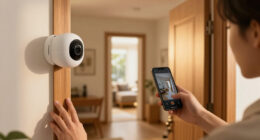
To create virtual walls for your robot vacuum, access its companion app and navigate to the mapping or boundary-setting feature. From there, you can draw or select keep-out zones on your home layout, such as sensitive areas or pet spaces. Some vacuums also support physical boundary markers like magnetic strips. Combining these digital and physical options enhances control over where your robot cleans. Keep exploring to learn more effective ways to customize your cleaning zones.

Get home appliances delivered free — and shop member deals
- Fast, free delivery on millions of items
- Access to Prime Big Deal Days deals on October 6–7
- Prime Video, Amazon Music and more included
Key Takeaways
- Use the robot vacuum’s companion app to access the mapping section and locate the virtual wall setting.
- Draw or select restricted zones directly on the home map within the app to create keep-out areas.
- Utilize physical boundary markers, such as magnetic strips, to reinforce virtual walls physically.
- Combine obstacle detection sensors with digital boundaries for more accurate and layered zone restriction.
- Regularly update and adjust virtual wall boundaries in the app to adapt to changes in your home environment.

Virtual walls are an essential tool for controlling where your robot vacuum cleans, especially when you want to restrict access to certain areas. Modern robot vacuums come equipped with advanced features like mapping capabilities and obstacle detection, making it easier than ever to create precise no-go zones. When setting up your virtual walls, the key is understanding how these features work together to keep your vacuum on the correct path and prevent it from entering unwanted spaces.
Mapping features are at the heart of most smart robot vacuums. They allow your device to create a detailed layout of your home, which can be customized through a companion app. By viewing this map, you can easily identify areas you want to keep off-limits. Simply select or draw the virtual boundary within the app, and your vacuum will recognize these boundaries during its cleaning routine. This process is efficient and precise, giving you full control over where your robot vacuum operates. You can define multiple zones, including specific rooms or even narrow corridors, with the tap of a finger.
Create custom virtual boundaries using your app for precise, efficient cleaning control.
Obstacle detection also plays a significant role in creating effective virtual walls. As your robot navigates your home, sensors constantly scan for objects and changes in the environment. These sensors help prevent collisions with furniture, walls, or other obstacles. When combined with mapping features, obstacle detection ensures that your vacuum respects the virtual barriers you set. For example, if you place a virtual wall across a doorway, the robot’s obstacle detection will reinforce this boundary by preventing it from passing through, even if the map doesn’t explicitly mark it as off-limits. This layered approach enhances accuracy and reduces the chances of accidental entry into restricted zones.
To create a virtual wall, you typically access your vacuum’s app and select the mapping section. From there, you can draw or select zones you want to restrict. Some models also allow physical boundary markers, like magnetic strips, which act as tangible virtual walls. These are especially useful in homes where Wi-Fi connectivity is inconsistent or for quick, temporary barriers. The combination of digital mapping, obstacle detection, and optional physical barriers provides flexibility and precision in directing your robot vacuum’s cleaning path. Additionally, smart technology enables real-time updates to the virtual boundaries as your home environment changes, maintaining optimal control over your cleaning zones.
In essence, understanding how your vacuum’s mapping features and obstacle detection work together allows you to set up effective virtual walls with confidence. This not only maximizes cleaning efficiency but also protects delicate items and keeps your pet’s space undisturbed. With these tools, you gain full control over your robot vacuum’s cleaning routine, making home maintenance easier and more tailored to your needs.
robot vacuum virtual wall boundary
As an affiliate, we earn on qualifying purchases.
As an affiliate, we earn on qualifying purchases.
Frequently Asked Questions
Can Virtual Walls Be Moved Once Set Up?
Yes, virtual walls can be moved once set up. You can use remote adjustment features to change the placement of the wall, making it easy to customize your cleaning area. Simply access your robot vacuum’s app or control panel, select the virtual wall or keep-out zone, and reposition it as needed. This flexibility allows you to adapt your robot’s cleaning path without hassle, ensuring your space stays protected or accessible.
Are Virtual Walls Compatible With All Robot Vacuum Brands?
While virtual wall technology is quite advanced, it’s not universally compatible across all robot vacuum brands. You might encounter compatibility issues if you try to use virtual walls with certain models, especially those from different manufacturers. Before investing, it’s wise to verify whether your vacuum’s brand supports virtual walls or keep-out zones. This way, you avoid surprises and ensure seamless operation without compatibility hiccups.
How Do Virtual Walls Affect Cleaning Efficiency?
Virtual walls improve your robot vacuum’s cleaning efficiency by effectively guiding it around obstacles and sensitive areas. They help prevent the vacuum from wasting time on unnecessary routes, allowing it to focus on cleaning designated zones. With obstacle detection, virtual walls guarantee the robot navigates smoothly without getting stuck or missing spots. As a result, your cleaning becomes more thorough and efficient, saving you time and effort.
Can Virtual Walls Be Used Outdoors?
Virtual walls are generally not designed for outdoor use due to outdoor barriers and wireless limitations. You might find that signals weaken or distort outside, making it difficult for your robot vacuum to recognize the virtual boundaries. Additionally, environmental factors like weather and obstacles can interfere. So, for outdoor areas, physical barriers or manual control are more reliable options than virtual walls, which work best indoors.
What Should I Do if Virtual Walls Stop Working?
If your virtual walls stop working, start troubleshooting virtual walls by checking their placement and ensuring they’re properly calibrated. Recalibrate the virtual wall if needed, following your robot vacuum’s instructions. Restart your device to see if that resolves the issue. If problems persist, update your vacuum’s firmware or contact customer support. Regular troubleshooting virtual walls helps maintain effective boundary control and prevents your robot from entering unwanted areas.
magnetic boundary strips for robot vacuum
As an affiliate, we earn on qualifying purchases.
As an affiliate, we earn on qualifying purchases.
Conclusion
Now that you know how to set up virtual walls, keeping certain areas off-limits is a breeze. Just like a trusty knight guarding the castle gates, your robot will respect these zones and focus on cleaning where it’s allowed. Remember, it’s a simple yet powerful way to customize your cleaning routine—no need for a magic wand, just some quick setup. With your virtual walls in place, your smart home is truly ready for the 21st century!
As an affiliate, we earn on qualifying purchases.
obstacle detection sensors for robot vacuum
As an affiliate, we earn on qualifying purchases.
As an affiliate, we earn on qualifying purchases.
Fall Picks
fall essentials
As an affiliate, we earn on qualifying purchases.