
To create a robot-friendly home, keep pathways wide, clutter-free, and free of narrow corridors or tight corners. Place furniture predictably and avoid blocking sensor views or placing low-hanging items that could interfere. Guarantee good lighting and consistent flooring to help sensors function smoothly. Regularly clean and maintain your environment to support obstacle detection. By designing spaces with these tips, you’ll improve navigation—continue exploring to discover even more ways to optimize your home for robots.
Key Takeaways
- Design wide, open walkways free of clutter to facilitate easy robot navigation.
- Arrange furniture to avoid blocking sensors and maintain clear lines of sight.
- Use uniform, smooth flooring like tile or hardwood, avoiding complex rugs or carpets.
- Ensure good lighting and keep sensors clean for optimal obstacle detection.
- Regularly maintain and reposition items to support consistent robot perception.
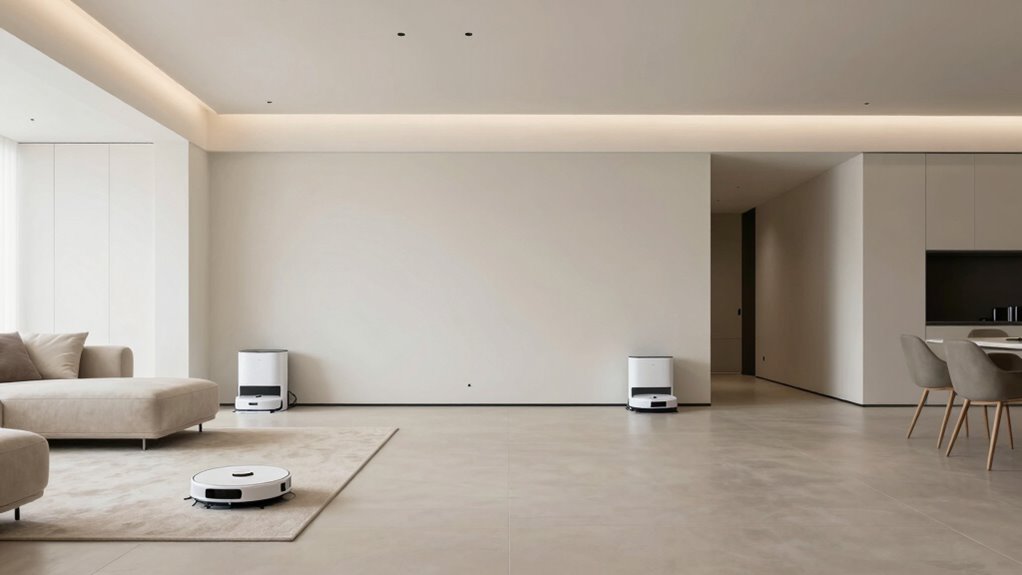
Have you ever wondered how to design your home so a robot can navigate effortlessly? Creating a robot-friendly layout involves more than just placing furniture; it’s about understanding how robots perceive and move through space. To guarantee smooth robot navigation, you need to focus on clear pathways and minimize obstacles that could hinder movement. Robots rely heavily on obstacle detection to avoid crashes and find the most efficient routes, so your home layout should support this capability. Think about how cluttered spaces or random objects can confuse a robot’s sensors, causing unnecessary delays or errors. By organizing your furniture and belongings thoughtfully, you make it easier for the robot to identify navigable routes and detect obstacles effectively.
Start by planning wide, open walkways that give the robot enough room to maneuver. Narrow corridors or tight corners can complicate obstacle detection, forcing the robot to slow down or struggle to turn. Keep pathways free of clutter, and avoid placing low-hanging items that might block sensors. Consider the placement of furniture; avoid blocking sensor view with large, bulky pieces, and position essential items in predictable locations. This helps the robot’s sensors get a clear line of sight, reducing the chances of missed obstacles or false detections. Additionally, understanding sensor perception and how it impacts navigation can help you optimize your home environment to improve obstacle detection accuracy. Incorporating sensor limitations into your planning can further enhance the robot’s ability to navigate effectively. Regular maintenance like cleaning dust and debris from sensors also supports sensor performance, ensuring consistent operation.
Lighting and floor surface play a vital role too. Bright, even lighting enhances the robot’s camera-based navigation, while uniform flooring simplifies sensor readings. Avoid rugs or carpets with complex patterns that could interfere with the robot’s obstacle detection and mapping capabilities. Smooth, hard surfaces like tile or hardwood are preferable, as they provide consistent feedback for navigation sensors. If you have multiple levels, think about how the robot will move between floors—adding ramps or ensuring that the robot can access all areas without obstacles blocking its path. Additionally, considering technology limitations helps in designing a space that aligns with the robot’s sensor capabilities, minimizing detection errors. Regularly cleaning the environment to keep dust and debris off sensors also helps maintain ideal obstacle detection, ensuring your robot can operate smoothly over time.
In essence, designing a home layout tailored for robot navigation means creating an environment that’s predictable, clutter-free, and easy to scan. When you prioritize obstacle detection and clear pathways, your robot can perform its tasks efficiently, saving you time and frustration. With thoughtful planning, your home becomes a space where robots can navigate confidently, making your life simpler and more automated.

Goodsby Replacement Cliff Drop Infrared Side Sensors for Shark IQ Robot Vacuums RV1001AE RV912S RV913S RV1000S QR1000SG AV1002AE AV1010AE AV911S QR1000SB UR1000SR UR1005AE RV1101ARUS UR1105ARUS
- Compatibility: Fits specific Shark IQ Robot models
- Model Check Reminder: Verify your vacuum model before ordering
- Compatibility Note: Not compatible with 7xx, 8xx, 20xx series
As an affiliate, we earn on qualifying purchases.
As an affiliate, we earn on qualifying purchases.
Frequently Asked Questions
How Can I Ensure My Home Wi-Fi Supports Multiple Robots?
To support multiple robots with your Wi-Fi, make certain you have enough bandwidth by upgrading your internet plan if needed. Use signal extenders to boost coverage in all areas, preventing dead zones where robots might lose connection. Position your router centrally, avoid obstructions, and consider a mesh network if you have a large or multi-story home. This setup guarantees your robots stay connected and perform at their best.
Are There Specific Safety Measures for Robot Charging Stations?
Yes, there are specific safety measures for robot charging stations. You should prioritize robot safety by placing the charging station in a dry, level area away from water or hazards. Guarantee the station has proper ventilation and clear access for easy docking. Avoid placing it near high-traffic zones to prevent accidents. Regularly check cords and connections for damage, and follow manufacturer guidelines to maintain a safe, efficient charging environment for your robots.
How Do I Prevent Robots From Damaging Fragile Items?
You can prevent robots from damaging fragile items by creating a clear, designated zone for delicate objects, and using barriers or signs as a robot obstacle to guide them away. Place fragile items on high shelves or inside protective containers. Regularly update robot maps and teaching it safe routes. This way, you protect your most precious possessions from accidental collisions, ensuring your fragile items stay unscathed amidst the robot’s busy navigation.
What Are the Best Materials to Use for Robot Navigation Flooring?
For ideal robot navigation, choose smooth, durable flooring materials like sealed concrete, hardwood, or vinyl. These surfaces allow robots to move efficiently without slipping or getting stuck. Avoid thick carpets or textured tiles, which can hinder movement and confuse sensors. By selecting flat, even flooring, you guarantee your robot can easily navigate your home, reducing errors and improving cleaning or task performance.
How Can I Customize My Home Layout for Different Robot Brands?
To gracefully accommodate various robot brands, you should subtly tailor your home layout by considering their unique navigation styles and sensor preferences. Use flexible furniture arrangements to minimize robot obstacles, ensuring smooth movement. Incorporate thoughtful wiring and clear pathways to support home automation systems, making each robot’s task easier. Regularly review and adjust the environment, creating an elegant space where different robots can operate seamlessly, enhancing your smart home experience.
hard surface flooring for robot vacuums
As an affiliate, we earn on qualifying purchases.
As an affiliate, we earn on qualifying purchases.
Conclusion
By now, you’re well on your way to designing a home that’s both cozy and robot-friendly. Remember, a tidy, obstacle-free space isn’t just good for your robot but also for your sanity—like keeping a ship’s deck clear of clutter. As you adapt your home, think of it as preparing a Victorian parlor for a robot from the future. With these tips, you’ll create a smart, seamless environment that feels just right—minus any digital cobwebs!
As an affiliate, we earn on qualifying purchases.
home layout for robot vacuum navigation
As an affiliate, we earn on qualifying purchases.
As an affiliate, we earn on qualifying purchases.