
TL;DR
Smart home security cameras let you check entrances, deliveries, and activity from your phone, but their usefulness depends on placement, power, Wi-Fi, and how footage is stored. Compare recording options, alert accuracy, privacy controls, and ongoing costs before you buy, then secure the account with a unique password and multifactor authentication.
A crisp camera feed can show you a delivery at the door, but it cannot stop someone from walking off with the package. Smart home security cameras give you a way to check activity and review footage; they work best as one part of a home security plan that also includes sound locks, useful lighting, and sensible routines.

Get home appliances delivered free with Prime
- Fast, free delivery on millions of items
- Prime Video, Amazon Music and more included
- Member-only deals all year
This guide walks you through the camera types, features, recording plans, and privacy choices that shape everyday use. You’ll see why a battery camera may suit a rental while a wired model may fit a busy entryway, and how to place cameras so they cover useful approaches without needlessly recording private spaces.
The goal is a setup you can trust when your phone buzzes at 2 p.m. and you’re nowhere near home. The feed should answer a real question, not fill your screen with alerts about every passing shadow.
Choose a camera by location, power, Wi-Fi, and storage needs before comparing resolution.
Check recording length, retention, and subscription terms; event clips usually use less storage than continuous recording.
Treat AI person, pet, vehicle, or package alerts as helpful sorting, not proof of what happened.
Secure camera accounts with unique passwords, multifactor authentication, firmware updates, and limited sharing.
Aim cameras at useful approaches while respecting neighbors, guests, household privacy, and local recording rules.
See What a Security Camera Can—and Can’t—Do
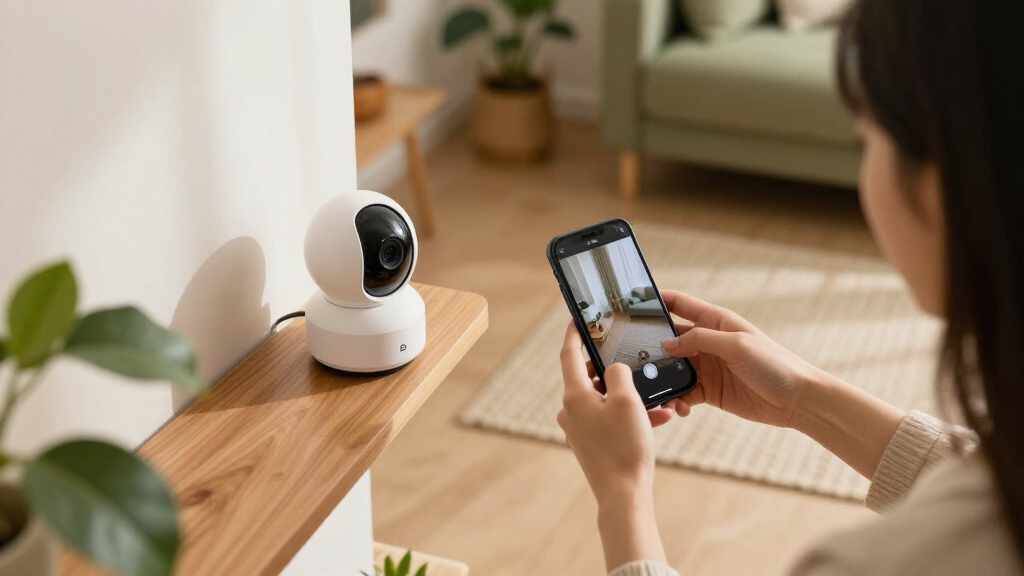
Smart home security cameras let you monitor a home remotely, receive activity alerts, and review recorded footage, depending on the model and service plan. Many also offer two-way audio or detection categories for people, pets, vehicles, or packages. They give you a clearer view of activity, but they cannot guarantee that a break-in will be prevented.
For example, a camera aimed at the porch might show a courier leaving a box beside the planter. That clip can help you work out when the parcel arrived or share evidence after a theft. It does not replace a locked door, and it won’t help if the camera points at the street while the porch itself sits just outside the frame.
Think of a camera like a porch light with a memory: it can draw your attention to an event and preserve what it saw, but it cannot respond on your behalf. Cameras let people monitor a home and check deliveries, entrances, or activity inside; a monitored alarm, secure doors, and good lighting address different needs.
That distinction matters when you set expectations. A camera may send an alert after motion begins, and its view may be blocked by a parked van, rain, or darkness. Plan for the information it can give you, then decide what other measures your home needs.
Products Worth Considering

Ring Battery Doorbell Plus (2nd Gen) and Spotlight Cam Plus Battery Bundle

eufy E25 Robot Vacuum and Mop with HydroJet Roller Mop, 20,000 Pa Suction

Dyson V8 Cyclone Cordless Vacuum
As an affiliate, we earn on qualifying purchases.
Match the Camera Type to the Place You Need to Watch
The right smart home security camera type depends on its location, power supply, and how you want to record. Indoor cameras watch rooms, outdoor cameras are built for exposure to weather, and video doorbells focus on the front entrance. Wired models need a power connection; battery cameras offer more flexible mounting but need recharging or battery replacement.
Imagine you rent a flat and want to watch the shared hallway just inside your door. A battery camera may be easier to position without new wiring, provided your lease and local rules allow recording there. For a driveway with frequent activity, a wired camera could avoid the routine of climbing a ladder to recharge a battery.
Storage creates another choice. A local-storage camera may save video to a memory card, hub, or network device, while a cloud camera uploads clips to a provider. Some models support both. Local video can reduce dependence on a cloud plan, but a stolen or damaged device may take its recordings with it; cloud footage may remain available after the camera is damaged, but it is held by a service provider.
Before buying, write down the spot, power source, recording pattern, and storage preference. A doorbell may be the neatest answer for visitors at your front step, while a wide driveway may need a separate outdoor camera. Check the exact model’s current service terms: recording history and advanced features can change by plan.
| Camera choice | Often suits | Tradeoff to check |
|---|---|---|
| Indoor | Rooms, pets, or household monitoring | Privacy, consent, and careful placement |
| Outdoor | Entrances, yards, or driveways | Weather protection, power, and Wi-Fi |
| Video doorbell | Front door and deliveries | Doorway angle and subscription terms |
| Battery-powered | Flexible mounting or rentals | Recharging depends on activity and conditions |
Choose Features That Make Alerts and Footage Useful
Useful camera features help you see the right part of a scene and understand the recording later. Resolution matters, but it works alongside lens quality, lighting, placement, field of view, and network performance. A wide view can cover more of a porch, while distant faces or package labels may appear smaller and harder to distinguish.
Say you mount a camera high over a garage to see the whole driveway. You may get a broad view of cars entering, but a visitor’s face could be too small to identify. A narrower view at eye level may give you more detail at the door. Infrared night vision can show activity in darkness; visible lights can provide color night footage but may draw attention to the camera.
Motion detection also affects daily life. Basic alerts can buzz every time a branch sways, while person or vehicle categories may cut down on irrelevant notifications. These systems can still miss or misclassify events, especially when lighting or placement is poor. Treat an alert as a prompt to check the clip, not proof of exactly what happened.
Make a quick checklist before comparing models: recording style (continuous or event-based), clip retention, subscription requirements, Wi-Fi signal at the mounting point, app compatibility, and shared-user controls. Event-based recording usually uses less storage than continuous recording, but you may need to check whether it captures enough before and after an event. Test the signal where the camera will sit; a strong router signal in the living room tells you little about a metal-sided shed at the edge of the yard.
Set Up Cameras Without Creating New Privacy Risks
A secure camera setup protects both the footage and the people who might appear in it. Use a unique account password, turn on multifactor authentication when offered, install firmware updates, and give access only to people who need it. Check where video is processed and stored, who can view it, how long it stays available, and how to delete it.
Consider a family using an indoor camera to check on a dog during the workday. A privacy shutter or schedule can keep the camera off at home in the evening, and separate household accounts can make it easier to remove access later. Bedrooms and other private spaces call for particular care; an indoor camera’s view can feel far more intrusive than a camera over the front door.
Placement affects neighbors and visitors, too. Aim an outdoor camera at your entrance or driveway rather than through a neighbor’s window. Recording laws differ by location, especially for audio, shared buildings, rental properties, workplaces, and areas used by guests. Check the rules that apply where you live and tell household members or other affected people when appropriate.
Cloud recording can preserve clips if a camera is stolen, but it sends footage to a provider. Local recording can keep more video in your home, though the storage device can also be damaged or taken. Neither option removes the need for account security. A camera linked to a reused password can expose private footage even when the hardware is mounted in a sensible spot.
Plan for Wi-Fi, Outages, and Ongoing Costs
Smart home security cameras often rely on internet access for remote viewing, alerts, and cloud features, so weak Wi-Fi or an outage can limit what they do. Some models keep recording locally when the internet drops, but remote access and connected features may stop. During a power cut, a battery camera may keep running; a wired one may go offline unless it has backup power.
Picture a camera at the back gate that works perfectly during setup, then drops its feed whenever the microwave and streaming TV are in use. The issue may be signal strength or network congestion, not a faulty lens. Check Wi-Fi at the exact mounting point and consider whether a hub, stronger coverage, or different placement is needed.
Storage costs can also add up. Some cameras offer live viewing or local recording without a subscription but reserve longer cloud history or advanced detection for a paid plan. Battery life varies with temperature, signal strength, settings, and how often the camera detects activity; advertised estimates reflect particular usage assumptions. A busy sidewalk can trigger far more recordings than a quiet backyard.
Before you commit, add up the camera price, storage plan, and likely maintenance. If you want event clips only, you may need less storage than someone recording continuously. Check what happens to old footage when a plan ends, whether shared users need their own accounts, and whether the camera retains any useful recording during an internet outage.
Make New AI and Smart-Home Features Prove Their Value
Newer cameras increasingly advertise on-device processing and AI-based detection, but the exact features vary by product. A device may classify people, pets, vehicles, or packages, and some analysis may happen locally. Other functions may still need internet access or a subscription, so check the current specifications and plan terms.
For instance, a person alert could help you ignore a cat crossing the yard at dawn. Yet the same camera might label a large dog as a person or miss a visitor hidden by a tall hedge. Better sorting can make notifications more useful, but it does not turn a camera into an infallible witness.
Smart-home compatibility also varies by model, region, and feature. Standards such as Matter have drawn attention, but camera support and specific integrations remain uneven compared with many other smart-home devices. If you want a camera to trigger a light or show a feed on a particular display, confirm that exact connection before buying.
Think of compatibility like a key: two devices can carry the same brand badge and still fail to open the feature you need. Check whether your phone is supported, how household members can share access, and what remains available if the provider changes its service. Features and prices shift, so verify current details instead of relying on an old review or a promise on the box.
Frequently Asked Questions
Do smart home security cameras need Wi-Fi?
Most need internet access for remote viewing, alerts, and cloud services. Some can record locally during an outage, but remote access and integrations may stop working. Check the model’s outage behavior before you mount it at a critical entrance.
Can a camera record without a subscription?
Sometimes. A model may provide live viewing or local recording at no extra charge while reserving cloud history or advanced detection for a paid plan. Read the current terms for the exact model, since plans can change.
Are smart home security cameras secure?
You can reduce risk with a unique password, multifactor authentication, timely firmware updates, and careful account sharing. No connected device is risk-free, so also check who can view footage and how long recordings remain stored.
Can cameras tell people from pets?
Many models offer person and pet detection, but accuracy depends on the camera, lighting, and scene. A dog near a hedge or a person partly out of frame may produce a missed or incorrect alert. Check the clip before drawing conclusions.
Where should I place a home security camera?
Entrances and delivery areas are common starting points because they capture useful approaches. Aim the view at your property and avoid unnecessary recording of neighbors’ windows or private spaces. Check local rules, especially for audio and shared areas.
Will a camera work during a power or internet outage?
A battery-powered camera may keep recording during a power cut, while a wired model generally needs power unless it has backup. Internet-dependent alerts, remote viewing, and integrations may stop during a connection outage even if local recording continues.
Conclusion
Choose the camera that fits the place you need to watch, then check its power, connection, recording, and privacy details before you mount it. A well-placed camera with secure access can give you a useful record of a delivery or an unexpected visitor; a high-resolution feed pointed at the wrong spot is just a sharp picture of nothing useful.
Set it up to answer one real question about your home. When the next alert arrives, you should see the porch—not a blur of leaves in the wind.