
A whole-home robot maintenance routine involves regularly updating its software, inspecting and cleaning brushes, sensors, and wheels weekly, and ensuring the charging station is in a central, clutter-free spot. You should also monitor your Wi-Fi connection for stability and perform routine checks for error messages or unusual noises. Keeping everything in good shape helps your robot clean efficiently and last longer. Stay with us to discover more tips for maintaining your device properly.

Get home appliances delivered free with Prime
- Fast, free delivery on millions of items
- Prime Video, Amazon Music and more included
- Member-only deals all year
Key Takeaways
- Schedule regular software updates and verify successful installation to keep the robot current and functional.
- Inspect and clean brushes, sensors, and wheels weekly to prevent debris buildup and ensure optimal navigation.
- Position the charging station in a central, clutter-free area and keep contacts clean for reliable recharging.
- Maintain a stable Wi-Fi connection and perform network tests to support remote control and updates.
- Monitor for error messages, unusual noises, or sensor issues regularly to prevent operational disruptions.

Have you ever wondered how to keep your home robots running smoothly and efficiently? Maintaining your robots isn’t just about turning them on and letting them go — it’s about establishing a routine that keeps them operating at peak performance. A key part of this routine involves regular robot software updates. These updates are vital because they fix bugs, improve functionality, and add new features that enhance your robot’s capabilities. You should set a schedule, perhaps once a month, to check for updates. Many robots automatically notify you when an update is available, but it’s good practice to manually verify if updates have been installed successfully. Keeping your robot’s software current ensures it can handle new obstacles, adapt to changes in your home environment, and operate more efficiently. Additionally, inspecting and maintaining the robot’s physical components, like brushes and sensors, is essential for optimal operation.
Another essential aspect of your maintenance routine is charging station placement. Where you position your robot’s charging station greatly influences its ability to perform well. Place it in a central, easily accessible location, away from clutter or obstacles that could interfere with docking. Avoid placing it near areas with high foot traffic or where cords and other objects might block the robot’s path. Make sure the charging area is on a flat, hard surface to guarantee the robot can dock properly. Regularly check that the charging contacts on both the robot and station are clean and free of dust or debris. Proper placement and maintenance of the charging station help your robot recharge quickly and consistently, preventing it from running out of power mid-clean or task. Monitoring wireless connectivity and ensuring a stable network connection is also crucial for smooth updates and remote control. Ensuring your home’s Wi-Fi network is robust and secure will help prevent connectivity issues that could disrupt your robot’s operation. Performing a network speed test can help identify potential bandwidth issues that might affect your robot’s performance.
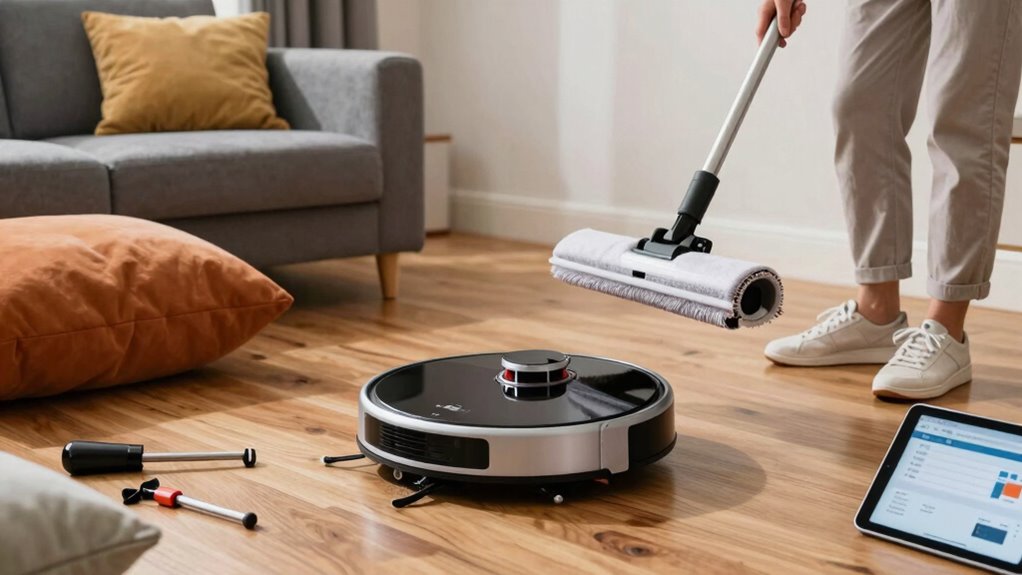
Furthermore, understanding robot navigation and how your robot perceives its environment can help you identify potential issues early and optimize its cleaning path. Beyond software updates and station placement, routine maintenance includes emptying dustbins or replacing filters, inspecting brushes and wheels for debris, and wiping sensors to guarantee optimal navigation. Scheduling these tasks weekly or bi-weekly keeps your robot functioning smoothly and prolongs its lifespan. Pay attention to any error messages or unusual noises during operation, as these can indicate maintenance needs before a problem becomes severe. Additionally, keep an eye on your robot’s connectivity to Wi-Fi or other networks, since interruptions can hinder updates or remote monitoring. Regularly checking software health can help prevent unexpected disruptions and ensure your robot performs at its best.
Products Worth Considering

Shark Navigator Robot Vacuum with Self-Empty Base, Dark Grey (RV2120AE)

Roborock Q7 M5+ Robot Vacuum and Mop with Self-Emptying Dock

eufy E25 Robot Vacuum and Mop Combo with HydroJet Roller Mop
As an affiliate, we earn on qualifying purchases.
Frequently Asked Questions
How Often Should I Replace the Robot’s Filters?
You should replace your robot’s filters every three to six months, depending on usage and the manufacturer’s recommendations. Stick to a regular maintenance schedule to keep your robot functioning at its best and maintain air quality. Check the filters periodically for dirt and wear, and replace them promptly when they appear dirty or clogged. Proper filter replacement is essential for efficient operation and extending the lifespan of your whole-home robot.
Can I Upgrade the Robot’s Software Myself?
Think of upgrading your robot’s software as giving it a fresh coat of paint—vital for smooth sailing. You can generally perform software updates yourself, especially if your robot supports robot customization and provides user-friendly firmware options. Check the manufacturer’s instructions or app, as some updates are automatic, while others require manual installation. Keeping software current guarantees peak performance and new features, making your robot feel like it’s always ready for the next adventure.
What Should I Do if the Robot Stops Charging?
If your robot stops charging, first check the charging dock placement, making certain it’s on a flat, unobstructed surface. Then, perform a battery calibration by fully charging and discharging the robot to optimize battery performance. Clean the charging contacts on both the robot and dock to guarantee a good connection. If issues persist, reset the robot or consult the user manual for troubleshooting steps.
Are There Specific Cleaning Solutions I Should Avoid?
You should avoid using harsh cleaning products or chemicals with strong fumes on your robot. Stick to gentle, robot-safe cleaning solutions to prevent damage. Always check the chemical safety labels before applying any cleaning product near your device. Using inappropriate cleaning solutions can harm the robot’s sensors or internal components, so select manufacturer-recommended cleaning methods. Regularly cleaning with safe products ensures your robot stays in top condition and functions properly.
How Do I Troubleshoot Connectivity Issues?
Think of your robot’s connection like a delicate web, easily disrupted. First, check your Wi-Fi signal strength and make certain your device is within range. For voice command troubleshooting, restart your smart home hub and update your robot’s firmware reset if needed. Sometimes, toggling your router off and on can re-establish the connection. If issues persist, reconfigure your network settings or contact support for further guidance.
Conclusion
By sticking to a regular maintenance routine, you’ll keep your whole-home robot running smoothly and avoid any unexpected hiccups. Think of it as giving your tech a little TLC—just enough to keep things humming along without a hitch. Remember, a little preventive care goes a long way, so don’t wait until it’s too late. Stay ahead of the game, and your robot will be a reliable sidekick for years to come.