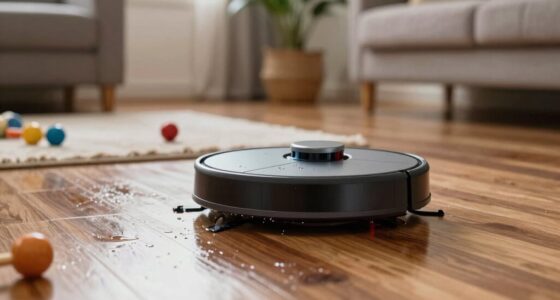
To improve your vacuum and mop combo robot’s results, keep it charged regularly and avoid letting the battery fully drain. Set a consistent cleaning schedule and choose times when it won’t disrupt your household. Clear clutter from floors regularly, and make sure to empty the dustbin and clean brushes often. Adjust settings based on your floor type and monitor performance to catch issues early. Keep practicing these tips to maximize efficiency — more helpful advice follows.
Listen free for 30 days with Audible
Thousands of audiobooks and originals — cancel anytime.
As an affiliate, we earn on qualifying purchases.
Key Takeaways
- Regularly clean and maintain sensors, brushes, and water tanks for optimal performance.
- Adjust cleaning settings based on floor type and surface conditions.
- Schedule routine maintenance and cleaning to prevent dust buildup and mechanical issues.
- Clear clutter and move objects out of the robot’s path before each cleaning session.
- Monitor battery health and optimize charging routines for consistent, effective cleaning cycles.

If you want your vacuum and mop combo robot to perform at its best, understanding how to maximize its use is essential. One of the most important factors is managing its battery life effectively. These devices rely on rechargeable batteries that can wear down over time if not cared for properly. To extend your robot’s battery life, make sure to keep it charged regularly and avoid letting the battery completely drain before recharging. When you notice a drop in cleaning performance, it might be time to replace the battery or perform a calibration if your model allows. Proper battery maintenance ensures your robot can complete its tasks without frequent interruptions, making your cleaning routine smoother and more efficient. Regularly inspecting and maintaining the battery can also prevent unexpected failures and prolong the device’s lifespan.
Maximize your robot vacuum’s performance by maintaining its battery and performing regular calibration.
Setting a consistent cleaning schedule is another key to getting better results. Most vacuum and mop combo robots offer programmable schedules, allowing you to automate cleaning during times that suit your routine. By sticking to a regular schedule, your robot can maintain a consistently clean environment without you having to manually start it each time. This not only keeps your floors cleaner but also prevents dirt and grime from building up, which can be harder to remove if left for too long. Be sure to tailor your cleaning schedules based on your household’s activity levels—more frequent runs for busy households, less often if your home stays relatively clean. Scheduling your robot to operate during times when you’re out or asleep can also reduce disruptions and make the process seamless. Additionally, understanding your device’s power management features can help optimize battery usage during each cleaning cycle. Regular maintenance checks can also enhance the overall efficiency of the device. Furthermore, staying informed about battery health can help you identify potential issues before they affect performance.
In addition to managing battery life and scheduling, pay attention to how your robot navigates your space. Clear the floors of clutter and move any small objects or cords out of its path. This prevents unnecessary interruptions and ensures thorough cleaning. Regularly empty the dustbin and clean the mop pad to maintain top performance. When the robot’s sensors and brushes stay clean, it can detect dirt more efficiently and clean more thoroughly. Also, keep an eye on the water tank and refill it as needed, especially if you’re using the mopping feature frequently. Doing these small maintenance tasks consistently will give your robot the tools it needs to do a better job. Proper floor surface assessment can help you optimize cleaning settings and avoid potential issues. Additionally, consulting your device’s manufacturer guidelines can provide insights into specific maintenance routines that are best suited for your model.
Finally, understand your device’s features and limitations. Read the manual to learn about specific settings that can enhance cleaning, such as adjusting suction power or water flow. Using these features correctly helps you get the best results tailored to your flooring type and cleaning needs. Staying proactive about maintenance and scheduling ensures your vacuum and mop combo robot performs at its peak, saving you time and effort while keeping your home spotless. Properly utilizing measurement tools can also help you gauge the effectiveness of your cleaning routine and identify areas for improvement.
vacuum and mop combo robot replacement battery
As an affiliate, we earn on qualifying purchases.
As an affiliate, we earn on qualifying purchases.
Frequently Asked Questions
Can I Use My Vacuum and Mop Combo on All Floor Types?
Your vacuum and mop combo might not work on all floor types. Check the floor compatibility in your device’s manual to see if it’s suitable for hardwood, tile, or carpet. For best results, follow maintenance tips like cleaning brushes regularly and emptying the bin often. Some models have adjustable settings for different surfaces, so use those to protect delicate floors and guarantee thorough cleaning.
How Often Should I Replace the Mop Pads?
You should replace your mop pads based on their longevity and your cleaning frequency. Generally, it’s best to change them every 2 to 4 weeks if you use your vacuum and mop combo regularly. If you notice signs of wear, stains, or reduced cleaning effectiveness, replace the pads sooner. Proper maintenance guarantees peak cleaning performance, so pay attention to mop pad longevity and stick to a consistent replacement frequency to keep your floors spotless.
Does the Robot Work Well With Pet Hair?
You’ll find your robot handles pet hair removal quite well, especially if it’s equipped with a strong suction system. Imagine the robot gliding smoothly across your floors, effortlessly gathering hair and preventing hair entanglement with specialized brushes or tangle-free designs. Regularly cleaning the brushes and filters guarantees peak performance. While it works best with loose pet hair, some stubborn tangles might require manual removal to keep your robot running efficiently.
Can I Schedule Cleaning Sessions Remotely?
Yes, you can schedule cleaning sessions remotely using the robot’s app integration. With remote scheduling, you decide when the robot cleans, even if you’re not home. Simply open the app on your smartphone, set the desired cleaning time, and the robot will follow your instructions. This feature makes maintaining a clean home easier and more convenient, ensuring your floors stay tidy without manual intervention.
Is It Safe to Leave the Robot Charging Unattended?
Did you know that over 30% of robot vacuum owners leave their devices charging unattended? It’s generally safe to do so if you follow proper battery safety and charging etiquette. Most robots are designed with safety features to prevent overheating or overcharging. However, it’s best to monitor them initially and confirm the charging station is in a safe, dry spot. Regularly check for any signs of damage or malfunction.
As an affiliate, we earn on qualifying purchases.
Conclusion
To maximize your vacuum and mop combo robot’s performance, stay consistent with regular cleaning schedules and keep its sensors and brushes clean. Did you know that homes with regular maintenance see up to 30% better cleaning results? By following these simple tips, you’ll guarantee your robot works efficiently, saving you time and effort. A well-maintained robot not only cleans better but also lasts longer, making your investment truly worthwhile.
robot vacuum sensor cleaning kit
As an affiliate, we earn on qualifying purchases.
As an affiliate, we earn on qualifying purchases.
As an affiliate, we earn on qualifying purchases.
Fall yard work Picks
leaf blowers
As an affiliate, we earn on qualifying purchases.