
Smart plugs with energy monitoring add remote control and power-use tracking to individual appliances, but the right choice depends on your smart-home platform and how you plan to use the data. I rank the Kasa Matter Smart Plug with Energy Monitoring as the best overall pick for its 15A capacity, Matter support, and multiple pack options. The Tapo P110M is a strong alternative if you want Matter compatibility across a range of pack sizes, while Emporia’s four-pack suits buyers who want several monitored outlets from one brand. The main tradeoffs are Matter versus Zigbee or Wi-Fi-only setup, per-outlet space, and whether you need detailed energy tracking or just basic usage visibility. Read on for the full comparison, buying advice, and picks for different needs.

Get home appliances delivered free with Prime
- Fast, free delivery on millions of items
- Prime Video, Amazon Music and more included
- Member-only deals all year
Complete the kit


Key Takeaways
Kasa Matter and Tapo P110M stand out for platform flexibility: both combine energy monitoring with Matter support and 15A capacity, with different pack options to suit smaller or larger setups.
Pack size changes the buying decision: Kasa Matter, Tapo P110M, and several Wi-Fi options come in multi-packs, while the Kasa EP25P4 adds a distinct Apple HomeKit-oriented choice.
Protocol fit matters as much as monitoring: THIRDREALITY’s Zigbee models suit buyers with a compatible hub, while many other picks rely on Wi-Fi or Matter-over-Wi-Fi setups.
Energy data varies in practical value: basic usage visibility may be enough for checking an appliance, but buyers planning to act on energy trends should compare each companion app’s reporting and history features.
Outlet layout can rule out a plug: a four-pack may cover several devices, but plug dimensions and neighboring sockets still matter; the Tapo P316M power strip offers a different answer when multiple outlets need control in one location.
| AiSeek Smart Plug with Energy Monitoring, 15A, 2.4 GHz Wi-Fi, 4-Pack |  | Best Value for Straightforward Wi-Fi Monitoring | Pack count: 4 | Maximum load: 15A, 1800W | Operating voltage: 120V | VIEW LATEST PRICE | See Our Full Breakdown |
| Kasa Matter Smart Plug with Energy Monitoring, 15A/1800W, 4-Pack |  | Best Overall for Matter-Based Homes | Model and pack: KP125MP4; 4-pack | Maximum load: 15A, 1800W | Operating voltage: 120V | VIEW LATEST PRICE | See Our Full Breakdown |
| Tapo P110M Matter Smart Plug with Energy Monitoring, 15A, 4-Pack |  | Best for Cost Insights and Automatic Shutoff | Model and pack: P110M; 4 plugs | Maximum load: 1800W | Connectivity: Matter and Wi-Fi; 2.4 GHz Wi-Fi | VIEW LATEST PRICE | See Our Full Breakdown |
| Kasa Smart Plug Mini 15A with Apple HomeKit and Energy Monitoring (EP25P4) |  | Best for Apple HomeKit Users | Model: EP25P4 | Maximum load: 15A, 1800W | Operating voltage: 120V AC | VIEW LATEST PRICE | See Our Full Breakdown |
| THIRDREALITY Smart Plug Gen3, 4-Pack with Power Monitoring |  | Best for Zigbee and Home Assistant Setups | Model and pack: Smart Plug Gen3; 4-pack | Connectivity: Zigbee 3.0 | Hub requirement: Compatible Zigbee hub required | VIEW LATEST PRICE | See Our Full Breakdown |
| Tapo Smart Plug P110M (2-Pack) – Matter Compatible, Energy Monitoring, 15A |  | Best for Flexible Smart-Home Integration | Pack size: 2 plugs | Maximum current: 15 A | Maximum wattage: 1800 W | VIEW LATEST PRICE | See Our Full Breakdown |
| Kasa Matter Smart Plug with Energy Monitoring, 15A/1800W, 2-Pack |  | Best for Local Matter Control | Model: KP125MP2 | Pack size: 2 plugs | Maximum current: 15 A | VIEW LATEST PRICE | See Our Full Breakdown |
| GHome Smart Plug, Wi-Fi, Works with Alexa and Google Home, 4-Pack | 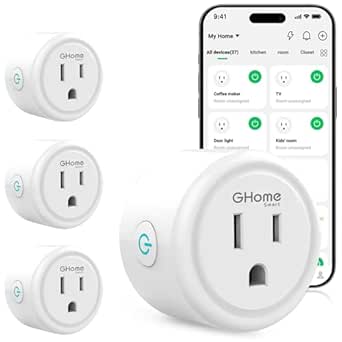 | Best for Multi-Room Scheduling | Model: WP3 | Pack size: 4 plugs | Operating voltage: 120 V | VIEW LATEST PRICE | See Our Full Breakdown |
| Emporia Energy-Monitoring Wi-Fi Smart Plugs, 4-Pack |  | Best Four-Pack for Energy Tracking | Model: EMSO1-4 | Pack size: 4 plugs | Operating voltage: 120 V | VIEW LATEST PRICE | See Our Full Breakdown |
| Kasa Smart Plug Mini with Energy Monitoring, KP115 |  | Best for Safety-Focused Single-Outlet Control | Model: KP115 | Connectivity: 2.4 GHz Wi-Fi | Operating voltage: 120 V AC | VIEW LATEST PRICE | See Our Full Breakdown |
| Tapo P115 Wi-Fi Smart Plug with Energy Monitoring, 4-Pack, 15 A |  | Best Overall for Wi-Fi Households | Pack quantity: 4 plugs | Maximum current: 15 A | Maximum wattage: 1,800 W | VIEW LATEST PRICE | See Our Full Breakdown |
| ThirdReality ZigBee Smart Plug 4-Pack with Energy Monitoring | 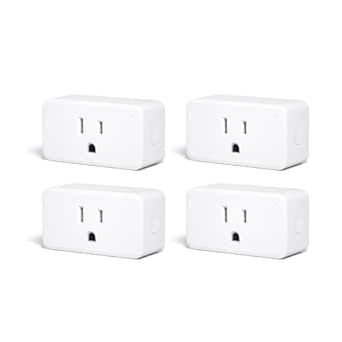 | Best for ZigBee Network Builders | Pack quantity: 4 plugs | Connectivity protocol: ZigBee 3.0 | Hub requirement: Yes; compatible hub or supported Echo device | VIEW LATEST PRICE | See Our Full Breakdown |
| Tapo P115 Smart Wi-Fi Plug with Energy Monitoring, 2-Pack, 15A |  | Best Starter Pair | Pack size: 2 plugs | Model: P115 | Operating voltage: 125 V | VIEW LATEST PRICE | See Our Full Breakdown |
| Tapo P316M Matter Smart Wi-Fi Power Strip with Energy Monitoring |  | Best for Multi-Device Monitoring | AC outlets: 6 individually controlled | USB ports: 3 always-on ports | USB output: 5 V, 2.4 A | VIEW LATEST PRICE | See Our Full Breakdown |
| Govee Smart Plug with Energy Monitoring, Wi-Fi and Bluetooth, 4-Pack |  | Best for Detailed Electrical Readings | Pack size: 4 plugs | Model: H5086 | Voltage: 110 V | VIEW LATEST PRICE | See Our Full Breakdown |
| smart plugs with energy monitoring | Connectivity | Operating voltage |
|---|---|---|
| AiSeek Smart Plug with Energy | 2.4 GHz Wi-Fi; no hub required | 120V |
| Kasa Matter Smart Plug with En | Matter, SmartThings, and Wi-Fi; 2.4 GHz Wi-Fi | 120V |
| Tapo P110M Matter Smart Plug w | Matter and Wi-Fi; 2.4 GHz Wi-Fi | — |
| Kasa Smart Plug Mini 15A with | 2.4 GHz Wi-Fi | 120V AC |
| THIRDREALITY Smart Plug Gen3 | Zigbee 3.0 | 110V |
| Tapo Smart Plug P110M | Matter and 2.4 GHz Wi-Fi | — |
| Kasa Matter Smart Plug with En | Matter and 2.4 GHz Wi-Fi | 120 V |
| GHome Smart Plug | Wi-Fi and Bluetooth; 2.4 GHz Wi-Fi required | 120 V |
| Emporia Energy-Monitoring Wi-F | 2.4 GHz Wi-Fi | 120 V |
| Kasa Smart Plug Mini with Ener | 2.4 GHz Wi-Fi | 120 V AC |
| Tapo P115 Wi-Fi Smart Plug wit | 2.4 GHz Wi-Fi | 110 V AC |
| ThirdReality ZigBee Smart Plug | — | 120 V |
| Tapo P115 Smart Wi-Fi Plug wit | 2.4 GHz Wi-Fi | 125 V |
| Tapo P316M Matter Smart Wi-Fi | 2.4 GHz Wi-Fi | — |
| Govee Smart Plug with Energy M | Wi-Fi and Bluetooth | — |
More Details on Our Top Picks
AiSeek Smart Plug with Energy Monitoring, 15A, 2.4 GHz Wi-Fi, 4-Pack
The AiSeek is a practical pick for buyers who want four plugs with real-time energy tracking and familiar app-based controls. In SmartLife, you can check power use, set schedules or timers, and group plugs; Alexa and Google Assistant add voice control after setup. Unlike the Kasa Matter Smart Plug and Tapo P110M, it does not offer Matter-based access across several smart-home platforms, so it suits a simpler Wi-Fi setup better than a mixed-platform home. Its 15A, 1800W rating, overload protection, and compact body cover everyday plug-in appliances, while the 2.4 GHz requirement and SmartLife-first linking add setup steps. Choose it for accessible monitoring and automation, not for broad Matter interoperability or detailed cost analysis.
Pros:- Tracks real-time power and energy use through SmartLife or Tuya.
- Supports schedules, timers, and group controls.
- 15A and 1800W maximum load with short-circuit and overload protection.
- Four-plug pack includes Alexa and Google Assistant support.
Cons:- Requires a 2.4 GHz Wi-Fi network and SmartLife setup before assistant linking.
- Does not list Matter support, unlike the Kasa Matter and Tapo P110M alternatives.
- The provided feature details do not specify cost estimates or energy-history charts.
Best for: Households that want four app-controlled plugs to track everyday appliance use and run schedules through SmartLife, Alexa, or Google Assistant.
Not ideal for: Buyers building an Apple Home or Matter-centered system, or anyone who wants to avoid 2.4 GHz Wi-Fi and linking accounts during setup.
- Pack count:4
- Maximum load:15A, 1800W
- Operating voltage:120V
- Connectivity:2.4 GHz Wi-Fi; no hub required
- Energy monitoring:Real-time power and energy tracking
- Apps and assistants:SmartLife, Tuya; Amazon Alexa and Google Assistant
- Safety:Short-circuit and overload protection; FCC certification stated
- Dimensions:1.4 x 2.8 x 2 in
- Warranty:2 years
Our verdict“Choose the AiSeek four-pack for basic real-time monitoring and schedules across several appliances when Matter support is not a priority.”
Kasa Matter Smart Plug with Energy Monitoring, 15A/1800W, 4-Pack
This Kasa four-pack earns the broadest-system role because its Matter compatibility gives energy monitoring a place in Apple Home, Alexa, Google Home, and SmartThings setups. For buyers who use more than one ecosystem, that flexibility matters more than an app-specific feature set. It also supports local network control for compatible Matter devices, unlike the Wi-Fi-focused AiSeek, and tracks energy use over time. The Tapo P110M adds electricity-cost estimates and power-threshold shutoff, so it is the more useful choice for buyers focused on cost insights or automatic protection. Kasa’s 15A/1800W capacity, compact form, and UL-certified flame-retardant design make it a capable everyday option, but it still requires 2.4 GHz Wi-Fi for Wi-Fi connectivity and its stated maximum load is not suited to higher-demand equipment.
Pros:- Matter compatibility spans Apple Home, Alexa, Google Home, and SmartThings.
- Local network control is available for compatible Matter devices.
- Tracks energy use over time.
- Compact, UL-certified flame-retardant design with a 15A/1800W rating.
Cons:- Wi-Fi connectivity requires a 2.4 GHz network.
- Its 15A/1800W maximum load rules out higher-capacity applications.
- Unlike the Tapo P110M, the supplied details do not list electricity-cost estimates or power-threshold shutoff.
Best for: Households using Apple Home, Alexa, Google Home, or SmartThings that want a four-pack of energy-monitoring plugs with Matter support.
Not ideal for: Buyers who want cost estimates or threshold-triggered shutoff, or who need plugs for loads above 15A or 1800W.
- Model and pack:KP125MP4; 4-pack
- Maximum load:15A, 1800W
- Operating voltage:120V
- Connectivity:Matter, SmartThings, and Wi-Fi; 2.4 GHz Wi-Fi
- Compatible platforms:Apple Home, Amazon Alexa, Google Home, Samsung SmartThings
- Energy monitoring:Energy use tracked over time
- Safety:UL-certified flame-retardant design
- Mounting:Surface mount
- Warranty:2-year limited
Our verdict“Pick this Kasa pack if cross-platform Matter support and energy tracking matter more to you than cost estimates or automatic threshold shutoff.”
Tapo P110M Matter Smart Plug with Energy Monitoring, 15A, 4-Pack
The Tapo P110M stands out when monitoring should lead to a decision, not just a readout. Its app provides consumption statistics and electricity-cost estimates, while user-set power thresholds can trigger automatic shutoff. That gives it a more analytical role than the Kasa Matter four-pack, whose listed features focus on platform reach and energy tracking over time. The P110M also uses Matter compatibility for Apple Home, Alexa, Google Home, and SmartThings, and supports remote, voice, and scheduled control. Cost estimates depend on the usage data and applicable tariff, so they are guides rather than guaranteed bill calculations. Like the Kasa and AiSeek options, it is limited to 2.4 GHz Wi-Fi and 1800W; choose it for more actionable app features, not for higher-load appliances.
Pros:- Tapo app provides consumption statistics and electricity-cost estimates.
- User-set power thresholds support automatic shutoff.
- Matter compatibility covers major smart-home platforms.
- Four-pack supports app, voice, remote, and scheduled control.
Cons:- Cost estimates depend on usage information and the applicable electricity tariff.
- Wi-Fi connectivity is limited to 2.4 GHz.
- The 1800W maximum load does not suit higher-demand equipment.
Best for: Energy-conscious households that want app-based consumption charts, estimated electricity costs, and threshold-triggered shutoff across a Matter-compatible home.
Not ideal for: Buyers who need loads above 1800W, rely on Wi-Fi bands other than 2.4 GHz, or expect cost estimates to match their bill without tariff configuration.
- Model and pack:P110M; 4 plugs
- Maximum load:1800W
- Connectivity:Matter and Wi-Fi; 2.4 GHz Wi-Fi
- Compatible platforms:Amazon Alexa, Apple Home, Google Home, Samsung SmartThings
- Energy features:Usage statistics, consumption charts, and estimated electricity costs
- Automatic control:User-set power thresholds support automatic shutoff
- Control methods:App, voice, remote, and scheduling
- Color:White
Our verdict“Choose the Tapo P110M if cost estimates and threshold-based shutoff are more useful to you than the Kasa Matter plug’s simpler energy-tracking focus.”
Kasa Smart Plug Mini 15A with Apple HomeKit and Energy Monitoring (EP25P4)
For an Apple-centered home, the Kasa EP25P4 pairs energy monitoring with native HomeKit support, alongside Siri, Alexa, Google Assistant, and SmartThings control. Its compact plug-in design is intended to leave another outlet accessible, a useful fit when replacing several outlets with monitored smart control. Compared with the Kasa Matter four-pack, this model lists HomeKit compatibility but not Matter; it may suit buyers who already use Kasa and HomeKit, while the Matter model offers a clearer path across multiple ecosystems. The EP25P4 tracks energy use in real time and historically, and includes scheduling and timers. Its 2.4 GHz Wi-Fi requirement and HomeKit remote-control need for a networked Apple device at home limit flexibility. The 15A/1800W rating is suitable for compatible everyday loads, not equipment that exceeds those limits.
Pros:- Supports Apple HomeKit and Siri, as well as Alexa, Google Assistant, and SmartThings.
- Tracks energy consumption in real time and historically.
- Compact plug-in design helps keep a second outlet available.
- Includes app control, schedules, timers, and a 15A/1800W rating.
Cons:- Requires a 2.4 GHz Wi-Fi network.
- HomeKit remote control requires a networked Apple device at home.
- Unlike the Kasa Matter four-pack, the supplied specifications do not list Matter support.
Best for: Apple HomeKit households that want compact energy-monitoring plugs with Siri control, schedules, and historical usage information.
Not ideal for: Buyers who want Matter-based interoperability or HomeKit remote access without a networked Apple device at home.
- Model:EP25P4
- Maximum load:15A, 1800W
- Operating voltage:120V AC
- Connectivity:2.4 GHz Wi-Fi
- Compatible platforms:Apple HomeKit, Amazon Alexa, Google Assistant, SmartThings
- Energy monitoring:Real-time and historical energy consumption
- Control:Kasa app, voice, scheduling, and timer
- Safety:UL-certified flame-retardant design
- Warranty:2-year limited
Our verdict“Choose the EP25P4 for HomeKit-linked energy monitoring and compact scheduling, but favor the Kasa Matter model if cross-platform Matter support is your priority.”
THIRDREALITY Smart Plug Gen3, 4-Pack with Power Monitoring
The THIRDREALITY Gen3 is the specialist choice for buyers whose smart home already runs on Zigbee. Its real-time power monitoring with stated ±1% detection accuracy gives this pack a more explicit measurement claim than the Wi-Fi AiSeek, while each plug also acts as a Zigbee mesh repeater to help extend network coverage. That mesh role can make the plugs useful beyond the appliances they monitor. The tradeoff is mandatory hub use: Home Assistant, SmartThings, Hubitat, or a compatible Echo device is needed, so this is less direct than the Matter Kasa and Tapo options for a hub-free setup. Power-on-state restoration is also platform-dependent, and the listed warranty is one year rather than the two years provided for several competitors. Choose it for a Zigbee network, not as a standalone Wi-Fi plug.
Pros:- Real-time power monitoring includes a stated ±1% detection accuracy.
- Zigbee 3.0 plugs also repeat the mesh network.
- Compact design is intended to leave adjacent outlets accessible.
- Supports remote and voice control through compatible hubs and devices.
Cons:- Requires a compatible Zigbee hub.
- Power-on-state restoration is available only on select platforms.
- One-year warranty is shorter than the two-year terms listed for the AiSeek and Kasa options.
Best for: Home Assistant, SmartThings, or Hubitat users who already have a compatible Zigbee hub and want power monitoring plus mesh repeaters.
Not ideal for: Buyers who want hub-free Wi-Fi installation, Matter support, or consistent power-on-state restoration across platforms.
- Model and pack:Smart Plug Gen3; 4-pack
- Connectivity:Zigbee 3.0
- Hub requirement:Compatible Zigbee hub required
- Operating voltage:110V
- Power monitoring:Real-time; stated ±1% detection accuracy
- Compatible platforms:Home Assistant (ZHA and Z2M), SmartThings, Hubitat, compatible Echo devices, and others
- Network feature:Zigbee mesh repeating
- Certifications:ETL certified; FCC specification stated as met
- Warranty:1 year
Our verdict“Pick the THIRDREALITY four-pack if you already use Zigbee and value its stated monitoring accuracy and repeater function more than hub-free setup.”
Tapo Smart Plug P110M (2-Pack) – Matter Compatible, Energy Monitoring, 15A
The Tapo P110M two-pack pairs energy tracking with broad Matter support, making it a strong fit for homes that mix Apple Home, Alexa, Google Home, and SmartThings. Its usage monitoring, bill estimates, and configurable power thresholds give buyers more insight and control than the GHome four-pack, which offers scheduling but no listed energy monitoring. The compact shape can also help preserve access to an adjacent outlet. The tradeoff is a 15A/1800W ceiling, so it is not intended for appliances that exceed that load, and it connects only to 2.4 GHz Wi-Fi. Compared with the Kasa KP125M two-pack, this Tapo set also highlights automatic power cutoffs as a way to manage connected devices; buyers who want internet-independent local Matter control should compare the Kasa’s stated local-control feature.
Pros:- Matter support spans Apple Home, Alexa, Google Home, and SmartThings.
- Energy monitoring includes bill estimation.
- Customizable power thresholds can cut power to a connected device.
- Compact design helps avoid blocking a neighboring outlet.
Cons:- Limited to 2.4 GHz Wi-Fi.
- The 15A/1800W maximum rules out higher-load appliances.
Best for: Households using several major smart-home platforms that want energy estimates and power-threshold controls for everyday plug-in devices.
Not ideal for: Owners of high-draw appliances above 15A/1800W or homes that require 5 GHz-only Wi-Fi.
- Pack size:2 plugs
- Maximum current:15 A
- Maximum wattage:1800 W
- Connectivity:Matter and 2.4 GHz Wi-Fi
- Energy features:Real-time monitoring, bill estimation, customizable power thresholds
- Compatible platforms:Alexa, Google Home, Apple HomeKit, Samsung SmartThings
- Control method:App and voice control
- Color:White
Our verdict“Choose the Tapo P110M if you want Matter-based platform flexibility plus energy estimates and threshold controls for standard household loads.”
Kasa Matter Smart Plug with Energy Monitoring, 15A/1800W, 2-Pack
The Kasa KP125MP2 stands apart for buyers who want energy monitoring alongside Matter control that can continue across the local network when internet access is down. It supports Apple Home, Alexa, Google Home, and SmartThings, giving it broader platform reach than the GHome four-pack, which is limited to Alexa and Google Home and does not list energy monitoring. Its compact design and UL-certified flame-retardant construction add practical reassurance for everyday outlet use. The main compromise is shared by many Wi-Fi smart plugs: it requires 2.4 GHz Wi-Fi, and its 15A/1800W rating sets a firm ceiling on connected loads. Compared with the Tapo P110M two-pack, the Kasa’s clearest distinction is stated local Matter control; the Tapo instead calls out bill estimates and configurable power cutoffs.
Pros:- Matter support works with Apple Home, Alexa, Google Home, and SmartThings.
- Local Matter communication can continue without internet access.
- Energy monitoring helps track connected-device consumption.
- Compact form and UL-certified flame-retardant design.
Cons:- Works only on 2.4 GHz Wi-Fi.
- Maximum load is limited to 15A/1800W.
Best for: Smart-home owners who use Matter-compatible platforms and want energy tracking with local-network control during internet outages.
Not ideal for: Buyers with 5 GHz-only networks, high-power appliances, or a need for detailed bill estimates and configurable cutoff thresholds.
- Model:KP125MP2
- Pack size:2 plugs
- Maximum current:15 A
- Maximum power:1800 W
- Operating voltage:120 V
- Connectivity:Matter and 2.4 GHz Wi-Fi
- Compatible assistants:Apple Home, Amazon Alexa, Google Assistant, Samsung SmartThings
- Safety certification:UL-certified flame-retardant design
- Warranty:2-year limited
Our verdict“Pick the Kasa KP125MP2 for cross-platform Matter use and local control, but choose the Tapo P110M if bill estimates and power thresholds matter more.”
GHome Smart Plug, Wi-Fi, Works with Alexa and Google Home, 4-Pack
The GHome four-pack is the only option in this group that supplies four plugs without a Matter requirement, making it useful for spreading basic app and voice control across several rooms. Schedules, timers, group control, and app sharing can simplify routines for lamps and other modest loads. But this roundup is about energy monitoring, and the provided product details do not list energy tracking for this model. That makes it a weaker match than either the Emporia four-pack or the Kasa KP115 if measuring device consumption is the deciding factor. Its 1200W rating is also lower than the 1800W ratings of those two alternatives. Setup requires the GHome app before linking Alexa or Google Home, and the plug needs 2.4 GHz Wi-Fi.
Pros:- Four plugs support control across multiple rooms.
- Schedules and timers automate connected devices.
- Group control and app sharing support shared household routines.
- Works with Alexa and Google Home.
Cons:- Energy monitoring is not listed in the supplied product details.
- Maximum wattage is 1200W, below the 1800W limit of the Kasa KP115 and Matter plugs.
- Requires 2.4 GHz Wi-Fi and setup through the GHome app before assistant linking.
Best for: Alexa or Google Home households that want four basic plugs for scheduling and grouped control of lamps and other lower-wattage devices.
Not ideal for: Buyers who need verified energy monitoring, Matter support, or a 1800W maximum load.
- Model:WP3
- Pack size:4 plugs
- Operating voltage:120 V
- Maximum wattage:1200 W
- Connectivity:Wi-Fi and Bluetooth; 2.4 GHz Wi-Fi required
- Voice assistants:Alexa and Google Home
- Compatible apps:GHome, Smart Life, Tuya
- Dimensions:2.1 × 2.1 × 1.1 in
- Certifications:ETL, FCC
Our verdict“Choose the GHome four-pack for basic multi-room scheduling, not if energy-use measurement is a must-have.”
Emporia Energy-Monitoring Wi-Fi Smart Plugs, 4-Pack
The Emporia four-pack gives energy-conscious buyers four monitoring points for lamps, fans, humidifiers, and other 120V devices. App scheduling and remote control, paired with Alexa and Google Assistant support, make it more than a measurement tool. Its defining tradeoff is the 10A continuous-load limit: although the product lists a 15A peak load for up to one hour per day, the stated continuous rating is lower than the 15A/1800W limits of the Tapo P110M and Kasa KP115. That makes load matching especially important. Compared with the GHome four-pack, Emporia is the more relevant choice for this energy-monitoring roundup; GHome lists schedules and voice control but no energy tracking. Emporia also uses 2.4 GHz Wi-Fi and does not list Matter or Apple Home support.
Pros:- Four plugs let buyers track several devices around the home.
- Energy monitoring pairs with remote app control and scheduling.
- Works with Alexa and Google Assistant.
- Supports common 120V devices such as lights, fans, and humidifiers.
Cons:- Continuous load is limited to 10A, below the 15A limits of the Tapo P110M and Kasa KP115.
- Requires 2.4 GHz Wi-Fi; 5 GHz networks are not supported.
- The listed 15A peak load is limited to one hour per day.
Best for: Buyers who want to monitor several 120V devices at once and whose connected appliances stay within a 10A continuous load.
Not ideal for: Owners of appliances needing more than 10A continuously, or households seeking Matter, Apple Home support, or 5 GHz Wi-Fi.
- Model:EMSO1-4
- Pack size:4 plugs
- Operating voltage:120 V
- Maximum continuous load:10 A
- Maximum peak load:15 A for up to 1 hour per day
- Maximum wattage:1200 W
- Connectivity:2.4 GHz Wi-Fi
- Compatible assistants:Amazon Alexa, Google Assistant
- Warranty:1 year
Our verdict“Pick Emporia for four energy-monitoring plugs on modest 120V loads, but choose a 15A model for devices that draw more continuously.”
Kasa Smart Plug Mini with Energy Monitoring, KP115
The Kasa KP115 combines energy monitoring, schedules, and remote control in a single plug without requiring a hub. Its overheating protection, fire-resistant shell, and sliding outlet cover give it a safety-focused profile that the supplied details for the GHome and Emporia plugs do not match. It also supports up to 1800W, compared with Emporia’s 1200W rating and 10A continuous-load limit, so it suits a wider range of standard household devices. The compromise is narrower platform support: the KP115 lists Alexa and Google Assistant, while the Matter-equipped Tapo P110M and KP125MP2 also support Apple Home and SmartThings. It connects only to 2.4 GHz Wi-Fi, and the product data does not specify Matter support, so buyers building around Matter should choose one of those newer options instead.
Pros:- Tracks energy use and supports schedules.
- Remote app and voice control work without a hub.
- Overheating protection, fire-resistant shell, and sliding outlet cover are listed.
- Supports up to 1800W.
Cons:- Limited to 2.4 GHz Wi-Fi.
- Listed assistant support is limited to Alexa and Google Assistant, unlike the Matter-based Tapo P110M and Kasa KP125MP2.
Best for: Alexa or Google Assistant households seeking one energy-monitoring plug with scheduling and listed overheating and outlet-safety features.
Not ideal for: Apple Home or SmartThings users who want Matter support, and buyers who need 5 GHz Wi-Fi.
- Model:KP115
- Connectivity:2.4 GHz Wi-Fi
- Operating voltage:120 V AC
- Maximum wattage:1800 W
- Voice assistants:Amazon Alexa, Google Assistant
- Hub required:No
- Safety features:Overheating protection, fire-resistant shell, sliding outlet cover
- Safety certification:UL
- Warranty:2 years
Our verdict“Choose the KP115 for a safety-feature-focused Alexa or Google setup; choose a Matter model if Apple Home or SmartThings integration is required.”
Tapo P115 Wi-Fi Smart Plug with Energy Monitoring, 4-Pack, 15 A
I’d choose the Tapo P115 four-pack for a household that wants energy tracking on several appliances without adding a hub. Its app presents usage as statistics and charts, while schedules, remote control, and compatible voice commands make it easier to act on that information. The compact bodies are useful when plugs share a wall plate, and configurable charge limits and automatic shutoff add control beyond basic on/off scheduling. Compared with the ThirdReality ZigBee Smart Plug 4-Pack, the P115 is simpler to add to a Wi-Fi home, but it does not extend a ZigBee network. It also only connects to 2.4 GHz Wi-Fi, and its estimated costs or savings depend on accurate settings and electricity rates. I’d pick it for straightforward, multi-room monitoring, not for mesh-network expansion.
Pros:- Four plugs let you monitor and schedule multiple devices.
- Tapo app displays energy statistics and charts.
- Compact design helps preserve access to neighboring outlets.
- Charge management and automatic shutoff add control for connected devices.
Cons:- Requires a 2.4 GHz Wi-Fi connection.
- Energy cost estimates and savings depend on device use, settings, and electricity tariffs.
Best for: Wi-Fi households wanting energy charts and scheduled control across several appliances without buying a separate hub.
Not ideal for: People with only 5 GHz Wi-Fi available or buyers who want smart plugs to strengthen a ZigBee network.
- Pack quantity:4 plugs
- Maximum current:15 A
- Maximum wattage:1,800 W
- Operating voltage:110 V AC
- Connectivity:2.4 GHz Wi-Fi
- Control:Tapo app, Alexa, Google Assistant, and SmartThings
- Energy features:Energy monitoring, scheduling, charge management, and automatic shutoff
- Mounting type:Plug-in
Our verdict“Choose this four-pack for accessible Wi-Fi energy monitoring across several rooms, provided 2.4 GHz coverage is available.”
ThirdReality ZigBee Smart Plug 4-Pack with Energy Monitoring
The ThirdReality ZigBee four-pack makes the most sense when energy monitoring is part of a hub-based smart home, rather than a reason to add Wi-Fi plugs. It provides real-time energy readings and each plug can also repeat ZigBee signals, so placing them around the home may help extend device coverage. Its compact shape avoids taking over adjacent outlets. Compared with the Tapo P115 four-pack, this model offers a network-building role, but setup depends on a compatible hub or supported Echo device; the Tapo plugs connect directly over Wi-Fi. Monitoring features can also vary by hub, so I’d check platform support before buying if detailed usage data is the priority. The IP20 rating means these are indoor plugs without water or dust protection, not choices for exposed or damp locations.
Pros:- Real-time energy monitoring is available through supported hubs.
- ZigBee repeater function can help extend network coverage.
- Compact design helps keep the neighboring outlet usable.
- ETL-certified and rated for up to 1,800 W.
Cons:- Requires a compatible ZigBee hub or supported Echo device.
- Energy monitoring features depend on the hub used.
- IP20 rating provides no water or dust protection.
Best for: Home Assistant or SmartThings users who already have a compatible ZigBee hub and want plugs that can also extend network coverage.
Not ideal for: Buyers seeking a hub-free setup, consistent energy data across platforms, or plugs for damp or dusty spaces.
- Pack quantity:4 plugs
- Connectivity protocol:ZigBee 3.0
- Hub requirement:Yes; compatible hub or supported Echo device
- Operating voltage:120 V
- Maximum wattage:1,800 W
- Dimensions:2.7 × 1.3 × 1.13 inches
- Certification:ETL
- Ingress protection:IP20
Our verdict“Pick this four-pack if you already run a compatible ZigBee hub and value network reach alongside energy monitoring.”
Tapo P115 Smart Wi-Fi Plug with Energy Monitoring, 2-Pack, 15A
For someone who wants to try energy monitoring on a couple of appliances, the Tapo P115 two-pack offers the same core approach as the four-pack without filling a home with plugs upfront. The Tapo app tracks usage with statistics and charts, and scheduling, remote control, voice commands, and automatic shutoff cover everyday management. Its small footprint helps when outlets are close together. Compared with the Govee four-pack, this is a more focused starter set with charge management, while Govee reports power, current, and voltage and includes twice as many plugs. The tradeoff is straightforward: two outlets may not be enough for a whole-home monitoring plan, and this Tapo model needs 2.4 GHz Wi-Fi. I’d start here for a few target devices, then choose a larger pack if monitoring needs spread.
Pros:- Two plugs provide a manageable starting point for monitoring selected devices.
- Tapo app includes energy statistics and charts.
- Scheduling, remote control, and supported voice commands are included.
- Compact design helps avoid blocking adjacent outlets.
Cons:- Two plugs may be limiting for multi-room monitoring.
- Works with 2.4 GHz Wi-Fi only.
- Rated for a maximum of 15 A and 1,800 W.
Best for: First-time energy-monitoring buyers who want to track and schedule two specific appliances before expanding.
Not ideal for: Households aiming to monitor many devices at once or users without a 2.4 GHz Wi-Fi network.
- Pack size:2 plugs
- Model:P115
- Operating voltage:125 V
- Maximum current:15 A
- Maximum wattage:1,800 W
- Connectivity:2.4 GHz Wi-Fi
- Control:Tapo app, remote control, Alexa, and Google Assistant
- Certifications:ETL, FCC, RoHS
Our verdict“Start with this pair if you want Tapo energy charts and control for two devices before committing to a larger setup.”
Tapo P316M Matter Smart Wi-Fi Power Strip with Energy Monitoring
The Tapo P316M is the clearest choice here when a single outlet needs to serve several separately managed devices. Its six individually controlled AC outlets can be scheduled independently, and energy monitoring pairs with surge protection. Matter support offers a wider platform fit than the Wi-Fi-only Tapo P115 plugs, while local network control can preserve operation during an internet outage. Three USB ports add charging capacity, but they are always on rather than individually controlled or monitored, so they do not match the flexibility of the AC outlets. The strip also needs 2.4 GHz Wi-Fi, and its 37-inch cord limits placement compared with small plug-in units. I’d choose it for a desk or media setup with multiple AC devices, not for someone who only needs to monitor one appliance.
Pros:- Six AC outlets can be controlled and scheduled individually.
- Energy monitoring and surge protection are built in.
- Matter support spans major smart-home platforms.
- Local network control can work during internet outages.
Cons:- USB ports are always on and are not individually controlled.
- Requires 2.4 GHz Wi-Fi.
- The 37-inch cord may restrict placement.
Best for: Smart-home users managing several AC devices at one desk or entertainment area who want individual outlet schedules and Matter compatibility.
Not ideal for: Buyers needing a compact single-device plug, individually controlled USB ports, or a longer power cord.
- AC outlets:6 individually controlled
- USB ports:3 always-on ports
- USB output:5 V, 2.4 A
- Maximum current:15 A
- Voltage:120 V
- Connectivity:2.4 GHz Wi-Fi
- Smart-home compatibility:Matter, Alexa, Google Home, Apple HomeKit, and Samsung SmartThings
- Cord length:37 inches
- Certification:ETL
Our verdict“Choose the P316M for a multi-device station where individually controlled, monitored AC outlets matter more than USB control or portability.”
Govee Smart Plug with Energy Monitoring, Wi-Fi and Bluetooth, 4-Pack
The Govee four-pack stands out for buyers who want more than a general energy-use view: it tracks power, current, and voltage, with data history available for up to a year. Group control, schedules, and Alexa or Google Assistant commands make the four plugs practical for coordinating several devices. Bluetooth joins 2.4 GHz Wi-Fi for connectivity, though setup and app controls still rely on the Govee Home app. Compared with the Tapo P115 four-pack, Govee exposes more electrical measurements and offers a stated year of history; Tapo adds configurable charge management and automatic shutoff. Neither is a fit for 5 GHz-only Wi-Fi, but Govee’s app requirement is a particular drawback for anyone trying to keep smart-home control within one platform. I’d pick it for measurement detail, not for app-free operation.
Pros:- Tracks power, current, and voltage rather than energy use alone.
- Energy data history is available for up to one year.
- Four plugs support schedules, remote control, and group control.
- Works with Alexa and Google Assistant without a separate hub.
Cons:- Does not support 5 GHz Wi-Fi.
- Setup and app controls require the Govee Home app.
- Voice assistant compatibility is limited to Alexa and Google Assistant.
Best for: Buyers who want power, current, and voltage readings plus a year of energy history across several appliances.
Not ideal for: People with only 5 GHz Wi-Fi, or those who do not want to use the Govee Home app for setup and app control.
- Pack size:4 plugs
- Model:H5086
- Voltage:110 V
- Maximum current:15 A
- Connectivity:Wi-Fi and Bluetooth
- Wi-Fi compatibility:2.4 GHz; does not support 5 GHz
- Energy monitoring:Power, current, and voltage
- Voice assistants:Alexa and Google Assistant
- Certifications:CA65, ETL, FCC, SDOC
Our verdict“Choose Govee if detailed electrical readings and long data history matter more than keeping controls in another app.”
How We Picked
I compared these 15 smart plugs with energy monitoring by how well they balance useful power tracking with everyday control. The main criteria were stated electrical capacity, connection protocol, compatibility claims, pack size, outlet or strip format, and the likely effort needed to set up and manage multiple plugs. I also looked at whether a product’s ecosystem or form factor solves a clear buyer need, rather than treating every plug as interchangeable.
The ranking favors options that make sense for a broad range of homes, with Matter support, clear 15A capacity, and flexible pack choices contributing to the top placements. Picks with more specific strengths—such as Apple HomeKit support, Zigbee connectivity, or a multi-outlet strip—rank for buyers who need those features. Wi-Fi-only and less differentiated options remain useful where simplicity or quantity matters, but rank lower when they offer fewer clear advantages over stronger alternatives. Product names and listed specifications guide this comparison; monitoring detail and ecosystem support should be confirmed against the manufacturer’s current documentation before purchase.
Factors to Consider When Choosing Smart Plugs With Energy Monitoring
Choosing a plug is only part of the decision. I’d start with what you want the energy data to help you do, then check whether the device can fit your outlet, connect to your home network, and work within your existing smart-home setup.
Decide What You Want Energy Monitoring to Tell You
Energy monitoring can serve different jobs: spotting whether an appliance is drawing power, comparing devices, or tracking patterns over time. Those goals call for different app features, so check whether the companion app shows live power, cumulative energy, and usable history rather than assuming every monitoring plug provides the same reports. A single current reading can answer “is this device on?” but may not help you estimate longer-term use. If you plan to change habits based on the data, look for reporting periods and export or history options in the product documentation. Avoid treating a plug’s reading as a utility-bill measurement unless its maker documents that use and accuracy.
Match the Protocol to Your Smart-Home Setup
Matter, Wi-Fi, and Zigbee affect setup, local control, and the equipment you need. Matter can help a plug work across compatible platforms, but it still requires a suitable controller and network setup; verify that your preferred voice assistant or hub supports the functions you need. Zigbee plugs need a compatible hub or coordinator, which can make sense in an established Zigbee home but adds a purchase and setup step for newcomers. Wi-Fi models avoid a separate hub, though they may depend more heavily on the maker’s app and cloud services. A common mistake is choosing by protocol name alone without checking the exact platform, app, and feature compatibility.
Check Electrical Limits and the Appliance You’ll Control
A 15A rating is common in this lineup, but a plug’s rating does not mean every appliance is a suitable match. Compare the appliance’s load with the plug’s stated limits, and follow the manufacturer’s instructions for motors, heaters, and other high-draw devices. A smart plug is not a substitute for a properly rated outlet or a way to bypass appliance safety guidance. Some devices also behave poorly when power is cut at the outlet, especially if they need a shutdown sequence or lose settings when unplugged. For anything with a critical or unusual load, verify both the plug and appliance documentation before connecting them.
Measure the Outlet and Think Through Placement
Plug shape can matter more than its listed features when outlets sit close together or behind furniture. A compact design may leave a neighboring socket free, while a wide body can block it; check product dimensions and outlet photos before ordering a pack. Also think about where you will read the energy data: a plug behind a heavy appliance is less convenient to reach for resets or inspections. If several devices share one area, a power strip such as the Tapo P316M may suit the layout better than multiple individual plugs. Do not assume a strip and a collection of plugs offer identical control or monitoring for each connected device.
Choose Pack Size Around Your Actual Plan
Multi-packs can simplify outfitting several rooms, but buying more plugs than you can configure or use may leave devices idle. Start by listing the appliances you want to monitor and confirming each one is suitable for a smart plug. Pack options also differ within the same product family, so compare the exact model and bundle rather than assuming a two-pack and four-pack are otherwise identical. If you are new to energy tracking, a smaller setup can show whether the app’s reports are useful before you expand. For a whole-home approach, check whether the app makes it easy to label devices and compare readings across multiple plugs.
Pay More for a Feature You Will Actually Use
Extra ecosystem support, a dedicated hub, or a power-strip format can add value when it solves a real setup problem. Matter is more useful if you want cross-platform flexibility; Zigbee is more appealing if your home already has a compatible hub; Apple HomeKit support matters most to buyers building around Apple’s platform. If you only need scheduled on/off control and occasional power checks, a simpler Wi-Fi plug may be enough. Compare not just hardware features but also app requirements, account setup, and whether the monitoring history is accessible in the way you prefer. The best fit is the one that gives you useful readings without adding a platform or workflow you do not need.
Frequently Asked Questions
Should I choose a Matter plug or a Wi-Fi-only smart plug?
Choose Matter when cross-platform compatibility is a priority and you have a compatible controller or plan to add one. It can reduce reliance on a single brand’s ecosystem, but support for energy reporting and other features can vary by platform, so check the exact capabilities listed for your setup. A Wi-Fi-only plug may be simpler if you already use its app and assistant, and it does not require a separate Zigbee hub. For either type, confirm whether remote control and monitoring depend on an internet connection. The protocol label alone does not guarantee every feature will appear in every app.
Can I use an energy-monitoring smart plug to check an appliance’s running cost?
You can use energy readings as an estimate if the app reports cumulative energy and you know the rate charged by your utility. The result may not match a bill exactly, since readings, billing periods, and utility fees differ. Check whether the plug keeps historical data for the period you want to review, and note whether the app allows you to enter an electricity rate. A live wattage reading by itself does not provide a running-cost total. Treat the figures as a guide to comparing usage unless the manufacturer documents a more precise billing method.
Do I need a hub for any of the plugs in this roundup?
Most Wi-Fi models connect through a wireless router and the maker’s app, while Zigbee models such as THIRDREALITY’s Zigbee option need a compatible hub or coordinator. Matter plugs may also require a compatible Matter controller, depending on the platform and setup you choose. Before buying, check what equipment you already own and whether it supports both the plug and its energy-monitoring features. A hub can add setup work, but it may suit a home that already uses Zigbee devices. If you want to avoid extra hardware, focus on the specific Wi-Fi models and confirm their network requirements.
Is a power strip a better choice than several individual smart plugs?
A power strip can make sense when several devices sit together and you want one compact installation, as with the Tapo P316M in this roundup. Individual plugs offer more placement flexibility and can be spread across rooms, but they occupy separate outlets and may create a less tidy setup. Check whether a strip monitors energy for each outlet or reports combined use; those details affect how useful its readings will be. Also verify the strip’s total electrical limits and the requirements of every connected appliance. Choose based on your outlet layout and the level of per-device information you need, not just the number of sockets.
Can I use these plugs with heaters, refrigerators, or other high-draw appliances?
Do not rely on a general 15A rating alone to decide. Check the plug’s instructions, the appliance’s load, and any restrictions for motors, compressors, heating elements, or devices that must remain continuously powered. Some appliances may not resume their previous operating state after power is restored, and cutting power can interfere with normal shutdown or temperature control. A smart plug should not replace a purpose-built control or safety device. If the manufacturer does not clearly approve your intended use, choose another control method.
Conclusion
For most shoppers, I’d start with the Kasa Matter Smart Plug with Energy Monitoring: it combines 15A capacity, Matter support, and multiple pack sizes, making it my best overall choice. The Tapo P110M is my best alternative for buyers who want a Matter option with flexible bundle sizes, while the Wi-Fi multi-packs from AiSeek, Emporia, and Tapo make sense for monitoring several suitable appliances at once. For beginners who want to avoid hub-based setup, I’d favor a Wi-Fi model whose app and platform support match the devices they already use. Buyers with a specific ecosystem should choose accordingly: the Kasa EP25P4 for Apple HomeKit support, THIRDREALITY for a compatible Zigbee setup, or the Tapo P316M when a power strip fits the room better than individual plugs. Before ordering, confirm outlet clearance, appliance load, and the monitoring history available in the app; those details matter more than adding features you will not use.