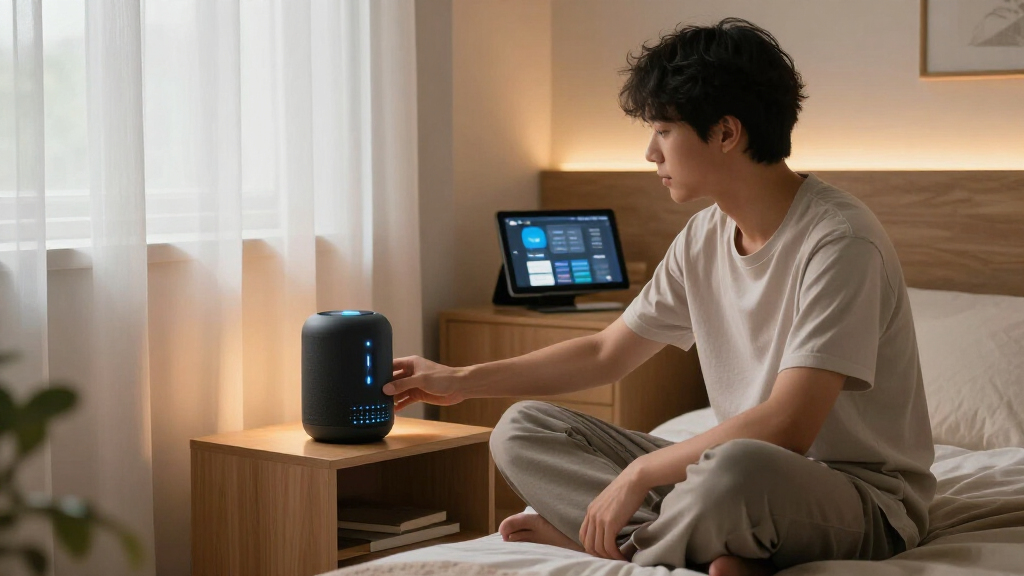

Smart home dorm room gadgets need to solve real problems in a small, shared, rented space: limited outlets, no thermostat control, strict rules against permanent installations, and tight budgets. My top pick overall is the Amazon Echo Spot, because it acts as the command center for every other gadget on this list while doubling as an alarm clock you’ll actually want on a nightstand. The Govee RGBIC Smart Table Lamp 2 stands out for ambient lighting on a budget, and the Kasa Smart Plug Ultra Mini wins on reliability and outlet-friendly size. The main tradeoff you’ll face is between building a connected ecosystem (starting with a voice hub) versus buying standalone gadgets that work independently. Keep reading for the full breakdown, including who each pick suits and which ones to skip.

Get home appliances delivered free with Prime
- Fast, free delivery on millions of items
- Prime Video, Amazon Music and more included
- Member-only deals all year
Complete the kit



Key Takeaways
- The amazon.com/dp/B0BFCBKXWL?tag=autohomebots-20&ascsubtag=dc-637279″ target=”_blank” rel=”nofollow sponsored noopener”>Amazon Echo Spot earned the top spot because it multiplies the value of every other gadget here — smart plugs and lamps become voice-controllable and schedulable through it.
- Smart plugs were the most contested category with three entries; the Kasa Ultra Mini won on build quality and compactness, while the Amazon Basics 4-Pack won on value for outfitting an entire room at once.
- The Google Nest Thermostat is the most powerful gadget on the list but also the least practical for most dorms — it only makes sense if your dorm has its own HVAC unit and allows installation.
- Lighting split into two clear roles: the Govee RGBIC lamp suits desk and bedside ambiance, while the RGB light bar with music sync is built for gaming and party setups rather than everyday study lighting.
- Every pick avoids hubs, drilling, or wiring changes, which was a hard requirement — dorm policies make anything requiring permanent installation a non-starter.
| Govee RGBIC Smart Table Lamp 2, Touch Bedside Small Table Lamp |  | Best Overall | Brightness: 500 lumens | Color Temperature: 2700K-6500K | Preset Scenes: 64+ | VIEW LATEST PRICE | See Our Full Breakdown |
| GHome WiFi Smart Plug – Compatible with Alexa and Google Assistant |  | Best Value Smart Plug | Connectivity: Wi-Fi 2.4GHz, Bluetooth | Voice Assistant Compatibility: Alexa, Google Assistant | App Compatibility: GHome, Smart Life, Tuya | VIEW LATEST PRICE | See Our Full Breakdown |
| Amazon Echo Spot (newest model), Smart Alarm Clock with Alexa, Glacier White |  | Best Smart Hub Pick | Voice Assistant: Alexa built-in | Display: Customizable clock face and colors | Wi-Fi Extender: Built-in eero mesh extender | VIEW LATEST PRICE | See Our Full Breakdown |
| RGB Light Bar with Music Sync and 213 Modes, Smart LED with App, Remote, and Control Box |  | Best for Gaming and Movie Nights | Preset Modes: 213 | Music Sync: Yes, built-in microphone | Control Methods: App, remote control, control box | VIEW LATEST PRICE | See Our Full Breakdown |
| Kasa Smart Plug Ultra Mini 15A, EP10P2, Wi-Fi Outlet | 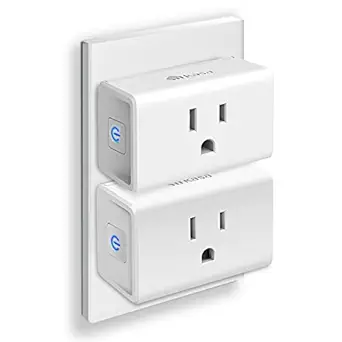 | Best Plug for Reliability | Current Rating: 15A | Connectivity: Wi-Fi 2.4GHz | Voice Assistant Compatibility: Alexa, Google Assistant | VIEW LATEST PRICE | See Our Full Breakdown |
| Amazon Basics Smart Plug, 4-Pack | 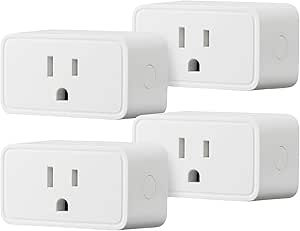 | Best Budget Multi-Pack | Compatibility: Alexa | Connectivity: Wi-Fi 2.4 GHz | Number of Plugs: 4 | VIEW LATEST PRICE | See Our Full Breakdown |
| Hifree Smart Table Lamp, Dimmable RGB Color Changing Desk Lamp |  | Best Ambient Lighting Pick | Control Methods: App, Voice, Touch | Compatibility: Alexa, Google Assistant | Color Options: RGB Color Changing | VIEW LATEST PRICE | See Our Full Breakdown |
| Google Nest Thermostat – Smart Wi-Fi Programmable Thermostat |  | Best for Climate Control Rebels | Energy Star Certified: Yes | HVAC Compatibility: Most systems including heating, cooling, zone controlled, and heat pump | Control Options: Wi-Fi, voice via Google Assistant or Alexa | VIEW LATEST PRICE | See Our Full Breakdown |
More Details on Our Top Picks
Govee RGBIC Smart Table Lamp 2, Touch Bedside Small Table Lamp
This lamp earns the top spot because it solves the widest range of dorm problems in one small footprint: study lighting, mood lighting, and a party centerpiece. The RGBICWW tech means separate color zones plus tunable white from 2700K to 6500K, so the same lamp works for late-night cramming and weekend hangouts. Compared with the Hifree Smart Table Lamp, the Govee pulls ahead thanks to Matter support, which means it plays nicely with Alexa, Google Home, and Apple HomeKit without locking you into one ecosystem — a real advantage if your roommate runs a different platform. The 64+ preset scenes and music sync modes rival the dedicated RGB Light Bar, though the light output is more modest. The tradeoff: it is corded, so placement depends on outlet location, and the pat-to-wake gesture only turns the lamp on, never off, which gets old fast.
Pros:- Works with every major platform via Matter, including Apple HomeKit
- Tunable white light (2700K-6500K) makes it practical for studying, not just decoration
- 64+ preset scenes and 8 music sync modes cover nearly any mood
- Flexible control via app, voice, or touch
Cons:- Corded design limits placement to outlet-adjacent spots
- Pat-to-wake gesture only powers the lamp on, not off
- Best features require upfront app setup and account creation
Best for: Students who want one device to cover desk lighting, ambient mood lighting, and entertainment sync without committing to a single voice assistant
Not ideal for: Anyone wanting a wire-free bedside light — the power cord dictates where this lamp can live, and rooms with scarce outlets may struggle
- Brightness:500 lumens
- Color Temperature:2700K-6500K
- Preset Scenes:64+
- Music Sync Modes:8
- Supported Platforms:Alexa, Google Home, SmartThings, Apple HomeKit via Matter
- Power Source:Corded electric
- Control Methods:App, voice, pat-to-wake touch
Our verdict“The most versatile pick in the roundup — buy it if you want a single lamp that handles studying, relaxing, and entertaining across any smart home platform.”
GHome WiFi Smart Plug – Compatible with Alexa and Google Assistant
If the Kasa Smart Plug Ultra Mini is the refined name-brand choice, the GHome plug is the budget play — it covers the same core functions (scheduling, timers, remote control, group control) at a lower price, making it the smarter buy when you need to outfit multiple outlets on a student budget. Compared with the Amazon Basics Smart Plug 4-Pack, the GHome’s advantage is cross-app flexibility: it works with GHome, Smart Life, and Tuya, so you are not tied to a single ecosystem app. Group control is genuinely useful in a dorm — one tap can kill the fan, lights, and kettle before you leave for class. The tradeoffs are real, though: it requires a 2.4GHz network (common on campus Wi-Fi but not guaranteed), and it cannot connect directly to Alexa or Google without going through app setup first, which adds friction compared with Kasa’s smoother onboarding.
Pros:- Undercuts name-brand plugs while matching core features
- Works with three different smart home apps (GHome, Smart Life, Tuya)
- Group control lets you switch multiple devices off in one action
- Scheduling and timers help cut phantom power draw
Cons:- Requires a stable 2.4GHz Wi-Fi network that some dorms don’t allow
- Cannot link directly to Alexa or Google without app-based setup
Best for: Budget-conscious students kitting out several outlets who want scheduling and group control without paying name-brand prices
Not ideal for: Students on restrictive campus Wi-Fi that blocks 2.4GHz device registration, or anyone who wants plug-and-play setup with zero app configuration
- Connectivity:Wi-Fi 2.4GHz, Bluetooth
- Voice Assistant Compatibility:Alexa, Google Assistant
- App Compatibility:GHome, Smart Life, Tuya
- Control:Remote app, voice, scheduling, timers
- Group Control:Yes
- Device Sharing:Yes
Our verdict“The best price-to-function ratio in the smart plug field — grab it if you need multiple outlets smartened up cheaply and your dorm Wi-Fi cooperates.”
Amazon Echo Spot (newest model), Smart Alarm Clock with Alexa, Glacier White
The Echo Spot is the only product here that can act as the command center for everything else in this roundup — it controls the Govee lamp, the smart plugs, and routines that tie them together, all from a voice command or a glance at its display. That hub role is what separates it from single-purpose gadgets like the Govee RGBIC Smart Table Lamp 2: the lamp changes color; the Spot decides when everything changes. Two dorm-specific perks stand out. First, the built-in eero mesh Wi-Fi extender can improve spotty dorm wireless coverage — genuinely useful in old residence halls. Second, the customizable clock face means it doubles as an actual alarm clock, which most smart speakers don’t. The tradeoffs: the screen is small for anything beyond clock and weather glances, it only works within the Alexa ecosystem (no Google or HomeKit), and full functionality depends entirely on a stable Wi-Fi connection.
Pros:- Acts as a central hub that controls every other smart gadget in this roundup
- Built-in eero mesh Wi-Fi extender can strengthen weak dorm Wi-Fi
- Surprisingly rich sound with clear vocals for music and alarms
- Physical mic-off button and privacy controls
Cons:- Locked into the Alexa ecosystem with no Google or HomeKit support
- Small screen limits it to glanceable info like time and weather
- Useless without reliable Wi-Fi
Best for: Students building an Alexa-based dorm setup who want one bedside device to control lights, plugs, alarms, and music
Not ideal for: Google Home or Apple HomeKit households — this device is Alexa-only, so it would fragment an existing non-Amazon setup
- Voice Assistant:Alexa built-in
- Display:Customizable clock face and colors
- Wi-Fi Extender:Built-in eero mesh extender
- Sound:Rich audio with clear vocals and deep bass
- Smart Home Control:Yes, compatible Alexa devices
- Privacy:Mic off button, in-app controls
- Materials:36% recycled materials
- Color:Glacier White
Our verdict“Buy this first if Alexa is your platform — it turns individual gadgets into a coordinated system, and the Wi-Fi boosting is a dorm bonus.”
RGB Light Bar with Music Sync and 213 Modes, Smart LED with App, Remote, and Control Box
This is the pure entertainment play of the lineup. With 213 preset modes and a built-in microphone for music sync, it out-specs the Govee RGBIC Smart Table Lamp 2 on spectacle — the lamp is a multitasker, while this bar exists to make gaming sessions and movie nights feel cinematic. The three control methods matter more than they sound: the physical control box and remote let you change effects mid-game without pulling out your phone, which the Govee lamp can’t match as easily. The anti-skid base and low-heat design mean it sits safely on a desk or TV stand during marathon sessions. The tradeoff is intelligence: unlike the Govee or the smart plugs, its smart home integration is murky — it works with its own app but doesn’t clearly support Alexa, Google, or Matter, so it can’t join routines or voice control setups. Setup also takes some tinkering to get modes dialed in.
Pros:- 213 preset modes offer far more variety than any lamp in this roundup
- Built-in microphone music sync creates an immersive viewing experience
- Physical remote and control box beat phone apps for mid-session adjustments
- Low heat and anti-skid design make it safe on cramped desks
Cons:- No confirmed compatibility with Alexa, Google Home, or Matter
- Initial setup and mode configuration takes real effort
Best for: Gamers and movie watchers who want maximum lighting spectacle behind a monitor or TV and don’t care about voice assistant integration
Not ideal for: Students building a connected ecosystem — without clear Alexa, Google, or Matter support, this bar stays siloed from your other smart devices
- Preset Modes:213
- Music Sync:Yes, built-in microphone
- Control Methods:App, remote control, control box
- Custom Features:DIY colors, scene modes, timing function
- Materials:Alloy, plastic, electronic components
- Safety:Low heat, anti-skid base
Our verdict“The pick for pure visual drama on a budget — just accept that it lives outside your smart home ecosystem rather than inside it.”
Kasa Smart Plug Ultra Mini 15A, EP10P2, Wi-Fi Outlet
The Kasa Ultra Mini is the plug I would hand to a first-time smart home buyer, because its setup process is the least frustrating in the category — the Kasa app walks you through pairing in minutes, a clear step up from the GHome WiFi Smart Plug, which needs extra app configuration before Alexa or Google will talk to it. The UL certification and 2-year warranty also set it apart: in a dorm where you’re plugging in fans, kettles, and chargers, third-party safety certification is not a detail to skip. The ultra-mini housing means two of these fit side by side on a power strip, unlike bulkier options. At 15A it handles most dorm appliances, though the compact form factor means you should still think twice about pairing it with high-draw devices like space heaters. The 2.4GHz-only Wi-Fi requirement is the main limitation, identical to the GHome plug and the Amazon Basics 4-Pack.
Pros:- Fastest, most foolproof setup in the roundup thanks to the Kasa app
- UL certified with a 2-year warranty for peace of mind
- Ultra-mini body fits two plugs on a single power strip
- Reliable scheduling, timers, and away-mode remote control
Cons:- Requires a 2.4GHz Wi-Fi network, which restrictive campus Wi-Fi may block
- Compact size caps practical power loads
Best for: Smart home beginners and safety-conscious students who want a plug that sets up in minutes and carries UL certification
Not ideal for: Students hoping to run high-wattage appliances like space heaters — the mini design and 15A rating aren’t built for heavy loads
- Current Rating:15A
- Connectivity:Wi-Fi 2.4GHz
- Voice Assistant Compatibility:Alexa, Google Assistant
- Safety Certification:UL certified
- Warranty:2 years
- Control:Kasa app, voice, scheduling
Our verdict“Pay the small premium over budget plugs for the smoother setup and safety certification — it’s the plug least likely to give you trouble mid-semester.”
Amazon Basics Smart Plug, 4-Pack
Four smart plugs for the price of one premium unit makes this the cheapest way to convert a dorm full of dumb devices — fans, lamps, coffee makers — into remotely contatable ones. Setup is where this pick earns its spot: unlike the GHome WiFi Smart Plug, which splits its loyalty between Alexa and Google Assistant, the Amazon Basics plug goes all-in on Alexa, and that single-platform focus makes pairing nearly foolproof. The compact housing means you can stack two in a standard dorm duplex outlet without blocking the second slot, something bulkier plugs often fail at. The tradeoffs are real, though. There’s no energy monitoring, so if you want to track how much power your mini fridge is draining, you’ll need a pricier option like the Kasa Smart Plug Ultra Mini. And Google Assistant users are simply out of luck here.
Pros:- Four plugs in one box at a very low per-plug cost
- Fast Alexa pairing with no hub or third-party app required
- Compact body leaves the second outlet free
- Scheduling and remote control cover the core smart plug basics
Cons:- Alexa-only compatibility locks out Google Assistant and HomeKit users
- No energy monitoring features
- Limited to 2.4 GHz Wi-Fi networks
Best for: Alexa households (or Echo Spot owners) who want to automate several dorm appliances at once without spending much
Not ideal for: Google Assistant users and anyone who wants per-device energy usage tracking
- Compatibility:Alexa
- Connectivity:Wi-Fi 2.4 GHz
- Number of Plugs:4
- Control Options:Voice, App, Schedule
- Hub Required:No
- Design:Compact, single-outlet fit
Our verdict“If you already own an Echo device and want maximum automation coverage per dollar, this four-pack is the obvious starting point.”
Hifree Smart Table Lamp, Dimmable RGB Color Changing Desk Lamp
Where the Govee RGBIC Smart Table Lamp 2 is all about flashy color effects, the Hifree splits its attention between mood lighting and actual work lighting, which matters in a dorm where one lamp often does everything. The flicker-free, eye-friendly LED output makes it usable for late-night study sessions, while RGB color changing and music sync handle the weekend atmosphere. It’s also the more flexible pick for mixed smart homes: unlike the Amazon Basics smart plug’s Alexa-only design, this lamp works with both Alexa and Google Assistant, plus touch controls for when your phone is buried in your backpack. The catch is that the full feature set lives in the app — scene modes, timers, and music sync all require setup many students won’t bother finishing, and if you skip it, you’re left with a fairly ordinary touch lamp.
Pros:- Dual assistant support works with both Alexa and Google Assistant
- Eye-friendly, flicker-free lighting suitable for studying
- Music sync and scene modes add real dorm-party value
- Three control methods (app, voice, touch) cover every situation
- Rated for over 10,000 hours of LED life
Cons:- Full functionality depends on completing smartphone app setup
- Physical dimensions aren’t clearly documented, making desk-fit planning harder
- Initial setup can feel convoluted compared to plug-and-play rivals
Best for: Students who want one lamp that handles both study lighting and party-mode color effects
Not ideal for: Anyone unwilling to complete app setup, or those who need guaranteed desk-lamp brightness specs before buying
- Control Methods:App, Voice, Touch
- Compatibility:Alexa, Google Assistant
- Color Options:RGB Color Changing
- Lighting Features:Dimmable, Scene Modes, Music Sync
- LED Lifespan:Over 10,000 hours
- Housing Material:ABS and PC
Our verdict“This is the lamp for students who refuse to choose between a productive study light and a color-changing centerpiece — as long as they’ll actually finish the app setup.”
Google Nest Thermostat – Smart Wi-Fi Programmable Thermostat
This is the wildcard of the roundup, because most dorms don’t let students touch the thermostat. But for anyone in an on-campus apartment, suite, or off-campus housing with their own HVAC system, the Nest delivers something no plug or lamp here can: actual money savings. Its ENERGY STAR certification and programmable scheduling mean the heat isn’t blasting while you’re in class. Compared to everything else in this lineup, which is about convenience, the Nest is about reducing a recurring bill. The 30-minute installation is genuinely approachable, and Matter certification means it plays nicely with the same Google Home and Alexa ecosystems as the Hifree lamp and Amazon Basics plugs. The tradeoffs: features like remote control and system alerts die without internet connectivity, the Nest Renew clean-energy program demands utility participation, and — the big one — it’s useless if your building controls the climate centrally.
Pros:- ENERGYY STAR certified with real energy-saving scheduling
- Installs in about 30 minutes without professional help
- Works with both Google Assistant and Alexa, plus Matter
- System alerts flag HVAC issues before they become emergencies
Cons:- Requires a compatible HVAC system, which most dorms don’t allow access to
- Remote features depend entirely on internet connectivity
- Nest Renew requires additional setup and participating utility rates
Best for: Students in apartments or suites with their own HVAC who pay their own energy bills
Not ideal for: Traditional dorm residents with centrally controlled heating and cooling — this will sit in the box unused
- Energy Star Certified:Yes
- HVAC Compatibility:Most systems including heating, cooling, zone controlled, and heat pump
- Control Options:Wi-Fi, voice via Google Assistant or Alexa
- Installation Time:Approximately 30 minutes
- Remote Control:Yes, via Google Home app
- Smart Home Integration:Google Home, Matter-certified voice assistants
- Energy Support:Nest Renew (requires compatible thermostat and utility rates)
Our verdict“Skip it in a standard dorm, but if you control your own HVAC and pay the bill, this is the one gadget here that pays for itself.”
How We Picked
I evaluated each gadget against the realities of dorm life rather than generic smart home standards. That meant scoring setup friction (no hub, no drilling, no wiring changes), footprint (does it hog a nightstand or block a second outlet?), ecosystem compatibility with both Alexa and Google Assistant, and price per function — dorm budgets rarely exceed a couple hundred dollars for an entire setup. Reliability of the companion app and Wi-Fi stability on crowded campus networks also weighed heavily, because a gadget that drops offline every week becomes a dumb gadget fast.
Ranking favored versatility over single-purpose power. The Echo Spot ranked first because it improves every other product in this lineup; plugs ranked by build quality and size; and lighting picks were separated by use case — ambient study lighting versus music-synced gaming setups. The Nest Thermostat ranked lower despite strong performance because it’s only viable in a narrow slice of dorm situations, which matters when a recommendation has to work for most readers.
Factors to Consider When Choosing Smart Home Dorm Room Gadgets
Before adding anything to your cart, think about how these gadgets will behave in a shared room on a campus network. A few decisions made upfront will save you money and frustration later.
Start With a Hub, Then Add Gadgets
The most common mistake buyers make is purchasing three or four smart gadgets individually and only later realizing they have no central way to control them. A voice assistant device like the Echo Spot or a Nest Hub turns scattered gadgets into an actual system — you can set schedules, group devices, and control everything by voice while your phone is across the room. If your budget forces a choice between one hub or two gadgets, I’d pick the hub first almost every time, because you can add plugs and lamps incrementally later. Without one, you’re stuck opening a separate app for every single device, which gets old within a week. Also check which assistant your roommates use — matching ecosystems makes shared control far easier.
Dorm Network Restrictions Can Break Smart Gadgets
Many campus Wi-Fi networks use enterprise security (like captive portals or WPA2-Enterprise) that cheap smart gadgets simply cannot join. Nearly every plug and lamp in this category requires a 2.4 GHz network with a standard password, which is why some students end up with gadgets that worked perfectly at home and refuse to connect at school. The workaround is usually a personal router or hotspot, but check your school’s policy before buying one — some campuses prohibit them. Smart plugs with Bluetooth fallback or local control are more forgiving than Wi-Fi-only models. This single issue causes more returns than any feature complaint, so verify your network situation before building out a whole setup.
Outlet Real Estate Is Your Scarcest Resource
A typical dorm room offers four to six outlets for everything you own: laptop, phone charger, fan, mini fridge, and all your smart gear. This makes plug design genuinely important, not a minor spec detail. Bulky smart plugs that block the second outlet effectively cost you twice their price in lost utility, which is why ultra-compact models rank higher in this roundup despite similar function. Consider a surge protector or power strip (if your school allows it) as the foundation, then place mini plugs strategically on the outlets you reach most. The 4-pack option makes sense here — dedicating one strip entirely to smart plugs creates a controllable zone for lamps, fans, and chargers.
Match Lighting to Your Actual Dorm Routine
Dorm lighting usually means one harsh overhead fluorescent fixture and nothing else, so the question is what you’re replacing or supplementing. If your problem is late-night study sessions while your roommate sleeps, a dimmable app-controlled lamp matters more than color modes or music sync. If your problem is a depressing room, RGB lighting with scene presets delivers more mood change per dollar than almost any other purchase. Music sync and 200-plus modes are genuinely fun but matter mostly for gaming setups and weekend gatherings — don’t pay extra for them if your main need is a warm reading light. A useful rule: buy warm dimmable light first, decorative color second.
Know the Thermostat Exception
The Nest Thermostat is the only gadget in this category that requires physical installation, which changes the entire buying calculus. It’s a fantastic product for apartments, rental houses, and suites with independent climate control — but in a traditional dorm with central HVAC controlled by the university, it’s useless and possibly against housing rules. Before considering any thermostat, confirm three things: your room has its own thermostat, your housing contract permits replacing it, and you can reinstall the original when you move out. Students in controlled-environment dorms get far more climate comfort from a smart plug paired with a fan or space heater (where permitted) than from any thermostat.
Budget Allocation: Where to Spend and Where to Save
A well-planned dorm setup typically runs $80–150 total, and the smartest allocation rarely means spreading money evenly. Spend real money on the hub and one quality lamp — these are the devices you interact with daily. Save on smart plugs, where $8–12 models from reputable brands perform nearly identically to premium ones for basic on/off and scheduling. Skip paid subscription tiers for lighting apps; every product in this roundup works fully without one, and recurring fees destroy the value math on budget gadgets. Also factor in move-out: anything you buy should be packable in a duffel bag, which is another reason compact designs rank higher throughout this guide.
Frequently Asked Questions
Can I use smart plugs and smart lights in a dorm room, or are they against the rules?
In most dorms, smart plugs and app-controlled lamps are completely fine because they don’t alter the room’s wiring or fixtures — they just plug into existing outlets. The gadgets that usually trigger housing policy issues are thermostats, anything hardwired, certain space heaters, and sometimes personal routers, since campus networks and HVAC systems are managed centrally. Check your housing agreement for a banned-appliances list before buying, and pay attention to power-draw limits on outlets, since some dorms restrict high-wattage devices regardless of how they’re controlled. Smart plugs themselves draw negligible power and pose no fire risk beyond the device plugged into them. If you’re pairing a plug with a fan or heater, the appliance itself is what needs approval, not the plug.
Do smart plugs work on campus Wi-Fi, or will I need my own network?
It depends entirely on how your campus network is configured. Standard home-style Wi-Fi with a password works fine with every plug in this roundup, but many universities use enterprise authentication (a login portal or username-based WPA2-Enterprise) that consumer smart devices can’t handle — this affects GHome, Kasa, and Amazon Basics plugs alike. If your campus uses that system, the usual solutions are a personal travel router (check school policy first), phone hotspot for initial setup, or choosing devices with Bluetooth control as a fallback. Some students keep gadgets on a hotspot permanently, though that eats mobile data. Call your IT help desk and ask specifically whether smart home devices can join the network — they’ve answered this question before.
Is the Echo Spot worth it if I already have my phone for alarms and apps?
The Echo Spot’s value comes from what it removes rather than what it adds: no more reaching for your phone at midnight, no fumbling with apps, and no doom-scrolling temptation when a alarm lives on a dedicated screen. As a hub, it lets you control every plug and lamp in this roundup by voice, set sunrise-style wake routines that gradually brighten a smart lamp, and run timers and reminders hands-free while studying. If you only ever buy one or two smart gadgets total, the Spot is arguably overkill and a $12 smart plug plus your phone covers the basics. But once you own three or more smart devices, the Spot pays for itself in convenience by becoming the single interface for all of them. Roommates also benefit — anyone in the room can control devices without pairing to your account.
Should I buy one expensive smart lamp or several cheap lighting gadgets?
One quality lamp beats three cheap ones for most dorm rooms, because the day-to-day experience — smooth dimming, reliable app connection, natural warm tones — depends on the quality of the light unit itself. The Govee RGBIC and Hifree lamps in this comparison sit at different price points but both offer app control and dimming; beyond that baseline, extra spend mostly buys richer color effects and better scene presets. Where cheap multi-pack lighting makes sense is decorative backlighting behind a desk or TV, where individual quality matters less than coverage. My suggested split for a typical setup: one good dimmable lamp at your bedside or desk, then budget light bars or strips for ambiance. Avoid buying every lighting product at once — live with one for a week and you’ll know exactly what’s missing.
What’s the smartest first purchase if I can only afford one gadget?
If you’ll eventually own multiple smart gadgets, buy the Echo Spot first, because it makes everything you add later more useful and works well as a standalone alarm clock in the meantime. If you’re certain you only want one practical upgrade, a two-pack of smart plugs is the highest-impact single purchase — automating a lamp and a fan immediately changes how your room functions for around $20. Plugs also have the advantage of working with whatever you already own, including non-smart devices, so nothing about the purchase locks you into an ecosystem. The one gadget I’d never recommend as a first purchase is the thermostat, since its usefulness depends entirely on your building’s setup. Start with the hub or the plugs; everything else builds naturally from there.
Conclusion
After comparing all eight gadgets, here’s how I’d match them to buyer types. For best overall, the Amazon Echo Spot is the clear winner — it’s the only product here that improves the value of every other product, and it earns its price through daily use as an alarm, timer, and voice controller. For best value, the Amazon Basics Smart Plug 4-Pack delivers the most functional smart room per dollar, especially paired with lamps and fans you already own. The Kasa Smart Plug Ultra Mini is my pick for best for beginners: it’s the most reliable, forgiving plug in the lineup, and Kasa’s app is the smoothest setup experience among the three plug options.
For best premium, the Google Nest Thermostat is the most capable device here — but only for students in suites or apartments with their own HVAC and permission to install it. For specific needs: choose the Govee RGBIC Smart Table Lamp 2 for study-friendly bedside lighting, the RGB light bar with music sync for gaming and social setups, the Hifree lamp as a budget desk-lighting alternative, and the GHome plug if you find it priced below the Kasa. Whichever path you take, start with one hub or two plugs, verify your dorm’s Wi-Fi situation first, and build from there.
Halloween Picks
halloween
As an affiliate, we earn on qualifying purchases.