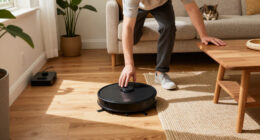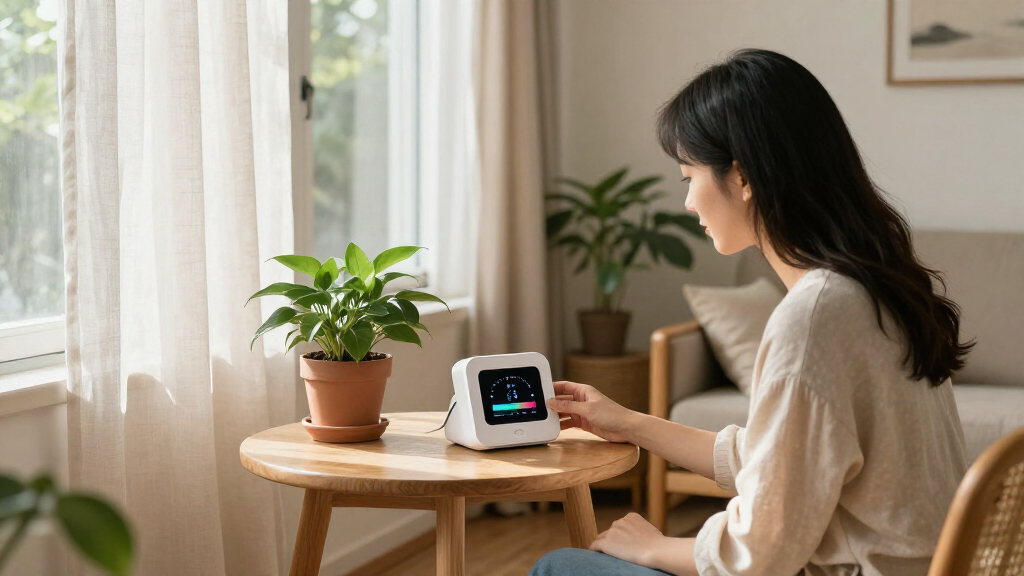

This checklist is for homeowners who want to make air quality part of a smarter home routine. It covers products for cleaning, monitoring, humidifying, dehumidifying, circulating air, and managing the thermostat.

Get home appliances delivered free with Prime
- Fast, free delivery on millions of items
- Prime Video, Amazon Music and more included
- Member-only deals all year
The sections are organized by the job each product is meant to support, with one named pick in each slot. Use them to compare the role of each device with the rooms and conditions you want to address, keeping your household’s needs at the center.
Before choosing, note where the device will go, what you want it to do, and how it will fit into your existing setup. Check the product’s stated room coverage, dimensions, power needs, and compatibility details so the right fit is clear before you buy.
Smart Air Purifier
An air purifier can be a useful part of a home air-quality setup when the goal is to treat the air in a particular room. The Levoit Core 600S-P Smart Air Purifier for Large Rooms is the pick for this slot. Before choosing it, identify the room where it will operate and compare that room with the product’s stated coverage and placement requirements.
A common buying mistake is treating “large rooms” as a guarantee that a purifier will work equally well in every layout. Room shape, open doorways, furniture placement, and where the unit can sit all affect whether it suits the space. Measure the intended area and check clearance around the unit, power access, and the manufacturer’s guidance for placement. Also confirm that its smart features work with the devices or app setup you plan to use. The product name alone does not establish specific filtration capabilities or supported integrations, so verify those details in the listing.
Choose this pick when its stated coverage and controls match the room and routine you have in mind. Room fit and placement should guide the decision more than the “large rooms” label alone.
What to look for:
- Compare stated coverage with the room’s measured area.
- Check the unit’s dimensions and placement clearances.
- Confirm access to a suitable power outlet.
- Review which smart controls and integrations are supported.
- Check filter details and replacement guidance in the product listing.
Levoit Core 600S-P Smart Air Purifier for Large Rooms

The Levoit Core 600S-P uses VortexAir Technology 3.0 and a three-stage filter to clean air in large rooms and open spaces. It has a CADR of 391 CFM, automatic fan speed adjustment, and 99.97% filtration efficiency for airborne particles measuring 0.1–0.3 μm.
Pros:
- Designed for extra-large rooms, open floor plans, and high ceilings
- Automatically adjusts fan speed in Auto Mode
- Captures pollen, dust, and animal dander allergens
- Compatible with specialty filters for toxins, smoke, and pet odors
Cons:
- At the stated rate, it cleans a 2,933 sq ft space once per hour
- HEPA-grade performance is specified when used with the Original Filter in Sleep Mode
Best for: Households looking for a smart purifier for a larger room.
Not ideal for: Spaces where the unit’s stated coverage or placement needs do not fit.
Bottom line: Match the purifier’s stated coverage and placement requirements to the room before choosing it.
Indoor Air Quality Monitor
An indoor air quality monitor helps make measurement the focus of an air-quality checklist. The Airthings View Plus Battery-Powered Radon and Air Quality Monitor is the pick for this slot. Consider where you want readings and whether a battery-powered device suits that location and your routine.
One common mistake is assuming that every monitor measures the same things or presents results in the same way. The product name identifies radon and air quality, but it does not specify every measurement, reporting method, alert, or smart-home connection. Check the listing and product documentation for exactly what it tracks, how readings are displayed, and whether any app or network requirements apply. Placement matters too: follow the manufacturer’s guidance for where and how to set up the monitor, and avoid choosing a spot simply because it is convenient if it conflicts with those instructions.
Consider battery access and how often you are willing to check or maintain the device. Measurement details and placement are the key fit questions; confirm them before relying on the monitor for a particular room or concern.
What to look for:
- Verify the specific measurements reported by the device.
- Review setup and placement instructions for the intended room.
- Confirm how readings are viewed and whether an app is required.
- Check battery type, access, and maintenance guidance.
- Confirm any smart-home or network compatibility you need.
Airthings View Plus Battery-Powered Radon and Air Quality Monitor

A Wi-Fi-connected indoor monitor with seven sensors for radon, PM2.5, CO2, VOCs, humidity, temperature, and air pressure. Use the Airthings app to view readings, track trends, and receive notifications; an account and internet access are required.
Pros:
- Monitors seven indoor air quality metrics continuously
- Battery-powered for cable-free placement
- App provides readings, trend analysis, and notifications
- Connects with other Airthings monitors for multi-room monitoring
Cons:
- Requires the app, an account, and internet access
- Cloud storage is used for data tracking and analysis
Best for: Households seeking a battery-powered monitor for radon and air quality.
Not ideal for: Buyers who need measurements or integrations not confirmed in the listing.
Bottom line: Check the monitor’s exact readings and setup requirements against your household’s needs.
Smart Humidifier
A humidifier is intended to add moisture to indoor air, making room suitability and day-to-day upkeep important parts of the choice. The AEOCKY BPA-Free Evaporative Humidifier for Rooms up to 1,500 sq. ft. is the pick for this slot. Its stated room coverage gives you a starting point for comparing it with the space you intend to use.
A frequent buying mistake is selecting by the maximum coverage figure alone. The layout, room boundaries, and placement can make a real difference to whether a device suits its intended location. Measure the room and check whether the manufacturer’s stated coverage applies to the way your space is arranged. Also review tank or refill details, cleaning instructions, and any humidity controls or smart features described in the listing. The name identifies this as an evaporative humidifier, but it does not establish specific maintenance intervals, controls, or compatibility.
Think about who will refill and clean the unit, where it can sit, and whether that location has convenient power access. Confirm the device’s dimensions and follow its operating guidance. A good fit depends on coverage, placement, and upkeep being practical for your room and routine.
What to look for:
- Compare the stated coverage with the measured room area.
- Check dimensions and placement guidance for the intended location.
- Review refill, cleaning, and maintenance instructions.
- Confirm what humidity controls and smart features are included.
- Check power access and any setup requirements.
AEOCKY BPA-Free Evaporative Humidifier for Rooms up to 1,500 sq. ft.

This evaporative humidifier uses a washable, reusable wick filter to add moisture without visible mist or dispersing mineral white dust, and it supports tap water use. It offers up to 800 mL/h output, Auto, Humidistat, and Sleep modes, adjustable humidity from 40–80% RH, and features including a timer, child lock, low-water reminders, and a 180-minute Dry Mode.
Pros:
- Evaporative design keeps minerals mainly in the wick filter, reducing white dust in the air.
- Tap water compatible, so distilled water is not required.
- Washable, reusable wick filter and Dry Mode support routine care.
- Multiple modes and adjustable humidity settings.
Cons:
- Wick filter requires regular cleaning and eventual replacement.
- Actual output and runtime vary with operating conditions and filter condition.
Best for: Households seeking an evaporative humidifier for a larger space.
Not ideal for: Rooms where its placement, upkeep, or stated coverage is impractical.
Bottom line: Make sure the room, refill routine, and maintenance needs suit the humidifier.
Smart Dehumidifier
A dehumidifier is the moisture-management slot in this checklist. The ALORAIR Smart Wi-Fi Crawl Space Dehumidifier, 70-Pint is specifically named for crawl-space use, so start by confirming that the location and installation conditions match the product guidance.
A common mistake is choosing a crawl-space unit without checking the practical details of that space. Measure available floor area and access routes, then review installation, drainage, power, and operating requirements in the listing or manufacturer documentation. The “70-Pint” description is part of the product name; check the product documentation for how capacity is specified and whether the unit suits the conditions where it will be used. Since Wi-Fi is included in the product name, verify network requirements and the supported controls before assuming it will work with your current setup.
Consider how you will reach the unit for setup and maintenance, and whether the crawl space has the required drainage and outlet arrangements. Confirm dimensions and the manufacturer’s instructions before installation. Space access and installation fit are especially important for a device intended for a crawl space.
What to look for:
- Measure the available space and access route.
- Review installation and drainage requirements.
- Confirm power and Wi-Fi requirements for the location.
- Check how capacity is described in the product documentation.
- Verify maintenance access and operating guidance.
ALORAIR Smart Wi-Fi Crawl Space Dehumidifier, 70-Pint

This Wi-Fi-enabled dehumidifier removes up to 35 pints of moisture per day under AHAM conditions and is designed for spaces up to 1,000 square feet. It includes a condensate pump with a 19.6-foot hose, automatic defrost and restart, and app-based humidity controls.
Pros:
- Wi-Fi and companion app allow remote monitoring and humidity adjustments.
- Built-in pump and 19.6-foot hose support gravity drainage or upward pumping.
- Automatic defrost and restart support continuous operation.
Cons:
- Weighs 36.3 pounds, which may make moving it less convenient.
- Coverage is limited to spaces up to 1,000 square feet.
Best for: Households looking for a smart dehumidifier specifically named for crawl spaces.
Not ideal for: Locations that cannot meet its installation, drainage, or connectivity requirements.
Bottom line: Confirm crawl-space access and installation requirements before selecting this unit.
Smart Ceiling Fan
Air circulation belongs in an air-quality checklist because it addresses how air moves through a room. The Govee 52-Inch Flush-Mount Smart Ceiling Fan with RGBIC Lights and Remo is the named pick for this slot. Its product name identifies a 52-inch flush-mount design, so check that both the size and mounting style suit the ceiling and room.
A common mistake is assuming that a fan will fit just because its diameter seems appropriate. Check the room’s dimensions, ceiling structure, available mounting space, and the product’s installation requirements. Flush-mount hardware needs to match the existing ceiling setup, and the fan’s dimensions should work with nearby fixtures and furniture. The product name also mentions smart controls, RGBIC lights, and “Remo”; review the listing to confirm the complete feature details, what is included, and which controls or integrations are supported.
Before choosing, verify that the installation method is appropriate for the ceiling and that the intended controls suit your household. Check dimensions and any clearance guidance, then consider how lighting and fan operation fit the room’s use. Mounting fit and control compatibility are central to this pick.
What to look for:
- Verify that the 52-inch size suits the room and ceiling.
- Check flush-mount installation requirements and ceiling compatibility.
- Review clearance guidance around fixtures and furnishings.
- Confirm the included lighting features and controls.
- Check smart-home, network, and remote-control compatibility.
Govee 52-Inch Flush-Mount Smart Ceiling Fan with RGBIC Lights and Remote

This 52-inch ceiling fan combines a five-blade fan with a dimmable main light and RGBIC ambient backlight. It has a reversible DC motor with six speeds, up to 5000 CFM airflow, and smart control through the app, remote, or compatible voice assistants.
Pros:
- Independent main light and RGBIC ambient backlight offer separate lighting options.
- Reversible DC motor supports summer downdraft and winter updraft.
- Six fan speeds and app, remote, and voice controls provide flexible operation.
- Dimmable main light offers up to 2800 lm and a broad color temperature range.
Cons:
- Requires updating the app for optimized minimum fan speed and Matter connectivity.
- The description notes that occasional communication error alerts may appear.
Best for: Rooms suited to a 52-inch flush-mount fan with smart controls and lighting.
Not ideal for: Ceilings or spaces that do not meet its mounting or clearance requirements.
Bottom line: Check ceiling compatibility, clearances, and control support before choosing the fan.
Smart Thermostat
A thermostat is the control point for managing a home’s heating and cooling routine, so system compatibility comes first. The ecobee Total Security and Savings Bundle with Smart Thermostat Premium is the pick for this slot. Before comparing features, identify your existing HVAC setup and check the product’s compatibility guidance for it.
A common buying mistake is assuming a smart thermostat works with every heating and cooling system or that installation is the same in every home. Check wiring, equipment type, and any accessory requirements using the manufacturer’s compatibility information. The product name includes a bundle, security, and savings wording, but it does not establish exactly which components or services are included. Review the listing for the bundle contents, setup steps, and any app, network, or subscription requirements. If you are unsure about wiring or installation, consult the product documentation or a qualified installer.
Consider who will configure the thermostat and whether the available controls suit the household’s routine. Confirm the fit with your HVAC equipment before focusing on connected features. System compatibility and included components are the key details to verify for this pick.
What to look for:
- Identify your HVAC system and check the manufacturer’s compatibility list.
- Review wiring and installation requirements before purchase.
- Confirm the exact bundle contents in the listing.
- Check app, network, and any service requirements.
- Verify which smart controls and integrations are supported.
ecobee Total Security and Savings Bundle with Smart Thermostat Premium
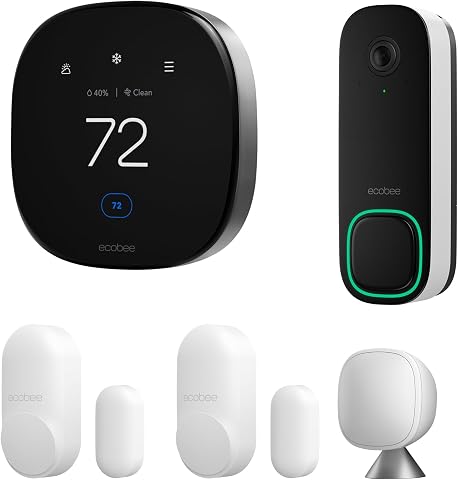
This bundle connects an ecobee Smart Thermostat Premium, doorbell, and sensors to support home security and energy management. The thermostat offers app control, indoor air quality monitoring, smoke alarm detection, and temperature alerts; the doorbell provides 1080p HDR video, night vision, and two-way talk.
Pros:
- Combines thermostat, doorbell, and sensors in one home security and energy management bundle.
- Thermostat includes smoke alarm detection, a built-in siren, temperature alerts, and indoor air quality monitoring.
- Doorbell features 1080p HDR video, night vision, and two-way talk.
- Can pause heating or cooling when a door or window stays open for more than five minutes.
Cons:
- Several security and automation features require an ecobee Smart Security plan.
- Thermostat requires 24 V AC power.
Best for: Households whose HVAC equipment is compatible with the thermostat.
Not ideal for: Systems that do not meet the product’s wiring or compatibility requirements.
Bottom line: Verify HVAC compatibility and bundle contents before choosing this thermostat.
If you are buying in stages, start with the air-quality need that matters most in your home, then prioritize the device that addresses it. A monitor can help you understand what you want to track; a purifier, humidifier, or dehumidifier can address a specific air-treatment role, while a fan and thermostat support circulation and climate control. Check fit and compatibility first so each purchase suits its intended space.
You do not need to tackle every category at once. Use the checklist to compare room requirements, installation details, and upkeep, then add devices as they make sense for your household. A thoughtful match between your space and your routine is a practical place to begin.