TL;DR
Smart home security systems connect sensors, cameras, and alarms to your phone, offering convenience and safety. Key factors include reliability, privacy, and compatibility. Knowing what to prioritize helps you choose the right setup.
Imagine walking into your home and knowing exactly what’s happening—whether it’s a package delivery, a suspicious movement, or a door left ajar. That’s the promise of smart home security systems. They aren’t just cameras and alarms; they’re connected networks that keep watch 24/7, send alerts straight to your phone, and even automate routines to protect what matters most.
If you’re thinking about upgrading your home’s safety, understanding how these systems work, what features matter, and how recent advances make a difference can save you money and frustration. This guide will walk you through the essentials—what to look for, how to avoid pitfalls, and how to set up a system that genuinely works for your home.
Prioritize backup power and cellular connectivity to keep your system active during outages.
Choose systems with strong encryption and privacy features to protect your data from hackers.
Invest in cameras with AI detection for fewer false alarms and better event verification.
Understand total long-term costs, including monitoring, storage, and maintenance, before buying.
Decide between DIY and professional installation based on your home’s complexity and your comfort level.
What’s Really Included in a Smart Home Security System?
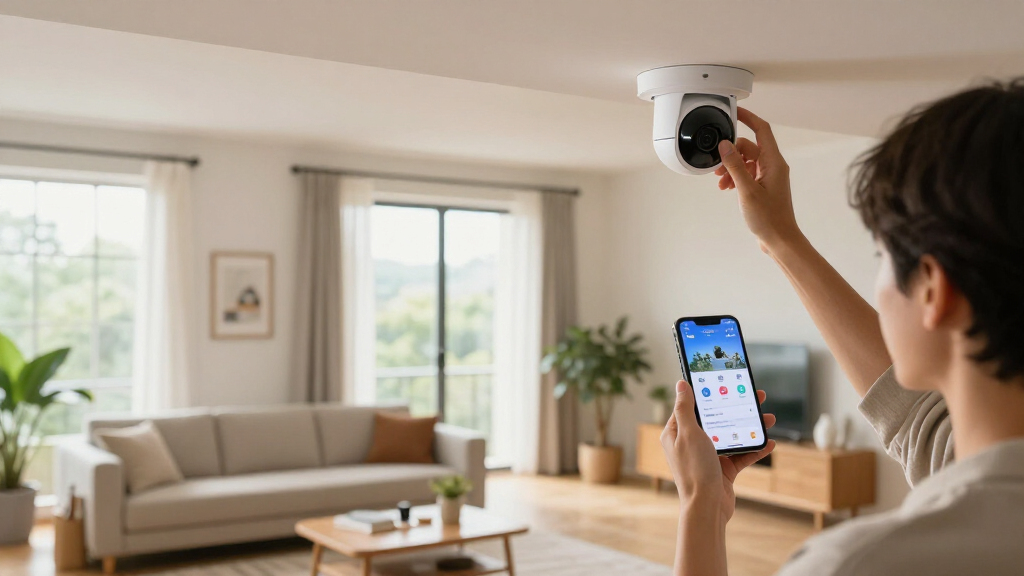
At its core, a smart home security system connects sensors, cameras, alarms, and locks to a central app or hub. Think of it like a nervous system for your house—constantly sensing, recording, and alerting. Common components include entry sensors on doors and windows, motion detectors, cameras both inside and outside, and smart locks that you can control remotely.
Imagine a typical scenario: you’re away and receive a notification that a door was opened. You check your app and see a live feed from your outdoor camera—clear 1080p footage of a delivery person. You unlock the door remotely to let them in, all from your phone. That’s the power of a comprehensive system that integrates sensors, video, and automation routines.
According to recent industry surveys, most systems include a mix of these features, but the real difference lies in how they work together and what they can do to keep your home secure.
smart home security system with cameras
As an affiliate, we earn on qualifying purchases.
As an affiliate, we earn on qualifying purchases.
Professional Monitoring vs. Self-Monitoring: Which Fits You?
Choosing between professional monitoring and self-monitoring
is like deciding whether to hire a guard or handle security yourself. Self-monitoring systems send alerts directly to your phone, so you’re the first responder. They’re cheaper, often under $200 for the equipment, but rely on your reaction. If you’re away or busy, nobody may notice a break-in.Professional monitoring, on the other hand, connects your system to a 24/7 monitoring center. When an alarm goes off, trained operators can verify the event with a live video clip and contact authorities if needed. This service typically costs $20-$50/month, but offers peace of mind—especially if you travel or have a busy schedule.
Example: Sarah’s system alerts her of a strange noise. She’s at work, but her monitoring service confirms it’s a break-in and calls police, leading to a swift response. Without professional monitoring, she’d have to check her app, call neighbors, or risk delays.
Research shows that homes with professional monitoring are 2-3 times more likely to get quick response, but the decision depends on your risk level and budget.
DIY home security kit with sensors
As an affiliate, we earn on qualifying purchases.
As an affiliate, we earn on qualifying purchases.
Reliability During Power and Internet Outages
When power or internet drops, your security system’s effectiveness can plummet. For true peace of mind, your setup needs backup power sources—like a battery in your hub, cellular backup for your internet, and local alarms that sound even if the cloud connection is lost.
Imagine a winter storm knocking out power and Wi-Fi. A system with a battery backup and cellular connection can still alert you and the monitoring center. Without these, your home becomes vulnerable at the worst moment.
Research indicates that over 40% of security system failures during outages are due to lack of backup. So, look for systems with built-in batteries, and consider adding a cellular module if your area is prone to outages.
professional monitored security system
As an affiliate, we earn on qualifying purchases.
As an affiliate, we earn on qualifying purchases.
Privacy and Cybersecurity: Protecting Your Home’s Secrets
Security devices themselves can be targets. Hackers have accessed cameras, disabled alarms, and even changed settings. To keep your home safe from digital intruders, prioritize strong security measures like multi-factor authentication, encryption, and automatic updates.
Imagine a neighbor’s camera being hijacked and streaming their backyard. Not only does this breach privacy, but it can also give hackers a map of your routines. Manufacturers now include privacy shutters and local storage options to limit exposure.
Understanding the implications of cybersecurity is essential because a breach can lead to real-world consequences—such as theft, vandalism, or even threats to personal safety. The tradeoff often involves balancing convenience with security; easier-to-access systems might be more vulnerable. Therefore, selecting devices with robust security features and following best practices can significantly reduce these risks, ensuring your data and home remain protected from digital intrusions.
smart door locks with remote control
As an affiliate, we earn on qualifying purchases.
As an affiliate, we earn on qualifying purchases.
How Good Are Camera Quality and Detection Accuracy?
Resolution isn’t everything. A blurry 4K camera doesn’t beat a well-placed 1080p camera that captures faces at the front door. Field of view, night vision, and motion detection are equally vital. Smart cameras now include AI to tell apart people, animals, or packages, reducing false alarms.
Picture this: your outdoor camera spots a squirrel and triggers an alert. With advanced detection, it filters out rodents and focuses on real threats. This accuracy saves time and prevents alert fatigue.
Research shows that high-quality, well-positioned cameras combined with AI detection cut false alarms by up to 70%, making your alerts more meaningful.
Compatibility and Interoperability: Making Sure Everything Plays Nice
Smart home security works best when devices communicate seamlessly. Check if your system supports standards like Wi-Fi, Zigbee, Z-Wave, or the newer Matter protocol. Compatibility ensures you can add sensors, locks, or cameras later without headaches.
For example, a homeowner with Zigbee locks and Z-Wave sensors can expand easily, but if their hub doesn’t support these standards, adding new devices becomes a chore—possibly requiring a new hub or risking incompatibility.
Recent updates show Matter aims to unify smart home devices, making integration smoother. Still, verify specific device support before buying.
What’s the Real Cost of a Smart Security System?
The sticker price is just the start. Besides equipment costs—ranging from $100 for basic kits to over $1000 for comprehensive setups—consider ongoing expenses like professional monitoring ($20-$50/month), cloud storage fees, and replacement batteries.
Imagine buying a sleek system, only to find out the cloud storage costs $10/month for a week of video history. Or the subscription expires, and your recorded footage disappears. Be sure to weigh these long-term costs before committing.
Research indicates that total costs over five years, including monitoring and storage, can easily double initial equipment prices. Know what’s included in your plan and what’s extra.
Installation and Maintenance—DIY or Pro?
Wireless, battery-powered systems are often DIY-friendly, letting you place sensors and cameras without drilling. They’re flexible and easy to move if you change your mind. Larger homes or complex wiring might benefit from professional installation, ensuring everything works perfectly.
Imagine a homeowner installing a system in a three-story house. DIY might work, but a pro can optimize sensor placement, troubleshoot issues, and set up integrations. Plus, professional setups often include ongoing support.
Regardless of choice, regular testing—like checking sensors, charging batteries, and updating software—keeps your system reliable. Think of it as routine home maintenance, but for your security.
Latest Tech Trends Making Your Home Safer
Recent advances include on-device AI that processes video locally, reducing lag and dependence on cloud servers. Cameras now can identify faces, packages, and animals in real time. Also, video-verified alarms combine sensor data with short clips, preventing false dispatches.
Imagine a camera that recognizes your pet and ignores its movement, or an alarm that only triggers after a live video confirms suspicious activity. These features save time, money, and false alarms.
Manufacturers are also focusing on privacy features—like shutters and encryption—so your data stays safe while smart tech gets smarter.
Frequently Asked Questions
Do I need professional monitoring for my smart home security system?
Not necessarily. If you’re home often and confident in your reaction time, self-monitoring can be enough. However, professional monitoring offers quicker response and peace of mind, especially if you travel frequently or have valuables inside.
Can a smart security system work without Wi-Fi or power?
Yes, if it has a battery backup and uses cellular data or local alarms. Many systems include these features, but remote alerts and cloud recording usually require internet access. Check your setup if outages are common in your area.
How do I prevent my smart cameras from being hacked?
Use strong, unique passwords, enable multi-factor authentication, keep firmware updated, and select reputable brands. Also, set up a separate Wi-Fi network for your smart devices to limit exposure if a device is compromised.
Are wired systems more reliable than wireless?
Wired systems tend to be more stable and immune to interference, but they’re harder to install and modify. Wireless systems are flexible and easy to expand. Your choice depends on your home’s structure and your comfort with DIY projects.
What should I look for in a smart home security system’s compatibility?
Check if the system supports standards like Zigbee, Z-Wave, or Matter. Compatibility ensures you can add new devices later without replacing the hub. Verify that your preferred sensors, locks, and cameras will work together smoothly.
Conclusion
Smart home security systems are more than gadgets—they’re your digital watchdogs, blending convenience with peace of mind. The best setup balances reliability, privacy, and smart features tailored to your home’s unique needs.
Remember, a system that works well today can falter tomorrow if you overlook backups, updates, or compatibility. Take control, stay vigilant, and keep your home safer with informed choices—and a little proactive maintenance.