
Choosing a smart thermostat used to be simple: pick the one with the best app. But today’s premium models take two fundamentally different paths to the same goal—lower energy bills and a comfortable home. The Google Nest Learning Thermostat (4th Gen) and the Ecobee Smart Thermostat Premium are the two most popular high-end options, yet they solve the comfort problem in opposite ways.

Get home appliances delivered free with Prime
- Fast, free delivery on millions of items
- Prime Video, Amazon Music and more included
- Member-only deals all year

Google Nest Thermostat Smart Programmable Wi-Fi Thermostat
- ✔ Controller Type: Amazon Alexa, Android, Google Assistant, iOS, Nest
- ✔ Specific Uses For Product: Heat Pump
- ✔ Temperature Control Type: Heating, Cooling
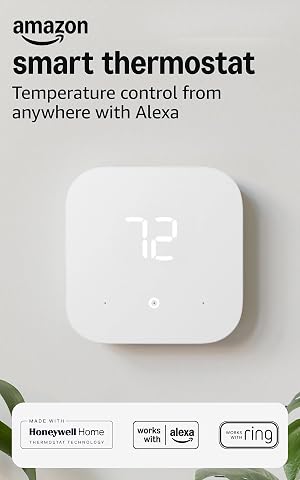
Amazon Smart Thermostat – Works with Alexa and Ring
- ✔ Size: 3.56 x 3.56 x 0.84 in
- ✔ Weight: 3.86 oz
- ✔ Compatibility: Most 24V HVAC systems

Honeywell Home Wi‑Fi Smart Color Thermostat (RTH9585WF1004)
- ✔ Controller Type: Touch Screen, Voice
- ✔ Additional Features: Customizable color touchscreen, Smart Response Technology
- ✔ Specific Uses For Product: Furnace Temperature Control
Nest trusts automation. It watches your schedule, learns when you’re home or away, and adjusts temperatures on its own. Ecobee trusts sensors. It ships with a remote room sensor, supports up to 32 additional sensors, and balances temperatures across the rooms you actually use. That difference shapes everything else: how you set it up, how you interact with it daily, and which smart home ecosystem it plays nicely with.
There’s also a price gap—Ecobee costs less than Nest despite including a sensor and offering broader compatibility. So the real question isn’t just which one is better; it’s which philosophy fits your household. If you want a thermostat that disappears into the background and handles everything, Nest is the pick. If you have uneven rooms, a large home, or rely on Alexa or Apple HomeKit, Ecobee is likely the smarter buy.
At a Glance
| Criteria | Google Nest Learning Thermostat (4th Gen) | Ecobee Smart Thermostat Premium | Winner |
|---|---|---|---|
| Installation and Setup | Simple DIY, but requires C-wire or adapter; no sensor included | Simple DIY, works without C-wire in most homes; sensor included | B |
| Learning and Automation | Automatic learning of schedule and temperature preferences | Smart Schedule with eco+; learns from sensor data, but less autonomous | A |
| Remote Sensors and Room Control | No remote sensors; relies on built-in sensor and occupancy | Up to 32 remote sensors; room-by-room temperature control | B |
| Smart Home Compatibility | Google Assistant, Matter, works with Alexa; no HomeKit | Alexa, Google Assistant, Apple HomeKit, Matter, Samsung SmartThings | B |
| App and Usability | Clean, minimal app; good for basic scheduling and history | Feature-rich app with detailed controls and sensor management | Tie |
| Energy Reports and Insights | Basic energy history and monthly reports | Detailed energy reports with room-level data and alerts | B |
| Design and Display | Premium rounded glass display; multiple color options | Sharp rectangular display; glass front, but less distinctive | A |
| Price and Value | $279.99 MSRP; no sensor, higher cost | $249.99 MSRP; includes one sensor, lower cost | B |
Google Nest Thermostat Smart Programmable Wi-Fi Thermostat
This option stands out for its ability to learn your schedule and automatically adjust temperatures when you are away. Unlike the Amazon Smart Thermostat, which requires explicit commands or app settings to change modes, the Nest uses motion detection and your phone’s location to automate these shifts, reducing the mental load on the user. The circular design with a simple LCD display is minimalist, focusing on readability rather than the colorful customization found on the Honeywell Home unit.Compared with similar options, the Nest offers the most robust HVAC monitoring alerts, notifying you of potential system issues before they become expensive repairs. However, this automation comes with a tradeoff: it requires a stable Wi-Fi connection and a Google account to function fully. While it works with Alexa, the integration is deeper with Google Assistant, making it less ideal for households exclusively committed to the Amazon ecosystem. The battery-powered design simplifies some wiring scenarios but may require a C-wire adapter for consistent performance in larger homes.
Pros:
- Automatically reduces heating/cooling when the home is empty, saving energy.
- Remote control and scheduling via the Google Home app.
- Works with major voice assistants (Google Assistant, Alexa).
- HVAC monitoring provides alerts for potential system issues.
Cons:
- Some HVAC setups still require a C-wire or additional power accessory.
- Full functionality depends on a stable Wi-Fi/internet connection.
- Limited customization compared to touchscreen competitors.
Best for: Homeowners in the Google/Android ecosystem who want set-and-forget automation.
Not ideal for: Users who prefer manual, detailed 7-day programming or those without a Google account.
Bottom line: The Google Nest Thermostat is the best overall choice for users who prioritize automated energy savings and seamless integration with Android devices.
“The Google Nest Thermostat is the best overall choice for users who prioritize automated energy savings and seamless integration with Android devices.”
Amazon Smart Thermostat – Works with Alexa and Ring
This model is better suited to those who already own multiple Echo devices and want a low-cost entry into smart climate control. Unlike the Nest, which attempts to learn your habits, the Amazon Smart Thermostat acts as a straightforward smart switch controlled via the Alexa app or voice commands. This makes it less intuitive for automated savings but significantly more predictable for users who prefer to dictate their schedule manually.A key differentiator is the guided installation via the Alexa app, which simplifies the process for DIYers more than the generic instructions often found with competitors. However, the lack of a built-in far-field microphone means you cannot talk directly to the thermostat; you must use a nearby Echo device. Compared to the Honeywell, it lacks a vibrant display, offering a minimalist interface that blends into the wall rather than standing out. It supports humidity sensing and auto air-filter ordering, features that add convenience but do not replace the detailed programming flexibility found in higher-end units.
Pros:
- Seamless integration with Alexa and Ring for voice and app control.
- ENERGY STAR certified, helping reduce energy bills.
- Guided, app‑based installation makes setup straightforward.
- Additional features like humidity sensing, scheduling, and auto air‑filter ordering.
Cons:
- Requires a C‑wire or separate power adapter kit.
- No built‑in far‑field microphone; needs an Alexa device for voice commands.
- Only supports 2.4 GHz Wi‑Fi networks.
Best for: Existing Alexa users looking for a budget-friendly, simple smart upgrade.
Not ideal for: Users who want standalone voice control or a colorful, customizable display.
Bottom line: The Amazon Smart Thermostat is the most pragmatic choice for Alexa-centric households seeking simplicity and affordability over advanced automation.
“The Amazon Smart Thermostat is the most pragmatic choice for Alexa-centric households seeking simplicity and affordability over advanced automation.”
Honeywell Home Wi‑Fi Smart Color Thermostat (RTH9585WF1004)
This pick makes the most sense for homeowners who view their thermostat as a design element rather than just a utility. The customizable color touchscreen allows the device to match interior décor, a feature completely absent in the minimalist Nest and the plain Amazon model. While the Nest automates, the Honeywell empowers, offering detailed 7-day programmable scheduling that gives users granular control over every hour of the week.Compared with similar options, the Honeywell supports a wider range of HVAC systems, including hot water and steam, though it still requires a C-wire. It lacks the advanced learning algorithms of the Nest but compensates with Smart Response Technology, which pre-heats or cools to reach your set temperature exactly when you want it. The interface is more traditional, appealing to users who find modern app-driven controls frustrating. However, the reliance on a C-wire and lack of native integration with Google or Alexa is less seamless than the ecosystem-specific competitors, requiring more manual setup for voice control.
Pros:
- Customizable color touchscreen matches home décor.
- Wi‑Fi and voice control via Alexa, Google Home, and mobile app.
- Energy Star certified with flexible scheduling and vacation hold features.
- Compatible with most forced‑air, hot water, steam systems and heat pumps.
Cons:
- Requires a C‑wire; may need an adapter for homes without one.
- Not compatible with electric baseboard heating.
- May not work with heating‑only oil furnace systems without a C‑wire.
Best for: Design-conscious users who prefer precise manual scheduling over automation.
Not ideal for: Those seeking advanced learning capabilities or seamless voice assistant integration.
Bottom line: The Honeywell Home Wi-Fi Smart Color Thermostat is the ideal choice for users who prioritize aesthetic customization and detailed manual programming.
“The Honeywell Home Wi-Fi Smart Color Thermostat is the ideal choice for users who prioritize aesthetic customization and detailed manual programming.”
As an Amazon Associate we earn from qualifying purchases.
Key Differences
The most important difference is how each thermostat handles uneven temperatures. Nest assumes one temperature reading is enough because it learns when you’re home and adjusts based on your presence. Ecobee assumes your home has hot and cold spots, so it uses remote sensors to average temperatures across rooms or prioritize the room you’re in. In practice, Ecobee solves the classic problem of a bedroom that’s too hot while the living room is comfortable. Nest simply can’t do that.
This also affects daily use. Nest’s learning feature means you might not touch the thermostat for weeks after setup. Ecobee’s Smart Schedule also learns, but it leans more on your manual adjustments and sensor data. If you want a truly hands-off experience, Nest’s automation is more advanced. If you want control over which rooms get heated or cooled, Ecobee gives you that control directly.
The ecosystem gap is just as significant. Nest works with Google Assistant and Matter, but it doesn’t support Apple HomeKit. Ecobee supports Alexa, Google Assistant, HomeKit, and SmartThings. If you’re invested in Apple’s ecosystem, that alone settles the argument. Even if you’re not, Ecobee’s broader compatibility makes it the safer choice for a multi-assistant household.
Detailed Comparison
Both thermostats are designed for DIY installation, but Ecobee has a slight edge. The Ecobee Premium includes a remote sensor in the box and works without a C-wire in most homes thanks to its power extender kit. The Nest Learning Thermostat also includes a C-wire adapter, but it’s a separate piece you may need to install. For homes with older wiring, Ecobee’s compatibility is more forgiving.
Setup time is similar—about 30 minutes for either. The Ecobee app walks you through sensor placement and room naming, while Nest’s app focuses on connecting to Wi-Fi and setting a basic schedule. If you’ve never installed a thermostat, Ecobee’s instructions are slightly clearer, but both are well within the reach of a typical homeowner.
Learning and Automation (Google Nest Learning Thermostat (4th Gen) wins — moderate)
Nest’s signature feature is its learning algorithm. It watches your temperature adjustments over the first week, learns your schedule, and then builds a program automatically. You can also use the Nest app to set a schedule manually, but the whole point is that you don’t have to. Ecobee’s Smart Schedule also learns, but it requires more input. It uses your sensor data and manual changes to suggest a schedule, which you can approve or edit.
In practice, Nest is more autonomous. If you want a thermostat that figures things out on its own, Nest wins. Ecobee gives you more transparency and control—you can see exactly what it’s doing and why. For people who like to tinker, Ecobee’s approach is better. For people who want to set it and forget it, Nest is the clear winner.
This is the biggest difference between the two. Ecobee ships with one remote sensor and supports up to 32. You can group sensors into comfort settings, telling the thermostat to prioritize the bedroom at night or the living room during the day. You can also average sensor temperatures to avoid hot and cold spots. Nest has no remote sensors at all. The 4th Gen Nest uses its built-in temperature sensor and occupancy detection, but it can’t measure other rooms.
If your home has a single thermostat and you deal with one room being too hot or too cold, Ecobee is the only one of the two that can fix that. It’s a major advantage for larger homes, multi-story houses, or rooms with poor airflow. Nest’s approach assumes your thermostat’s location represents the whole home, which is often not true.
Ecobee is the most compatible smart thermostat on the market. It works with Amazon Alexa, Google Assistant, Apple HomeKit, Samsung SmartThings, and Matter. Nest works with Google Assistant and Matter, but not HomeKit. If you use Alexa for voice control or have an iPhone and rely on HomeKit automations, Ecobee is the only choice.
Even for Google users, Ecobee works fine with Google Assistant. Nest’s integration with Google Home is tighter—you can see the thermostat in the Google Home app and control it there—but Ecobee also appears in Google Home. The practical difference is that Ecobee doesn’t lock you into one ecosystem. That flexibility matters if you switch assistants or have a mixed household.
App and Usability (minor difference)
Both apps are polished and reliable. The Nest app is minimalist, showing a large temperature dial and a few menus. It’s easy to understand but lacks advanced features. The Ecobee app is busier—it shows sensor readings, comfort settings, and energy reports—but it gives you more control. For basic scheduling and temperature changes, both are equally intuitive.
Where they differ is in managing sensors and automations. Ecobee’s app lets you create custom comfort profiles and assign sensors to each one. Nest’s app has no such option because there are no sensors. If you want to dig into data or set up geofencing, Ecobee offers more flexibility. If you want a clean, simple interface, Nest is nicer to look at.
Ecobee provides more detailed energy reports. It shows run time, temperature trends, and sensor-level data, and it sends alerts when your HVAC is running longer than usual. Nest gives you a monthly energy history and compares your usage to previous months, but it doesn’t offer room-level insights because it doesn’t have room sensors.
For energy-conscious users, Ecobee’s reports are more actionable. You can see exactly which rooms are causing your system to work harder. Nest’s reports are fine for a general overview, but they don’t help you identify specific problem areas. If you want to optimize your energy use, Ecobee gives you the data to do it.
Design and Display (Google Nest Learning Thermostat (4th Gen) wins — moderate)
Nest is the better-looking thermostat. The 4th Gen model has a rounded, edge-to-edge glass display with a metal trim and comes in several finishes, including a new mirror-like option. It looks like a piece of modern art on your wall. Ecobee’s Premium has a rectangular display with a glass front, but it’s more utilitarian. It’s not ugly, but it doesn’t have the same visual appeal.
If your thermostat is in a prominent spot—like an entryway or open living room—Nest’s design is a real advantage. Ecobee’s display is also slightly smaller and less crisp. Both have good touch responsiveness, but Nest’s larger display and aesthetic polish make it the winner for design-conscious buyers.
The Nest Learning Thermostat lists for $279.99, while the Ecobee Smart Thermostat Premium lists for $249.99. Ecobee is cheaper and includes a remote sensor worth about $40. Nest doesn’t include any sensors. So Ecobee offers more hardware for less money.
That doesn’t automatically make Ecobee the better value. Nest’s learning algorithm is a different kind of value—it saves you time and effort. But for the price, Ecobee delivers more features: sensors, broader compatibility, and richer reports. If you’re comparing strictly on what you get for your dollar, Ecobee wins.
Google Nest Learning Thermostat (4th Gen): Pros and Cons
Pros:
- Excellent automatic learning that requires minimal setup
- Beautiful, premium design that enhances your wall
- Simple and clean app experience
- Works with Google Assistant and Matter
- Occupancy detection can help with away mode
Cons:
- No remote sensors, so it can’t fix uneven room temperatures
- No Apple HomeKit support
- More expensive than Ecobee
- Learning can be unpredictable for irregular schedules
Pros:
- Includes a remote sensor and supports up to 32
- Works with Alexa, Google, HomeKit, and SmartThings
- Detailed energy reports and room-level insights
- Lower price than Nest
- Works without a C-wire in most homes
Cons:
- Learning is less automatic; requires more manual input
- Design is less distinctive than Nest
- App can feel cluttered with options
- Sensor placement takes time to configure properly
Who Should Choose What
Choose Google Nest Learning Thermostat (4th Gen) if:
- You want a thermostat that learns your schedule with zero effort
- Your home is relatively even in temperature, so a single sensor is enough
- You’re already in the Google ecosystem and don’t use Apple HomeKit
- Aesthetics matter to you, and the thermostat will be in a visible spot
Choose Ecobee Smart Thermostat Premium if:
- You have rooms that are too hot or too cold, and you want to fix that
- You use Apple HomeKit or Amazon Alexa and need broad compatibility
- You want detailed energy data and room-level insights
- You want the best value for your money, including a sensor in the box
Skip both if: If you just want a programmable thermostat and don’t care about smart features, a $50 model from Honeywell or Amazon will do the job. If you have a heat pump or a zoned HVAC system, check compatibility with your specific equipment before buying either.
Value for Money
Both thermostats are premium products, but Ecobee offers more for less. You get a remote sensor, broader smart home compatibility, and richer energy reports for $30 less than Nest. For most households, that’s the better value. Nest’s higher price is justified only if you value its automatic learning and design enough to pay a premium.
Consider the long-term cost. Energy savings from either thermostat typically range from 8% to 15% on heating and cooling, so the price difference is recouped within a year. But Ecobee’s sensor system can lead to greater savings in homes with uneven temperatures because it avoids over-conditioning unused rooms. That’s a concrete financial benefit that Nest can’t match.
If you’re on a tight budget, neither is the right choice—a basic smart thermostat like the Amazon Smart Thermostat or Google Nest Thermostat (non-learning) costs half as much and still offers app control. But if you’re ready to invest in the best, Ecobee gives you more for your money.
Final Verdict
For most homes, the Ecobee Smart Thermostat Premium is the better choice. It costs less, includes a remote sensor, works with every major smart home platform, and gives you the tools to fix uneven room temperatures. The Nest Learning Thermostat is a fantastic product, but its lack of sensors and HomeKit support are significant limitations for a premium device.
Choose Nest if you have a small, well-insulated home where a single thermostat reading is fine, you’re deeply invested in Google’s ecosystem, and you want the most beautiful thermostat on the wall. Choose Ecobee if you have multiple rooms, use Alexa or Apple HomeKit, or simply want the best combination of features and price.
The biggest deciding factor is whether you need room-level control. If you do, Ecobee is the only option. If you don’t, Nest’s learning and design might win you over. But for the majority of buyers, Ecobee delivers more value and better performance.
Frequently Asked Questions
Can the Nest Learning Thermostat use remote sensors?
No, the Nest Learning Thermostat (4th Gen) does not support remote sensors. It relies on its built-in temperature sensor and occupancy detection. If you need to measure temperatures in multiple rooms, you’ll need the Ecobee or another thermostat with sensor support.
Does Ecobee work with Google Home?
Yes, the Ecobee Smart Thermostat Premium works with Google Assistant and appears in the Google Home app. It also supports Amazon Alexa, Apple HomeKit, and Samsung SmartThings, making it the most compatible smart thermostat available.
Which thermostat saves more energy?
Both can save 8% to 15% on heating and cooling costs. Ecobee’s remote sensors can lead to additional savings in homes with uneven temperatures because it can avoid heating or cooling empty rooms. Nest’s automatic learning is effective but doesn’t offer room-level optimization.
Can I install either thermostat myself?
Yes, both are designed for DIY installation. Ecobee is slightly more forgiving because it includes a power extender kit that works without a C-wire. Nest also includes a C-wire adapter, but you may need to install it separately. Most homeowners can complete either installation in under an hour.