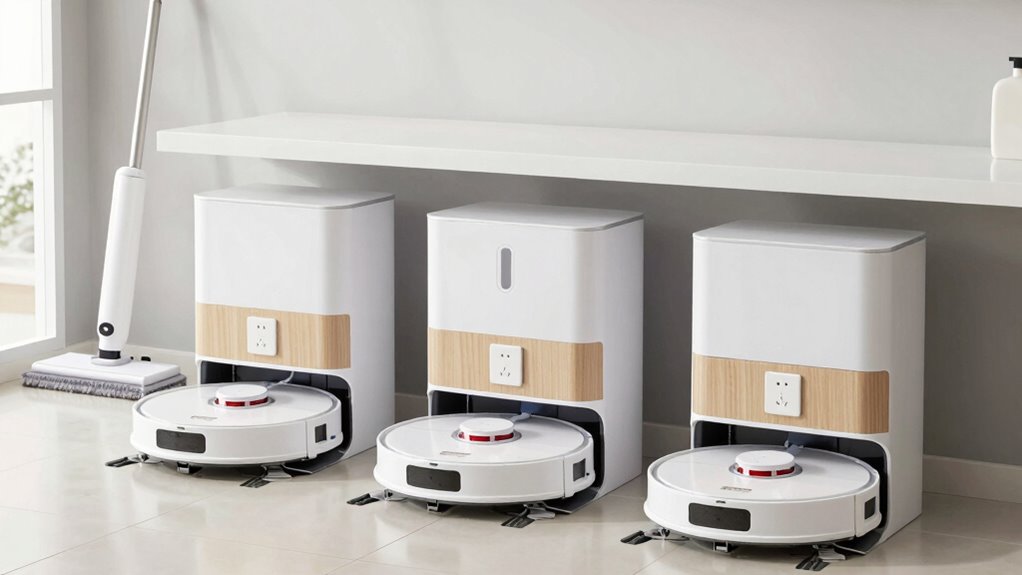

To organize your household robot charging stations effectively, designate a dedicated, clutter-free space for each robot with clearly labeled cords and docks. Use cable clips or sleeves to prevent tangling, and select energy-efficient chargers with timers to optimize power use. Regularly check and clean the area to prevent overheating and damage. Group robots by usage or task for easier management. Keeping your setup tidy and well-maintained helps extend device lifespan and guarantees smooth operation—discover more tips below.

Get home appliances delivered free with Prime
- Fast, free delivery on millions of items
- Prime Video, Amazon Music and more included
- Member-only deals all year
Key Takeaways
- Designate specific, accessible areas for each robot’s charging station to prevent clutter and misplacement.
- Label cords and docking stations for quick identification and efficient maintenance.
- Use cable management solutions like clips or sleeves to prevent tangling and damage.
- Group robots by usage frequency or task type for streamlined charging routines.
- Regularly clean and inspect the charging area for safety, dust prevention, and device longevity.
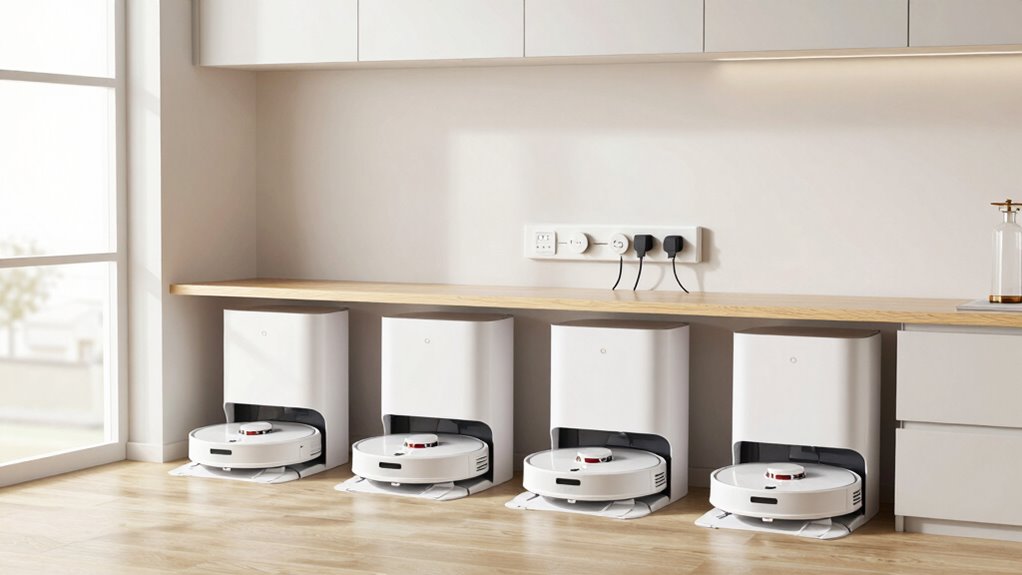
Setting up an efficient charging station for multiple household robots can streamline your daily routines and guarantee your devices are always ready to go. When you organize your charging area properly, you reduce clutter, prevent misplacement, and guarantee each robot receives the proper maintenance it needs to perform at its best. A well-designed station not only keeps your devices charged but also extends their lifespan through effective robot maintenance. Keeping your robots properly maintained involves regular checks on their batteries, sensors, and brushes, which can be facilitated by a dedicated, accessible charging hub. This way, you can easily monitor each device’s condition and address issues before they cause malfunctions.
Organize your robot charging station to boost efficiency, extend device lifespan, and simplify maintenance for seamless daily routines.
Energy efficiency plays a vital role in designing your charging station. Positioning your chargers in a location with minimal external interference helps prevent overcharging and unnecessary energy drain. Using smart chargers or timers can maximize power consumption by charging devices only when necessary, reducing your electricity bills and environmental footprint. Additionally, selecting energy-efficient chargers with automatic shut-off features ensures that your robots aren’t wasting energy once fully charged. Proper organization also involves grouping your robots based on usage frequency or task type, which streamlines the charging process and minimizes downtime. For example, keeping daily-use robots in one section and less frequently used units in another allows you to charge only what’s needed at a given time.
Labeling cords and docking stations helps you quickly identify which robot belongs where, saving you time and frustration. Incorporate cable management solutions like clips or sleeves to prevent tangling and accidental disconnections, which can damage ports or cause charging failures. Remember, a cluttered charging area can lead to overlooked maintenance tasks or forgotten devices, increasing the risk of battery degradation or hardware issues down the line. As your robot fleet grows, consider investing in a modular setup that can be expanded easily, maintaining efficiency as your household’s needs evolve. Proper energy management is essential for keeping your setup both safe and sustainable over time. Additionally, understanding the importance of proper maintenance can help extend the lifespan of your devices and improve their performance. Regularly researching best practices for robot care can also contribute to better longevity and efficiency.
Finally, regular cleaning of the area and using dust-resistant materials can help prevent overheating and ensure longevity of your devices. Keep the charging station clean and dry, free from dust and debris that could interfere with connections or cause overheating. Regularly inspecting cables and connectors ensures all components operate smoothly and safely. By paying attention to these details, you create a reliable, energy-efficient environment that supports your household robots’ maintenance and longevity. In turn, you’ll spend less time troubleshooting, and your devices will perform at their best, making your daily chores more manageable and less stressful.
Products Worth Considering

Dyson W1 PencilWash Cordless Wet and Dry Floor Cleaner with Dock

Ring Alarm Pro 14-Piece Home Security Kit with Built-In eero Wi-Fi 6 Router

Levoit Vital 200S-P Smart Air Purifier for Large Rooms up to 1875 ft²
As an affiliate, we earn on qualifying purchases.
Frequently Asked Questions
What Safety Precautions Are Necessary for Robot Charging Stations?
You should prioritize battery safety and fire prevention at your robot charging stations. Make certain the area is well-ventilated, keep the charging stations away from flammable materials, and regularly inspect cords and connectors for damage. Use surge protectors to prevent electrical fires and avoid overcharging to maintain battery health. Keep a fire extinguisher nearby, and educate everyone in your household on safe charging practices to reduce risks.
How Do I Prevent Charging Station Overloading?
To prevent overloading your charging station, you should optimize power distribution and focus on energy efficiency. Use a dedicated circuit with a circuit breaker to handle the total power load. Distribute the charging stations evenly across different outlets, avoiding high-power devices on the same circuit. Regularly monitor the power usage, and consider installing smart chargers that automatically regulate energy flow to prevent overloads and guarantee efficient operation.
Can Charging Stations Be Integrated With Smart Home Systems?
You might find it a happy coincidence that many smart home systems now support wireless integration of charging stations, making setup seamless. By connecting your robots’ chargers to your smart system, you can enhance energy efficiency through automated scheduling and monitoring. This integration allows you to control charging remotely, optimize power use, and keep your household robots ready without the hassle of manual intervention, making your smart home truly smarter.
What Maintenance Is Required for Multi-Robot Charging Stations?
You need to regularly check your multi-robot charging stations for dust and debris, guaranteeing proper power management. Keep the charging contacts clean to prevent connectivity issues that can affect battery lifespan. Monitor the station’s firmware updates and reset it if necessary. Also, inspect the cables and connectors for wear. Proper maintenance helps extend the battery lifespan of your robots and ensures smooth operation of your charging station.
How to Troubleshoot Charging Issues With Household Robots?
When your household robots refuse to charge, think of their batteries as temperamental musicians needing perfect tuning. First, check if battery calibration is accurate, ensuring they hit the right notes. Inspect power surge protection to prevent electrical storms from disrupting the harmony. Reset the charging station if needed, and look for loose connections or debris. These steps will help your robots reconnect and get back to orchestrating your daily routine smoothly.
Conclusion
Think of your household robots as a team of diligent workers, each needing a designated break spot to recharge and return ready to tackle tasks. When you organize their charging stations well, it’s like designing a well-oiled machine—smooth, efficient, and stress-free. I once watched my cluttered corner turn into a sleek hub, making daily chores feel less like a battle. Properly set up, your robots will work seamlessly, turning chaos into harmony in your home.