To keep your robot mop routine low maintenance, stay on top of regular cleaning and inspections. Empty the water tank, clean brushes, and check sensors often to prevent clogs and navigation issues. Use the right settings for your floor types and keep software updated. Store it properly when not in use and avoid exposing it to extreme temperatures. Following these simple steps can save you time and trouble—more expert tips await if you keep exploring.
Play games included with Prime
Start a Prime free trial and play with Amazon Luna on your devices.
As an affiliate, we earn on qualifying purchases.
Key Takeaways
- Regularly clean sensors, brushes, and water tanks to prevent dirt buildup that increases maintenance needs.
- Use appropriate cleaning modes and water flow settings to reduce wear and simplify upkeep.
- Keep charging contacts and station free of dust to ensure reliable charging and reduce troubleshooting.
- Schedule routine software updates for optimal performance and fewer technical issues.
- Store the robot in a dry, cool place and perform long-term maintenance to extend device lifespan.

Robot mops can save you time and effort, but without proper maintenance, they can quickly become a hassle. To keep your routine smooth and avoid high-maintenance issues, understanding the robot mop features and following some simple maintenance tips is essential. First, familiarize yourself with your device’s features—such as adjustable cleaning modes, water tank capacity, and sensor functions. These features are designed to make cleaning more efficient, but they also require proper care to operate at their best. For example, sensors can get dirty or misaligned if you don’t regularly clean them, causing navigation problems or missed spots. Similarly, knowing how to adjust water flow based on your floor type can prevent over-wetting or streaks, reducing the need for frequent troubleshooting.
Understanding your robot mop’s features helps maintain efficiency and prevents common issues.
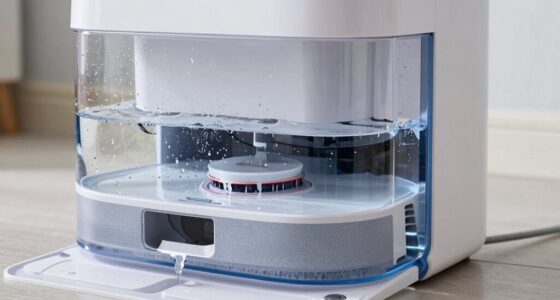
To prevent your robot mop from needing constant attention, establish a routine maintenance schedule. Regularly empty the water tank and clean the brushes and mop pads. Accumulated dirt, hair, and debris can clog the system, making the mop work harder and decreasing its lifespan. Use a soft cloth or a small brush to remove dust and debris from sensors and wheels—this simple step keeps the device functioning smoothly and prevents unnecessary strain on motors. Additionally, inspect the brushes periodically for wear and replace them when necessary, as worn brushes can reduce cleaning efficiency and cause strain on the motor, leading to potential breakdowns. Proper sensor maintenance can also help avoid false readings that disrupt the cleaning process. Keeping your device free of debris and dust is a key part of preventative care.
You should also pay attention to battery health. Keep the charging contacts clean and ensure the charging station is free of dust and obstructions. Proper charging habits extend your robot mop’s battery life and ensure it’s ready to run when you need it. If your device has a mapping feature, update the software as recommended by the manufacturer. Software updates often include bug fixes and improvements that can prevent frustrating malfunctions and maximize your robot’s performance. Being aware of smart features can help you customize your cleaning routine for optimal results. Additionally, regularly reviewing manufacturer guidelines for device troubleshooting can save you time when issues arise.
Finally, store your robot mop in a dry, cool place when not in use, especially if you won’t be using it for an extended period. This simple step helps prevent damage to internal components and keeps your device ready to go when needed. By understanding your robot mop’s features and following straightforward maintenance tips, you can keep it running efficiently without the routine turning into a high-maintenance chore. Regular upkeep not only prolongs the life of your device but also ensures it consistently delivers the cleaning results you expect.
robot mop water tank cleaning kit
As an affiliate, we earn on qualifying purchases.
As an affiliate, we earn on qualifying purchases.
Frequently Asked Questions
Can I Use Generic Replacement Parts for My Robot Mop?
Yes, you can use generic replacement parts for your robot mop, but you should be cautious about compatibility concerns. Not all generic parts fit perfectly or work efficiently with your model, which could cause issues or damage. Always check the manufacturer’s specifications and reviews before purchasing generic parts. When in doubt, stick to original parts to guarantee the best performance and avoid potential problems that might arise from incompatible replacements.
How Often Should I Schedule Routine Maintenance?
You should schedule routine maintenance every one to three months, depending on usage. Regular inspection of parts like brushes and filters helps prevent issues, while cleaning sensors guarantees peak performance. Also, monitor your robot’s battery lifespan—replacement may be needed after a certain number of charge cycles. By staying consistent with these checks, you’ll keep your robot mop running smoothly and avoid high-maintenance repairs.
Does My Robot Mop Need Special Cleaning Solutions?
Nope, your robot mop doesn’t need special cleaning solutions—just stick to the recommended cleaning frequency and use compatible solutions. Ironically, many think fancy solutions are necessary, but regular, mild soap and water usually do the trick. Keep your device clean and well-maintained, and it’ll run smoothly without any high-maintenance fuss. Always check your manufacturer’s guide for solution compatibility to avoid any mishaps.
Can I Override the Automation Settings?
Yes, you can override the automation settings on your robot mop. Use manual control options through the app or device to pause or stop the routine whenever needed. Some models also allow custom programming, so you can set specific cleaning schedules or disable certain automation features. This way, you maintain flexibility and prevent your robot mop from becoming high maintenance, ensuring it works exactly how you want without unnecessary interventions.
What Is the Warranty Period for a Robot Mop?
Think of your robot mop’s warranty as a safety net woven with care. Typically, warranty coverage lasts for about one year, shielding you from unexpected mishaps. During this period, repair policies are your go-to safety lines, ensuring repairs are handled promptly and cost-effectively. Keep your proof of purchase handy, and you’ll sail smoothly through any hiccups, knowing help is just a call away within the warranty period.
robot mop sensor cleaning brushes
As an affiliate, we earn on qualifying purchases.
As an affiliate, we earn on qualifying purchases.
Conclusion
By keeping your robot mop’s routine simple and your expectations realistic, you prevent it from turning into a high-maintenance diva. Think of it as tending a garden — with regular, gentle care, your robot stays happy and efficient, never demanding more than it’s worth. When you give it just enough attention, it keeps your floors sparkling without becoming a burdensome chore. So, stay consistent and keep things light — your robot will thank you with spotless floors and peace of mind.
As an affiliate, we earn on qualifying purchases.
As an affiliate, we earn on qualifying purchases.
NFL season / tailgating Picks
team gear
As an affiliate, we earn on qualifying purchases.