TL;DR

Get home appliances delivered free — and shop member deals
- Fast, free delivery on millions of items
- Access to Prime Big Deal Days deals on October 6–7
- Prime Video, Amazon Music and more included
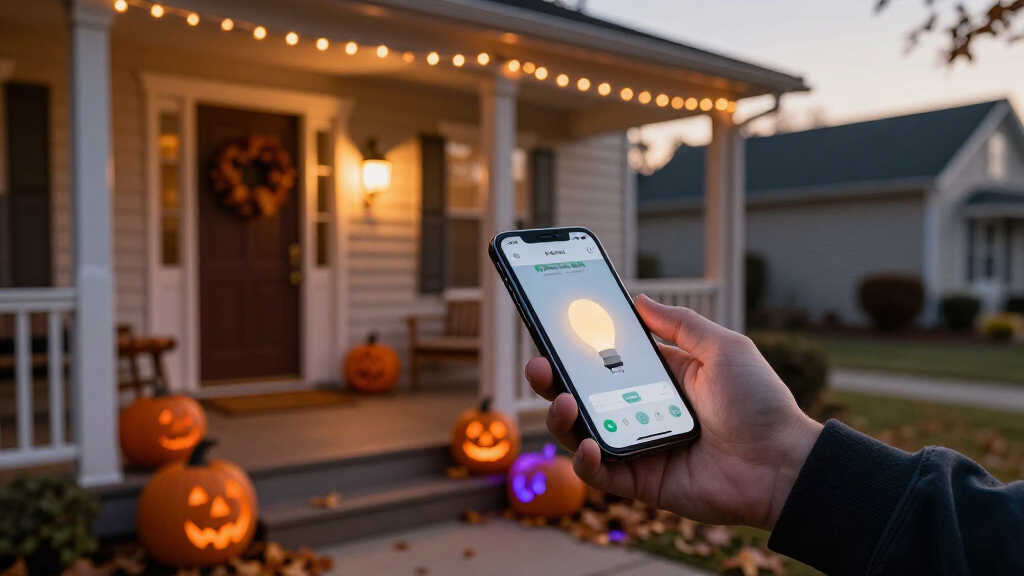
Smart home Halloween lighting uses app-controlled bulbs, light strips, and plugs to create color scenes, lightning flashes, and motion-triggered scares. You can start for under $100 with smart plugs on existing decorations, or build a full purple-and-orange display with addressable LED strips that sync to music. The key aspects for success are outdoor-rated gear (IP44+), a reliable hub or Wi-Fi setup, and one automation routine that ties lights, sound, and sensors together.
Last October, my neighbor spent two hours on a ladder zip-tying orange string lights to his gutters. I spent four minutes in an app, and my porch turned deep purple with flickering candle-orange windows while thunder sounds played from a hidden speaker. He asked how much my setup cost. His face when I said “about eighty bucks” was its own Halloween treat.
Smart home Halloween lighting has gotten genuinely good — and genuinely cheap. Addressable LED strips that chase purple-orange gradients down your fence, bulbs that flicker like dying candles, lights that flash lightning-white when a trick-or-treater hits your walkway. All controlled from your phone or a single voice command.
In this guide, you’ll learn what gear is worth buying, how to build the classic Halloween scenes, and how to automate the whole show so October 31 runs itself.
Start with smart plugs ($10–15 each) on existing decorations — a full entry setup costs under $45 and requires zero new lights.
The winning color recipes: purple + orange for classic Halloween, dim green + red for horror, blue-white strobe for lightning — and always run at 40–60% bright…
Only buy outdoor-rated gear with an IP44+ rating, use GFCI outlets, and hire a licensed electrician for any new outdoor wiring — never DIY electrical work.
The highest-impact automation is a motion-triggered routine: doorbell detects a trick-or-treater, lights strobe red for three seconds, then return to calm purp…
Every smart lighting purchase doubles for Christmas and everyday use, and Matter-certified gear keeps mixed brands controllable in one app.
The 4 Pieces of Gear That Actually Matter
Smart Halloween lighting comes down to four product types: smart bulbs, smart light strips, smart plugs, and outdoor-rated floodlights. Get the mix right and one evening of setup covers your whole house.
Smart bulbs run $10–50 each depending on brand. That price gap isn’t just marketing — it reflects a real tradeoff between convenience and reliability. Philips Hue sits at the premium end because its Zigbee hub keeps bulbs responsive even when your Wi-Fi is congested, and it ships a dedicated Halloween scene library you can deploy in one tap. Govee, Wyze, and TP-Link Kasa cover the budget end with most of the same 16-million-color flexibility, but they lean on your home Wi-Fi — which means a router reboot mid-party can leave you restarting lights instead of scaring kids. Smart light strips ($20–100+) outline windows, doors, and fences — Govee’s RGBIC strips can display multiple colors at once, so you get a flowing purple-to-orange gradient instead of one flat color. That single feature is the difference between “house with purple lights” and “house that looks professionally decorated,” which is why I’d argue strips give you the most visual impact per dollar of anything on this list.
| Gear | Typical Cost | Best For | Watch Out For |
|---|---|---|---|
| Smart bulbs | $10–50 each | Porch lights, window lamps, candle effects | Hue needs a hub; Wi-Fi bulbs need strong signal |
| Smart light strips | $20–100+ | Windows, fences, eaves, door frames | Must be IP44+ rated for outdoor use |
| Smart plugs | $10–15 each | Making existing string lights and inflatables smart | Check amp rating for high-draw decorations |
| Smart floodlights/spotlights | $30–100+ | Graveyard scenes, uplighting trees and tombstones | Wired versions may need an electrician |
Here’s the analogy I use: bulbs are your actors, strips are your stage lighting, plugs are the stagehands, and floodlights are the spotlight operator. You need all four roles for a full production — but even one actor alone beats a dark porch. The practical implication: don’t buy everything at once. Start with whichever role covers your house’s most visible spot, because that’s where your money converts to curb appeal fastest.
Start Under $100: The Smart Plug Shortcut
The cheapest way into smart Halloween lighting is smart plugs on decorations you already own. At $10–15 each, three plugs and your existing string lights, spotlights, and inflatable ghost get you scheduling, voice control, and remote on/off for around $40 — no new lights required.
This is the move if you’re testing the waters. My first smart Halloween was two Kasa plugs: one on a string of orange lights, one on a spotlight aimed at a foam tombstone. Both went on automatically at dusk via a schedule in the app. Total cost: $28. Total effort: ten minutes.
Why start here rather than with bulbs? Because plugs teach you the automation layer — schedules, routines, app control — using gear you already trust. If you decide smart lighting isn’t for you, you’re out $30 and the plugs still run your coffee maker in November. If you decide it is, you’ve already learned the skills the fancier gear requires. The risk is all downside-proof; that’s rare in home tech.
From there, upgrade in this order:
- Smart plugs on existing decorations — instant scheduling for under $45
- Two or three color bulbs for porch and window lamps — adds the purple-orange scene, ~$35
- One addressable strip for a window or door frame — adds animated effects, ~$40
- A motion sensor or video doorbell trigger — adds the jump scare, ~$25+
The order matters: each step builds on the automation skills and app setup from the last, so you’re never configuring a new system from scratch — just adding devices to one you already understand. And nothing you buy gets retired after October 31 — every piece works for Christmas, game days, and everyday ambiance too, which means the real cost per use keeps dropping every season you redeploy it.
The Color Combos That Read “Halloween” From the Street
Purple and orange is the classic Halloween palette because it combines dusk and fire — cool against warm, eerie against festive. That contrast is doing real psychological work: the purple reads as twilight and unease, the orange as jack-o’-lantern warmth, and together they signal “Halloween” to a brain that couldn’t tell you why. Green and red reads horror-movie — green suggests decay and sickly moonlight, red suggests blood, and the pairing works precisely because it feels off. Blue-white strobes read lightning because that’s literally what a lightning flash looks like. Get these three looks down and your house covers every mood of the season.
Specific recipes that work:
- Classic Halloween: Deep purple (#4B0082) porch and eaves, warm orange (#FF6A00) windows — instantly recognizable at 50 feet
- Haunted graveyard: Dim green (#0A4D0A) uplighting on tombstones, red accent on the door, everything at 40% brightness
- Storm night: Blue-white scene set to strobe or flash mode, ideally synced to a thunderstorm soundtrack
The tradeoff worth knowing: coherence beats variety. A house running one disciplined two-color scene looks more deliberate — and more expensive — than a house cycling through every color the app offers. Pick one recipe per zone and commit. Philips Hue ships ready-made Halloween scenes in its app if you’d rather skip the color theory, and newer Govee products include AI-assisted scene generation that builds animated combinations for you; just expect the AI results to need a brightness haircut, since generated scenes tend to run hot. Flicker modes deserve special mention — several bulbs and strips offer a candle flicker effect that makes jack-o’-lanterns and window lamps look lit by real flames, without the fire risk. That last part matters more than people think: real candles cause an estimated 750 home fires per Halloween season, according to the U.S. Fire Administration, so simulated candlelight isn’t just convenient — it’s safer, and it never blows out halfway through the evening.
The one mistake I see every year: full brightness. Halloween lighting looks best dim because darkness is half the effect — drop everything to 40–60% and let the shadows do half the decorating. Bright lights kill the mystery; dim lights create it.
Build a Motion-Triggered Scare in 20 Minutes
Motion-triggered Halloween lighting uses a sensor — a video doorbell, motion detector, or camera — to flip your lights into a scare scene when someone approaches. It’s the single highest-impact automation you can build, and it takes about 20 minutes.
Why is it the highest-impact? Because static decorations are scenery, but something that reacts to you feels alive. Kids who ignored a purple porch for three houses will remember the one that flashed red the moment they stepped up. The scare works because of contrast: a calm baseline scene makes the sudden change land, which is why the routine returns to calm afterward rather than staying scary.
Picture the trick-or-treater’s walk: they hit the sidewalk, your Ring doorbell detects motion, and every light on the porch snaps to strobing red while a green floodlight blasts the graveyard. Three seconds later, everything settles back to calm purple. That’s a routine — and here’s how to build it:
- Open your smart home app (Alexa, Google Home, or HomeKit) and create a new routine
- Set the trigger: “when motion is detected” on your doorbell or motion sensor
- Add actions: change porch bulbs to red strobe, turn on the floodlight, set a 3-second delay, return to your purple scene
- Add a sound action if you have a smart speaker nearby — a thunderclap or cackle works wonders
- Set an activation window (say, 6–10 PM on October 31) so it doesn’t fire at 2 AM when a raccoon wanders through
Two practical notes. First, the raccoon caveat is real — one year my scene triggered eleven times the night before Halloween, courtesy of a very committed opossum. Time windows and sensitivity settings are your friends. Second, keep the scare short. Three to five seconds of strobing is startling; thirty seconds is just annoying for the parent waiting at the sidewalk. Restraint is what separates a good scare from a nuisance, and the return-to-calm step is what resets the effect for the next group of kids.
Outdoor Setup: What Keeps the Magic From Shorting Out
Outdoor smart Halloween lighting works reliably in cold and rain if you buy gear rated IP44 or higher — that rating means the device is protected against splashing water from any direction. Below that rating, and a single rainy October night can kill a strip or plug. Understanding why matters: the “4” in IP44 protects against splashes, not jets or submersion, so gear mounted under an eave has an easier life than a strip zip-tied to a fence post in driving rain — position accordingly.
Three rules I follow after years of October setups:
- Check the IP rating before buying — indoor strips labeled “indoor use only” will fail outdoors, sometimes spectacularly. The cost difference between indoor and outdoor rated strips is usually $10–20; the cost of a failed display on October 30 is a rain-soaked hardware run.
- Use outdoor-rated extension cords and GFCI outlets — a GFCI outlet cuts power in milliseconds when it detects current leaking where it shouldn’t, which is the difference between a tripped breaker and a shock. If your outdoor outlets aren’t GFCI-protected, a licensed electrician can add them; it’s a small job that protects everything you plug in afterward.
- Don’t overload circuits — spread decorations across outlets rather than daisy-chaining power strips. LEDs draw little individually, but a dozen inflatables and strips on one circuit adds up, and a tripped breaker takes your whole show dark at 7 PM.
Cold weather matters less than you’d think — most LED smart gear is rated to around -4°F, well below any Halloween night. Wi-Fi reach matters more: a bulb at the far end of the backyard with two walls between it and your router will drop off the network, and a dropped device mid-routine means part of your scene simply doesn’t fire. Zigbee and Z-Wave devices (like Hue, which uses Zigbee through a hub) hold their connections better at distance than direct Wi-Fi bulbs because they run on a separate, lower-congestion radio band and mesh — each powered device relays for the others. That hub-versus-Wi-Fi tradeoff is real: hubs cost more upfront but keep working when your Wi-Fi hiccups mid-party, and “mid-party” is exactly when your Wi-Fi hiccups, with twenty phones on your network.
Also: skip the DIY wiring entirely. If a display needs new outdoor outlets, new circuits, or anything behind the panel, that’s licensed-electrician work — not a Halloween-weekend project. The stakes aren’t a broken strip; they’re your house.
Sync Lights to Music and Keep Everything in One App
Music-synced Halloween light shows pair your lights with songs like “Thriller” or “This Is Halloween” so colors pulse and chase in time with the beat. Why does syncing matter so much? Because synchronized light and sound reads as intentional — as a production — while unsynchronized lights just read as decoration. It’s the closest a residential porch gets to a staged show.
Serious hobbyists use free software called xLights to program full sequences; casual decorators can just enable Govee’s built-in music sync, which uses your phone’s microphone to react to any audio playing nearby. The spectrum of effort looks like this: Govee music sync takes one tap and looks good from the sidewalk; Hue’s Sync app coordinates lights with soundtracks playing on your TV for tighter timing because it reads the audio signal directly rather than listening through a mic; and xLight shows take weekends of programming but produce the driveway-stopping displays that end up on local news. The honest tradeoff: microphone-based sync reacts slightly late — a fraction of a second, but noticeable on big beat drops — while signal-based sync and hand-programmed sequences hit every cue exactly. Most people won’t notice the difference from the street, which is why I tell first-timers to start with one-tap sync and only graduate to xLights if they catch the bug.
On the ecosystem side, the Matter standard has quietly fixed smart lighting’s oldest headache — brand lock-in. Before Matter, buying Govee strips meant committing to Govee’s app, and mixing brands meant juggling three apps that couldn’t talk to each other — which made multi-brand routines impossible. A Matter-certified bulb works with Alexa, Google Home, and HomeKit without picking a team, which means your Govee strips and Hue bulbs can finally live in one app and one routine. One caveat: Matter support is still inconsistent on older and ultra-budget devices, so check the box before assuming interoperability. When you’re building that master Halloween routine, structure it in layers:
- Dusk trigger turns on the base purple-orange scene
- Motion routine layers the scare effect on top
- Bedtime schedule (or geofencing) shuts everything down — which also cuts energy use versus leaving lights burning all night
Layering matters because it keeps each behavior independent: you can disable the scare for a nervous toddler or shift the dusk time as days shorten without rebuilding the whole routine. One app, one schedule, zero running outside in a costume to flip a switch.
Christmas Called: Your Halloween Gear Doubles in December
Every piece of smart Halloween lighting you buy works again at Christmas — same strips, same bulbs, same plugs, just different colors. This is the argument that justifies spending more upfront: purple and orange in October becomes red and green in December, warm white in November, team colors on game day. The implication for how you buy: since every purchase works year-round, it’s worth spending a little more on durable, outdoor-rated gear you’ll deploy six times a year versus the cheapest option you’d replace annually.
The newest twist is permanent outdoor lighting — trim-mounted, eave-installed systems from Govee and Gemstone Lights that stay on your house year-round and switch scenes per holiday. They run from a few hundred dollars for DIY Govee kits to $1,500–3,000+ for professionally installed Gemstone systems. That sounds steep until you divide it by every holiday for the next decade — and until you never climb a ladder with a staple gun again. The tradeoffs are real, though: permanent systems need an install (or a confident DIY weekend), they’re visible on your eaves year-round even when off, and a permanent fixture means a single point of failure for every holiday at once. They make sense if you decorate for three or more holidays a year; they’re overkill if Halloween is your only show.
For most people, though, the honest math favors the middle path: quality IP-rated strips and a few good bulbs, bought once, redeployed every season. Your Halloween investment isn’t a Halloween expense. It’s a lighting system wearing a costume.
Frequently Asked Questions
What’s the cheapest way to start with smart Halloween lighting?
Buy two or three smart plugs at $10–15 each and connect them to decorations you already own, like string lights and spotlights. You get dusk-to-bedtime scheduling, voice control, and remote shutoff for under $45. Add color bulbs later for the purple-orange scene.
Do smart lights work in cold or rainy Halloween weather?
Yes, if they’re rated IP44 or higher for water protection — most LED smart gear also handles temperatures down to around -4°F. The bigger risk is Wi-Fi range at the edge of your property; Zigbee hub-based systems like Philips Hue hold connections better at distance than direct Wi-Fi bulbs.
Can smart lights flicker like real candles?
Yes — many smart bulbs and strips include a built-in candle flicker mode that simulates wavering flame light. It’s also safer: real candles cause an estimated 750 home fires each Halloween season, according to the U.S. Fire Administration.
How do I sync my Halloween lights to music?
The easy route is Govee’s built-in music sync, which uses your phone’s microphone to pulse lights with any nearby audio. Philips Hue Sync coordinates lights with soundtracks on your TV. For full custom light shows, hobbyists use free xLights software to program songs like “Thriller” note by note.
Can I reuse my Halloween setup for Christmas?
Absolutely — every smart bulb, strip, and plug works year-round with different colors. Purple and orange becomes red and green in December. Permanent eave-mounted systems like Govee and Gemstone Lights take this further, staying installed year-round and switching scenes per holiday.
Conclusion
If you do one thing this October, build a single routine: purple-orange scene at dusk, motion scare at the front walk, everything off at bedtime. That’s twenty minutes of setup that transforms your house from “house with lights” to “the house on the block.”
Because the best Halloween display isn’t the biggest one — it’s the one that seems to know you’re coming.
NFL season / tailgating Picks
team gear
As an affiliate, we earn on qualifying purchases.