
Maintaining your Dyson V15 Detect ensures it performs at its best, capturing invisible dust and debris efficiently. Regular cleaning of filters, brushes, and other parts prolongs its lifespan and keeps your home spotless. Follow this simple guide for a safe and thorough cleaning process.

Get home appliances delivered free — and shop member deals
- Fast, free delivery on millions of items
- Access to Prime Big Deal Days deals on October 6–7
- Prime Video, Amazon Music and more included
Before you begin, gather the necessary cleaning supplies and refer to your vacuum’s user manual for specific instructions. Always ensure the device is unplugged or turned off before starting maintenance.
Key Takeaways
| Regular Filter Cleaning | Keeps suction power optimal and prevents odor buildup. |
| Check for Blockages | Remove debris from the wand, brush bar, and hose. |
| Clean the Brush Bar | Remove hair and fibers that can hinder performance. |
| Use the Right Tools | Attach crevice tools for detailed cleaning of tight spots. |
Power Off and Prepare Your Dyson
- Turn off the Dyson V15 Detect and unplug it from the charging station or power outlet.
- Remove the main wand and attachments if attached.
- Gather cleaning supplies: soft cloths, a small brush, water, and optional cleaning solutions.
Clean or Replace the Filters
- Remove the pre-filter and main filter from the vacuum according to the manual.
- Rinse the filters under cold water, avoiding any soap or detergents.
- Let the filters air dry completely for at least 24 hours before reinstalling.
- Replace filters if they are damaged or excessively dirty to maintain suction power.
Clear Blockages and Debris
- Check the wand, hose, and brush bar for blockages or tangled debris.
- Use a crevice tool or small brush to dislodge dirt from tight spots.
- If needed, detach the brush bar and remove lint or hair wrapped around it.
Clean the Brush Bar and Attachments
- Remove the brush bar from the vacuum (if detachable) following the manual.
- Use scissors to cut away tangled hair or fibers carefully.
- Wipe the brush and attachments with a damp cloth and dry thoroughly before reassembling.
Final Checks and Reassembly
- Ensure all parts are dry before reassembling.
- Reinstall filters and attachments securely.
- Turn on the vacuum briefly to check for normal operation.
The Products in This Guide
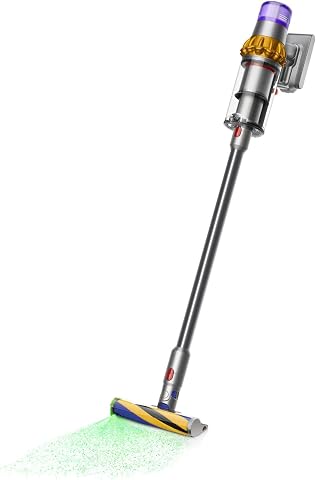
Dyson V15 Detect Total Clean Extra
- ✔ Battery Life: 60 minutes
- ✔ Power Mode: Intelligent, adaptive
- ✔ Filter Type: Refurbished premium

LANMU Crevice Tool Vacuum Attachments Compatible
- ✔ Material: Plastic
- ✔ Compatibility: Multiple Dyson models
- ✔ Design: Slim, flexible
Dyson V15 Detect Total Clean Extra
The Dyson V15 Detect Total Clean Extra is a powerful, intelligent vacuum that benefits from regular cleaning to maintain peak performance. Its advanced features and thorough inspection make it a reliable choice for whole-home cleaning.
Pros:
- Powerful suction
- Intelligent debris detection
- Long battery life
- LCD display for real-time info
Cons:
- Requires regular filter cleaning
- Can be heavy for some users
- Filters need periodic replacement
Best for: Deep cleaning and regular maintenance of your home
Not ideal for: Light, quick cleanups or for users preferring lightweight options
Bottom line: Consistent cleaning and maintenance keep your Dyson V15 Detect performing at its best.
LANMU Crevice Tool Vacuum Attachments Compatible
The LANMU Crevice Tool Vacuum Attachments are compatible with Dyson models and perfect for cleaning tight spots, corners, and small crevices. An essential addition for detailed cleaning.
Pros:
- Narrow, flexible nozzle
- Compatible with multiple Dyson models
- Ideal for corners and furniture
- Easy to attach and use
Cons:
- May not fit older Dyson models
- Requires separate purchase
- Limited to crevice cleaning
Best for: Cleaning narrow gaps and hard-to-reach spots
Not ideal for: Large surface cleaning or carpet areas
Bottom line: A versatile tool that enhances your Dyson’s cleaning reach.
Frequently Asked Questions
How often should I clean the filters on my Dyson V15 Detect?
It is recommended to rinse the filters every 1-3 months, depending on usage, and ensure they are completely dry before reinstallation.
Can I use water to clean the vacuum’s interior parts?
Yes, water can be used to rinse filters and removable parts, but avoid getting the motor or electronic components wet. Let parts air dry thoroughly before reassembling.
What should I do if my Dyson V15 Detect is not picking up debris properly?
Check for blockages, clean or replace filters, and inspect the brush bar for tangles. Regular maintenance helps restore suction.
Is it safe to clean the vacuum with household cleaners?
It is best to use only water and mild soap on removable parts. Avoid harsh chemicals that could damage plastic or electronic components.
Keep Your Dyson V15 Detect in Top Shape
Regular cleaning and maintenance of your Dyson V15 Detect will ensure it continues to deliver powerful, intelligent cleaning for your entire home. Follow these simple steps frequently to maintain optimal performance and prolong the lifespan of your vacuum.
With proper care, your Dyson can keep your living space cleaner and healthier for years to come. Happy cleaning!
Affiliate disclosure: As an Amazon Associate we earn from qualifying purchases. Prices and availability are accurate as of the time of publishing.
NFL season / tailgating Picks
team gear
As an affiliate, we earn on qualifying purchases.